Finding the Perfect TV: A Guide to Samsung TVs
November 19, 2026
Choosing the right TV is a long-term decision that involves several factors — including screen size, picture quality, brightness, viewing environment, and preferred content.
Advances in TV technology have expanded the options available, from OLED, QLED, and Neo QLED to the latest Micro RGB. AI capabilities now go beyond picture and sound optimisation to support content discovery, device connectivity, and personalised viewing experiences. As a result, consumers are asking more specific questions about screen size, AI features, and their viewing needs rather than simply “Which TV is the best?”
Samsung Newsroom outlines key criteria and answers common questions about buying a TV.
How To Choose the Right TV Size
When choosing a TV size, viewing distance and available space are key considerations. For comfortable, immersive viewing, the recommended distance is approximately 1.2 times the screen size in centimeters, based on a 40-degree field of view.1
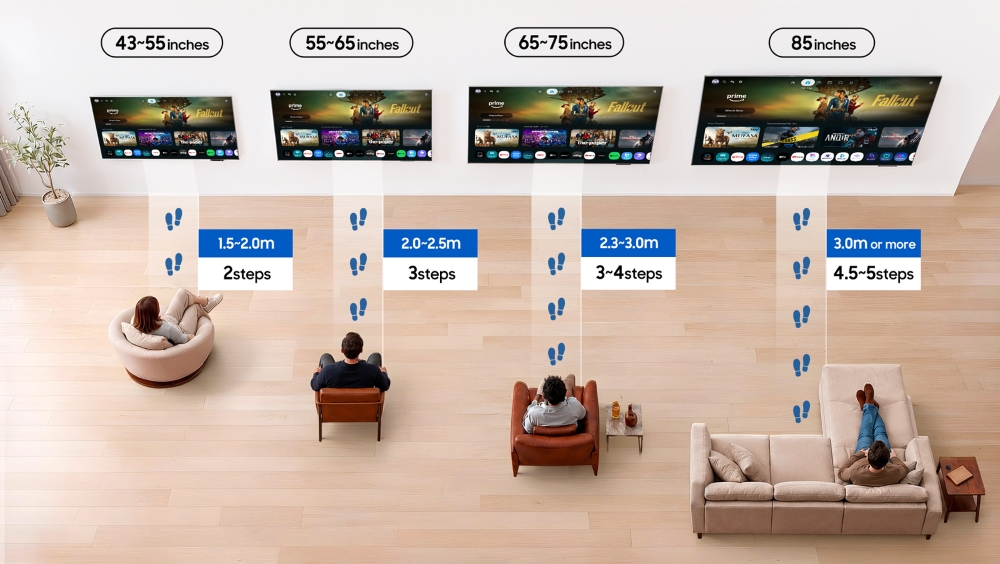
For typical living room seating arrangements, recommended screen sizes vary by viewing distance:
- 1.5 to 2.0 meters: 43- to 55-inch TVs
- 2.0 to 2.5 meters: 55- to 65-inch TVs
- 2.3 to 3.0 meters: 65- to 75-inch TVs
- 3.0 meters or more: 85-inch or larger TVs
These are general guidelines, as comfortable viewing distances may vary depending on viewing habits — such as watching content with subtitles or as a family.
Larger screens enhance immersion but may cause eye strain if too large for the space. Samsung offers TVs ranging from 32 to 114 inches to accommodate different spaces and viewing preferences.
How Lighting Affects TV Selection
Viewing times and lighting conditions vary from home to home, making the viewing environment an important consideration when choosing a TV. In bright spaces, screen brightness and reflection reduction are key, while contrast ratio matters more in darker settings.
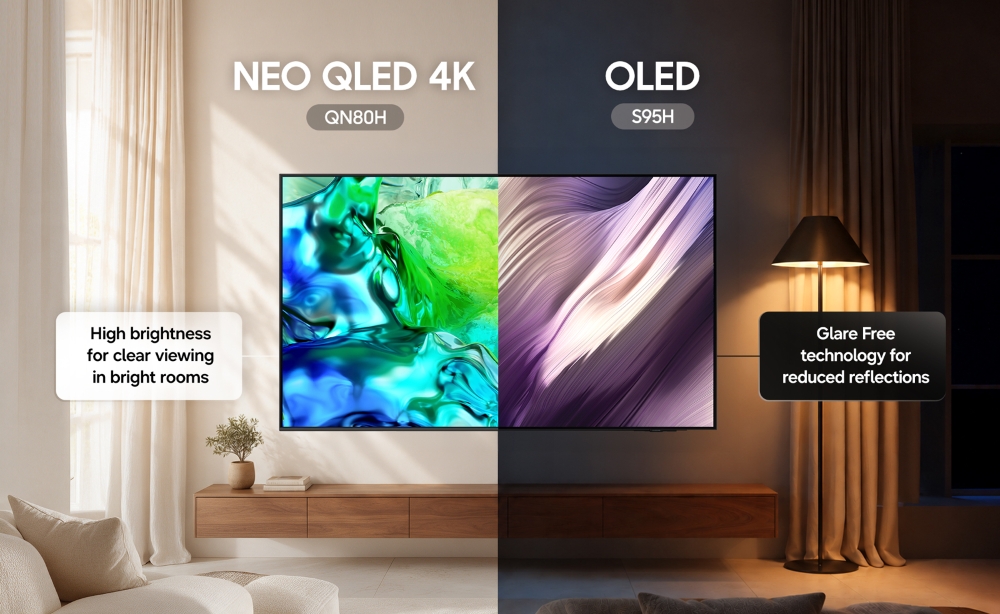
For sunlit living rooms, Micro RGB and Neo QLED TVs provide high brightness for clear viewing. OLED TVs, meanwhile, deliver exceptional contrast — making them well suited to darker spaces.
However, advances in display technology are making lighting conditions less of a constraint. OLED TVs with Glare Free technology minimise reflections, maintaining a clear picture even in brightly lit rooms.2
AI technology analyses scene brightness in real time and automatically adjusts brightness levels based on ambient lighting. It brightens dark scenes to preserve detail in well-lit rooms and reduces glare while enhancing contrast in darker settings. These adjustments help minimise eye strain without compromising picture clarity.
How Samsung TV Display Technologies Compare
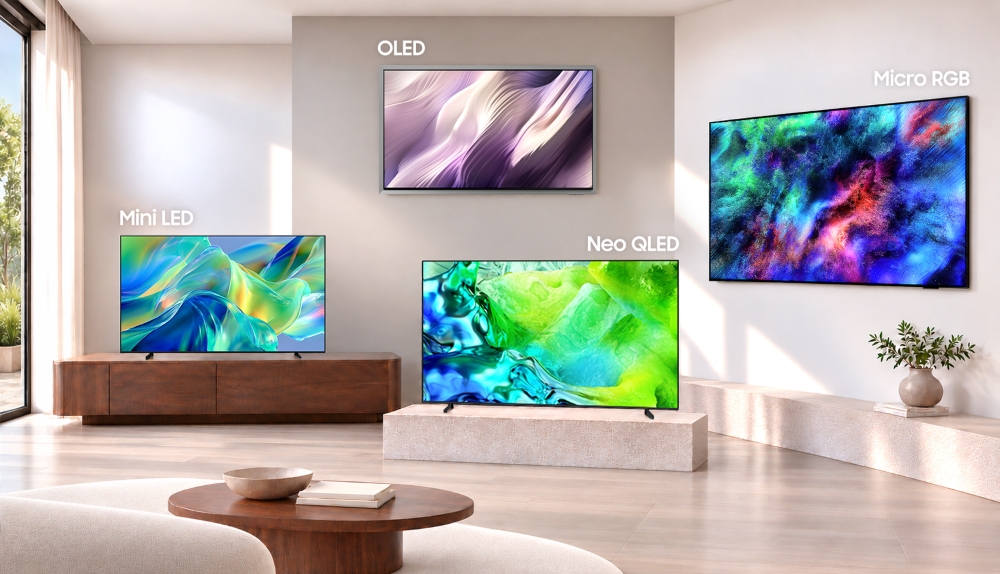
Display technologies produce light and colour differently, each offering advantages depending on viewing conditions and intended use:
- Micro RGB: Features individually controlled, microscopic red, green, and blue (RGB) backlights for a wide colour gamut and precise colour reproduction.
- OLED: Relies on self-emissive pixels rather than a backlight to deliver near-perfect blacks and fast response times.
- Neo QLED: Combines Quantum Matrix Technology that precisely controls the Quantum Mini LED backlight with Quantum Dot technology that accurately reproduces 2,140 Pantone colours and 110 skin tones.
- Mini LED: Employs smaller LEDs than conventional backlights to produce strong contrast, particularly for HDR content.
For vivid, accurate colours and lifelike picture quality faithful to the original content, Micro RGB TVs are the best option.
OLED TVs excel at reproducing deep blacks, making them ideal for movies and TV shows in dark rooms. In brighter spaces, TVs with advanced backlight control have an advantage.
Mini LED TVs provide strong contrast at an affordable price, while premium Neo QLED TVs combine rich colours from Samsung’s proprietary quantum dot film with powerful AI upscaling.
How Content Shapes TV Choices
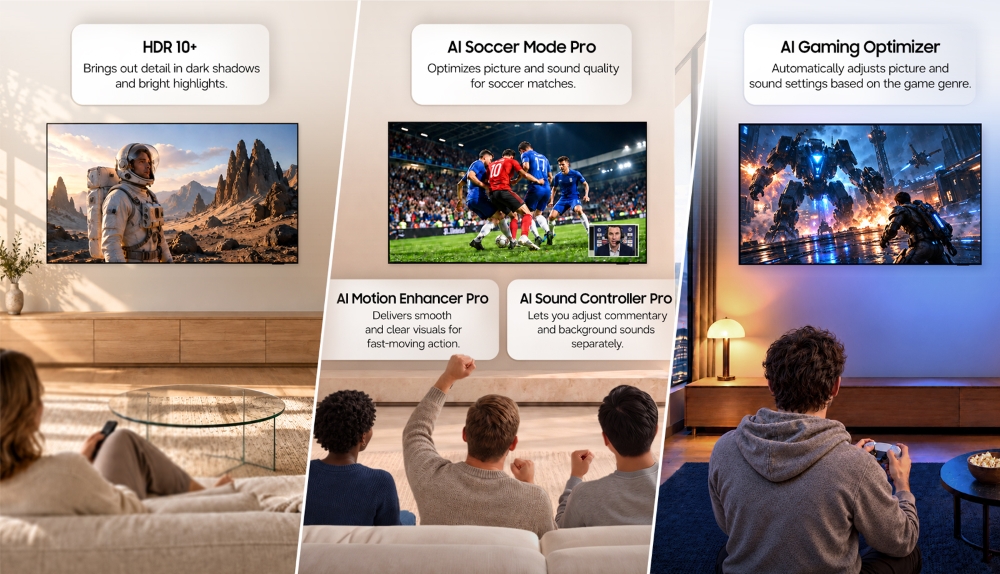
Different types of content call for different TV features:
- Movies: High Dynamic Range (HDR) on OLED and Micro RGB TVs brings out subtle details and colours in both bright and dark scenes, creating greater depth and realism.
- Live Sports: AI-powered features enhance the viewing experience through real-time picture and sound adjustments. Advanced features like AI Football Mode Pro3, AI Motion Enhancer, and AI Sound Controller 4 Pro which work together to deliver clearer action and more immersive stadium sound are available on our premium Micro RGB (R95H), OLED (S95H and S90H), and flagship Neo QLED (QN990H) TVs.
- Video Games: High refresh rates ensure smooth motion, while low input lag enables faster responses to player commands. AI Gaming Optimiser automatically adjusts picture and sound settings based on the game genre. Serious players should look to our OLED TV lineup (S90H and S95H) for up to 165Hz refresh rates, or the Neo QLED QN80H for up to 144Hz of smooth action.
- Art: Samsung’s Art TV lineup, including The Frame and The Frame Pro, displays renowned artworks when not in use — transforming living spaces into galleries. Customisable bezels, the One Connect Box, and Wireless One Connect 5 create a picture frame-like appearance, while Samsung Art Store6 provides access to more than 5,000 artworks through a subscription.
How AI Makes TVs Smarter
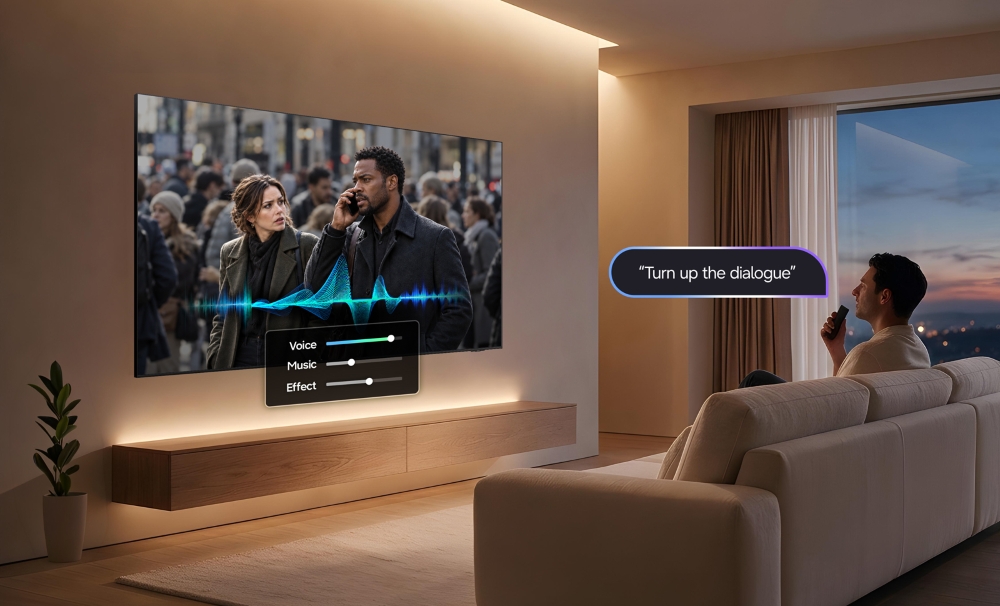
Unlike conventional TVs, Samsung AI TVs automatically optimise picture and sound while supporting content discovery and information searches 7.
- AI Upscaling Pro: Enhances older or lower-resolution content for sharper visuals on high-resolution screens and more immersive sound.8
- AI Football Mode Pro: Adjusts picture and sound to recreate the atmosphere of live soccer matches.
- AI Gaming Optimiser: Recognises game genres and tailors picture and sound settings accordingly.
- Vision AI Companion: Connects with AI services to help viewers search for information and discover related content on-screen.9
When choosing a TV, consumers should look for AI features that match their viewing habits — from automatic picture and sound optimisation for sports, movies, and games to on-screen information searches.
TV Buying Guide at a Glance
Q. What TV size is ideal for a living room?
For viewing distances of 2.3 meters or more, a 75-inch or larger TV is recommended. With 4K resolution now widespread, larger screens maintain sharp picture quality even at closer distances. However, sufficient installation space and viewing distance remain important.
Q. What TV size is ideal for a bedroom?
Bedrooms typically have shorter viewing distances and limited space, making 42- to 50-inch TVs generally suitable. The ideal size depends on the distance from the bed to the screen, as well as the TV’s overall dimensions including the stand and bezel.
Q. Should consumers choose a 65- or 75-inch TV?
The recommended viewing distance is approximately 2.0 meters for a 65-inch TV and 2.3 meters for a 75-inch model. If possible, compare both sizes from the intended viewing distances before deciding.
Q. Can lower-resolution content still look sharp on a 4K TV?
Yes. AI Upscaling enhances lower-resolution content to match 4K displays for sharper viewing. Results may vary by model and source material.
Q. Do OLED TVs reduce glare?
OLED TVs combine exceptional contrast with Glare Free technology to minimise reflections. The 2026 Samsung S99H, S95H and S90H OLED TVs feature a low-reflection layer that diffuses external light while preserving contrast and colour, even in bright rooms.
Q. What is the difference between HDR and non-HDR TVs?
HDR TVs reproduce a wider range of brightness and preserve details in highlights and shadows, creating greater depth and realism.
Q. Can I use a Samsung Smart TV without a subscription?
Yes. Samsung Smart TVs offer features and free content without a paid subscription. All Samsung TVs have access to Samsung TV Plus which provides free channels featuring news, entertainment, dramas, and movies.10
Samsung Art Store allows users to select artworks and the monthly curated ‘Art Store Streams’ collection for free. A subscription unlocks access to the full collection of more than 5,000 artworks.
Q. Which is better for gaming, OLED or Neo QLED TVs?
OLED TVs are the winner for gaming. They deliver quick response times, low input lag, and fast refresh rates of up to 165Hz on premium models (S90H, S95H and S99H). S90H and above models feature full G-Sync Compatible and AMD FreeSync Premium Pro support for seamless gameplay.
Neo QLED QN80H remains a great option if you game in bright, sunlit rooms thanks to its fast refresh rates of up to 144Hz, high brightness, and strong HDR performance.
Q. How can theatre-quality sound be achieved with a Samsung TV?
Q-Symphony11 enables compatible Samsung TVs and sound devices to play audio together, delivering optimised surround sound based on room layout and device placement.
- Recommended viewing distances may vary depending on individual eyesight, preferences, and installation conditions. ↩︎
- Measured against Unified Glare Rating (UGR) testing standard, validated as ‘Glare Free’ by UL. ↩︎
- Feature availability and performance may vary depending on the content viewed and the apps used. ↩︎
- Feature availability and performance may vary depending on the content viewed and the apps used. ↩︎
- Applicable to The Frame Pro. TV requires a separate power cable connection. Operating distance can vary depending on the usage environment. ↩︎
- Subscription required to access full art collection. Requires an internet connection and a Samsung Account. ↩︎
- Features vary by model. ↩︎
- Viewing experience may vary according to types of content and format. Upscaling may not apply to PC connection and Game Mode. ↩︎
- Availability, supported features, and user interface may vary by country, region, model and watching conditions. Information based on current viewing is only available on Samsung TV Plus channels. Provides AI-created content, with accuracy not guaranteed. Voice commands recognize English, French, Spanish, Portuguese, German, Italian, and Korean, but not all accents, dialects, and s are recognized. This feature provides AI-created content, with accuracy not guaranteed—please check results. Requires certain Bluetooth remote (sold separately on some models). Inbox remote for some models does not support voice recognition. Requires either a Mobile Quick Remote or separately purchased Bluetooth remote. Feature accessible by the AI button, or by the Home button (long press) on the remote control without an AI button. ↩︎
- Channel and content availability may vary by country, region, and model and is subject to change without prior notice. ↩︎
- Q-Symphony is compatible with selected Samsung TVs. Check for product specifications by TV model. ↩︎


