Galaxy Buds4 Series Elevates Call Clarity with HD Voice
March 13, 2026
HD voice cuts background noise and captures every word
At the recent Galaxy Unpacked event, Samsung Electronics introduced the most advanced Galaxy Buds to date. Galaxy Buds4 Series sound as good as they feel, with hi-res audio1 and design innovations that maximise everyday wearability. The Galaxy Buds4 series redefines the experience of using premium earbuds — prioritising quality and comfort.
Galaxy users can instantly connect Buds4 Pro or Buds4 to the ecosystem of devices they already enjoy by simply opening the Buds cradle.2 When paired with the Galaxy S26 series, together they deliver crisp and clear conversations.
From juggling work calls to catching up with loved ones, you’ll hear the difference loud and clear with HD voice.3
How does HD voice work?
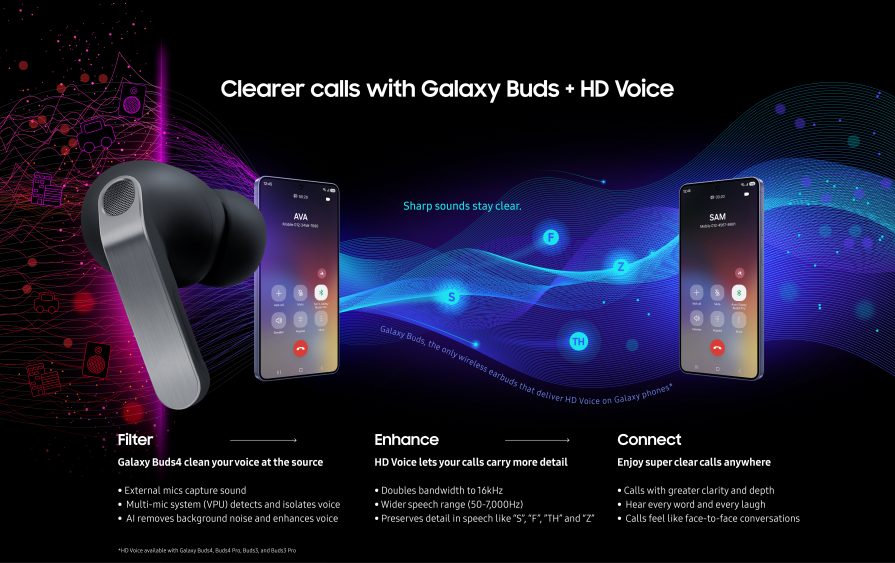
The clarity begins with advanced AI-powered noise reduction4. The Galaxy Buds4 series uses multiple microphones that collect sounds from different directions, along with a Voice Pick Up Unit (VPU) which helps detect and prioritise users’ voices. Advanced networks then analyse the sound in real time to separate speech from background noise such as traffic, wind, or other nearby conversations.
Traditional Bluetooth calls capture voice frequencies with a limited bandwidth, causing speech to sound compressed and less natural. HD voice preserves more natural detail during communications by doubling the Bluetooth bandwidth to 16kHz, called super wide band. HD voice also uses machine learning models trained for noise reduction and voice enhancement to enable a wider range of the human voice to be transmitted.
Wider Audio Range Brings Out Every Word
This expanded range helps capture subtle sounds like “s”, “z”, “th”, and “f”, which help distinguish words that are hard to understand in standard Bluetooth calls. By preserving these details, conversations are clearer and more natural.
By combining intelligent noise reduction and expanded Bluetooth bandwidth, HD voice creates a call experience that feels closer to speaking in person.
Galaxy Buds are the only Bluetooth earbuds that can support HD voice on Galaxy smartphones and tablets.
How to activate HD Voice: Open your Galaxy Buds, then on your Galaxy Smartphone, go to Settings → Your Galaxy Buds Settings → Sound quality and effects → Advanced quality options → Super wide band speech
The Galaxy Ecosystem Difference
While many earbuds offer clear calls, Galaxy Buds paired with Galaxy devices are engineered to optimise HD voice performance. From the moment you make or answer a call, your Galaxy Buds4 series will preserve voice details while reducing background noise to help ensure every word comes through naturally.
That’s the advantage of Galaxy ecosystem integration and end-to-end optimisation.
Heard enough? Grab Galaxy Buds4 series and learn about all the latest Galaxy devices on Samsung.com/uk.
[1] Requires initial setup via settings or Samsung Wear app on a compatibleGalaxy device. See FAQ section of product page onSamsung.com for compatibility requirements by feature.
[2] Requires a compatible Samsung Galaxy device, Internet connection, and Samsung account.
[3] Requires initial setup via settings or Samsung Wear app on a compatibleGalaxy device. See FAQ section of product page onSamsung.com for compatibility requirements by feature.
[4] Available on Buds4 Pro.


