Samsung Expands the Galaxy Book6 Lineup, Making Galaxy Book More Accessible
September 1, 2026
The new 14-inch Galaxy Book6 combines up to 25 hours of video playback, the latest Intel® Core™ Series 3 processor performance and connected Galaxy experiences, starting at £799 RRP
Samsung Electronics Co., Ltd today announced a new 14-inch Galaxy Book6, expanding the Galaxy Book6 lineup with a more accessible model designed for everyday computing. Starting at £799, Galaxy Book6 combines up to 25 hours of video playback1, Intel® Core™ 5 performance, Galaxy AI-enabled features and the design language of the Galaxy Book6 family.
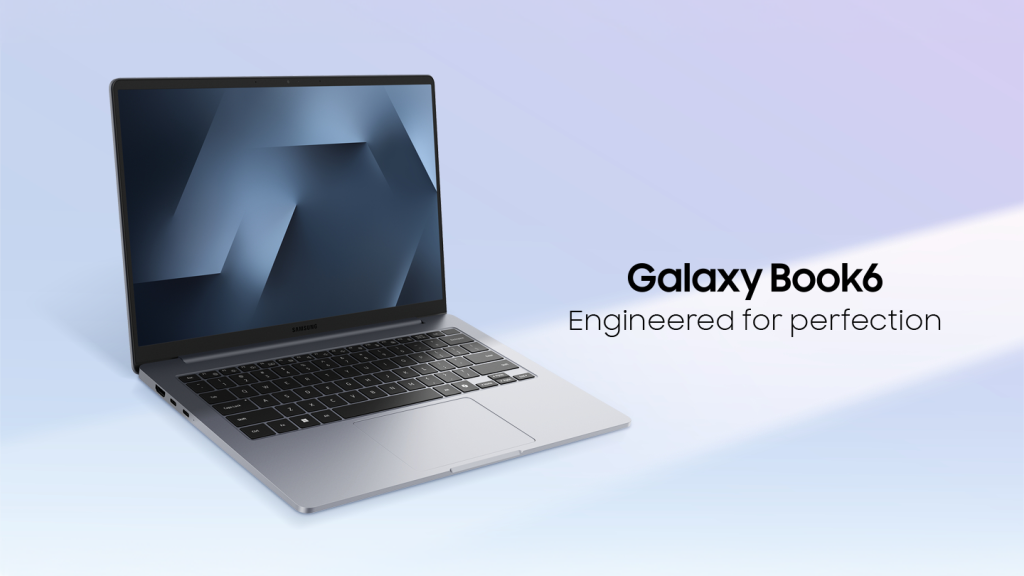
“With the new Galaxy Book6, we wanted to make the Galaxy Book experience available for more people,” said Mincheol Lee, EVP, Head of Galaxy Ecosystems Business Team at Samsung Electronics. “At a more accessible price, it brings together the everyday essentials users value, including dependable performance, long-lasting battery life, connected Galaxy experiences and Galaxy Book6’s design DNA, giving users confidence that lasts beyond the purchase.”
Performance and Battery for Everyday Use
The new Galaxy Book6 is designed around the tasks people rely on every day, from browsing the web and creating documents to video calls, multitasking and streaming content. With up to 25 hours of video playback on a single charge, users can work, study and enjoy content for longer throughout the day.
That long-lasting power is paired with Intel® Core™ Series 5 processor performance, bringing Intel’s latest architecture and power efficiency to essential PC experiences. The processor also supports Galaxy AI2 and other AI features designed to help users work, create and get things done more easily.
Built with Galaxy Book6 Design DNA
The latest addition to the Galaxy Book6 lineup carries forward the design language of the series, defined by clean, balanced lines and a symmetrical design. A centered logo further reinforces a unified Galaxy Book6 identity.
At 15.7mm thin and 1.35kg, Galaxy Book6 combines a slim profile with portability that makes it easy to carry throughout the day, from home and school to work and travel. For the first time on Galaxy Book, Violet Silver brings a fresh expression to the lineup, adding a distinctive touch to the clean, understated Galaxy Book6 design. A classic Grey option is also available.
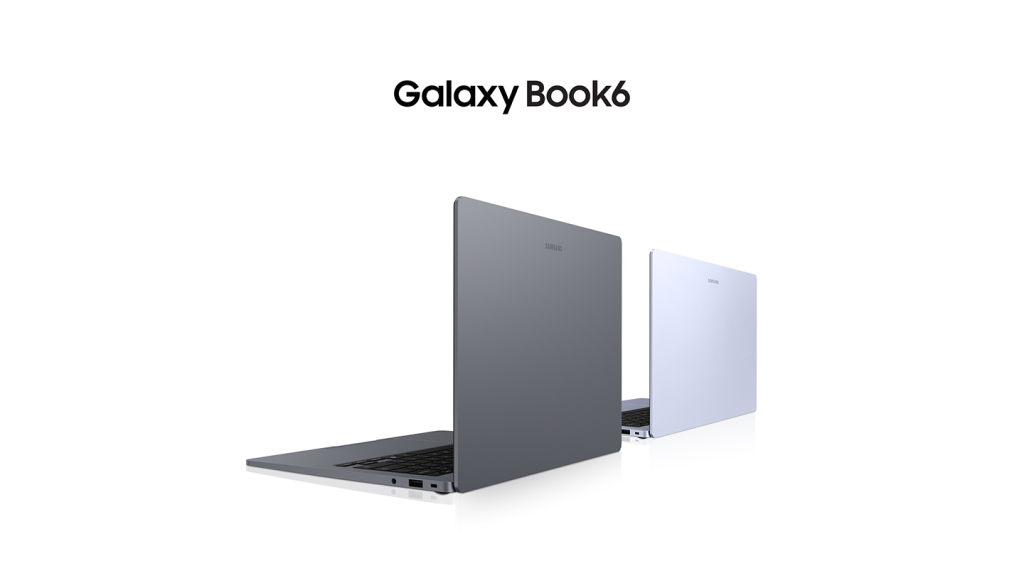
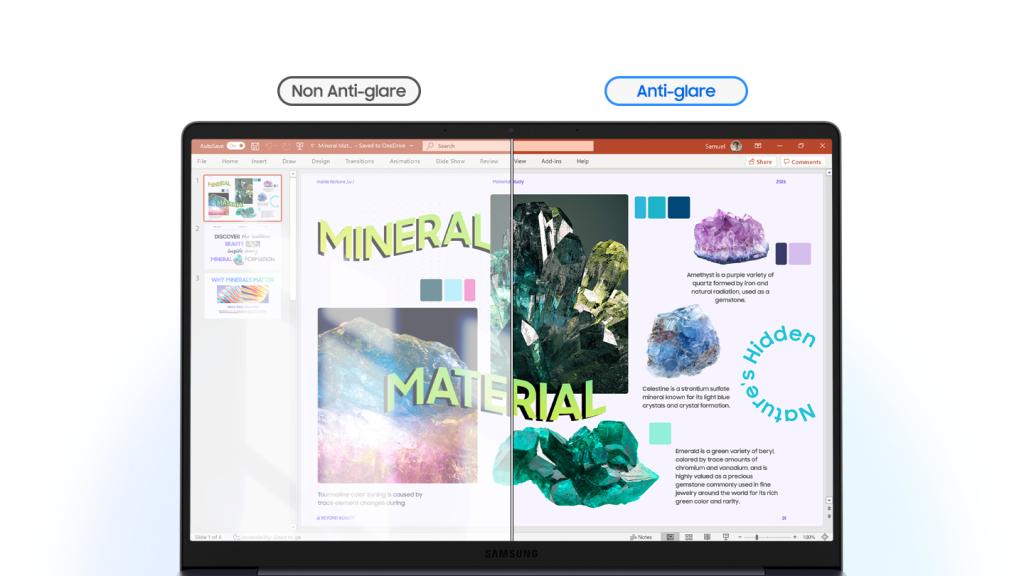
The 16:10 display provides more vertical viewing space for documents, web pages and multitasking, while anti-reflective technology minimises glare for clearer, more comfortable viewing wherever you are. Galaxy Book6 also keeps commonly used connections close at hand.
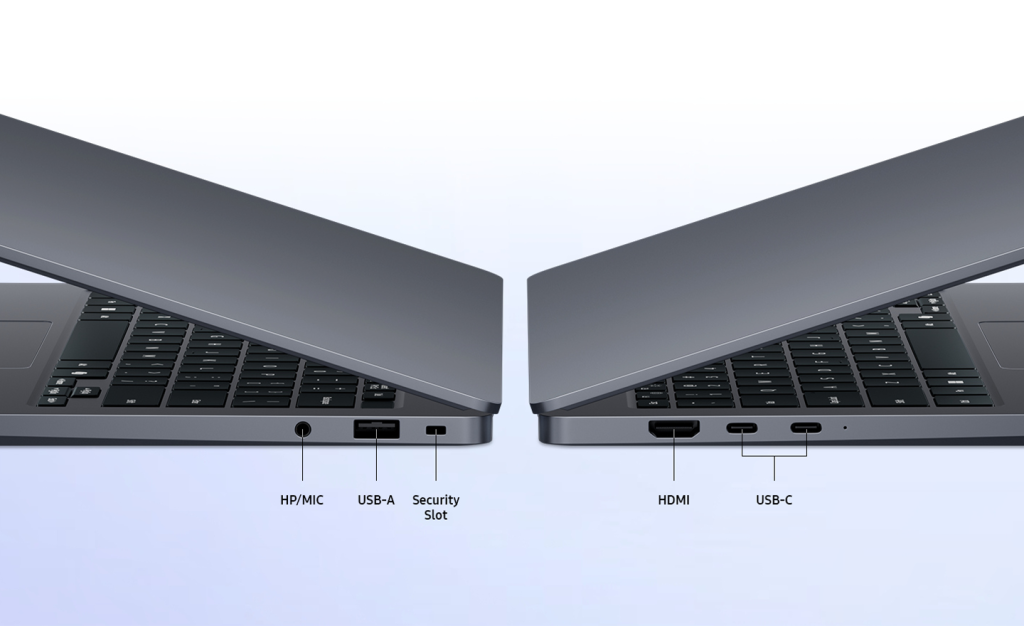
Its two USB Type-C ports offer the same functionality, so users can connect with less guesswork, while USB Type-A, HDMI 1.4 and a 3.5mm headphone jack, give users a versatile range of connectivity for displays, peripherals and accessories without relying on additional dongles.
Galaxy Experiences That Work Better Together
The Galaxy Book6 brings together Galaxy AI and connected experiences across Galaxy devices to make it easier to find information, move content and work across screens.
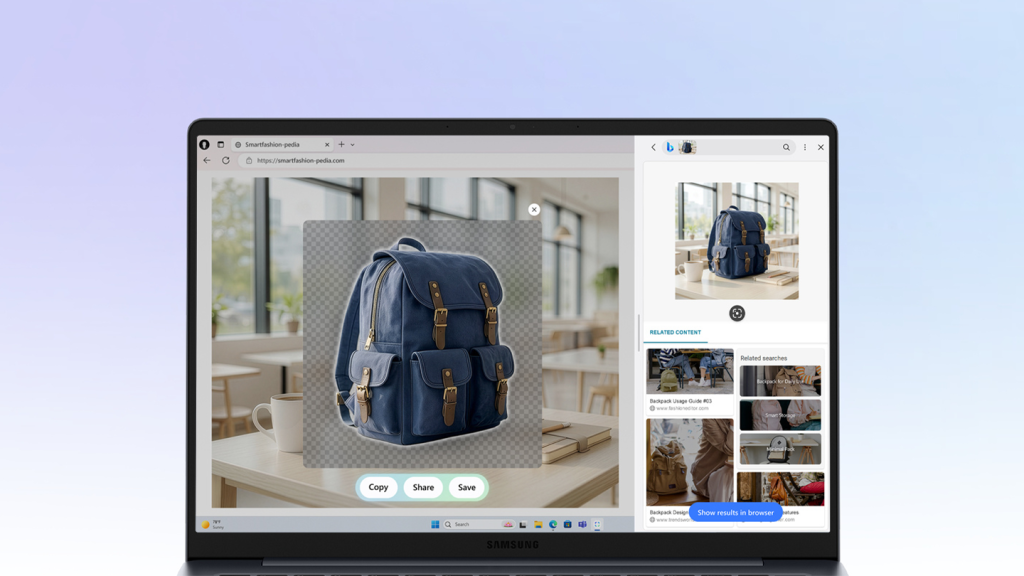
AI Select3 lets users select content directly on the screen and instantly access helpful information and insights while browsing, shopping or viewing content online. It also includes AI cut out, which lets users instantly remove image backgrounds to prepare polished visuals for presentations, e-commerce listings or marketing materials. Note Assist4 summarises notes and surfaces key information so users can review important details faster.
Content also moves more easily across Galaxy devices. Quick Share enables fast file sharing between compatible devices, while Storage Share lets users access photos, videos and files across compatible Galaxy smartphones and Galaxy Book without transferring them first – making it easier to bring content from a phone directly into a document, presentation or creative project.
Galaxy Book6 also helps users work naturally across screens. Multi Control5 allows a single keyboard and mouse to control multiple supported Galaxy devices, while Second Screen6 turns a Galaxy Tab into an additional display. Nearby Devices7 simplifies device discovery and connection, and Link to Windows8 extends supported Galaxy smartphone experiences to the PC.
Together, Galaxy AI and connected Galaxy experiences reduce the steps between devices, helping users stay focused as information, content and work move more seamlessly across the Galaxy ecosystem.
Confidence That Lasts Beyond the Purchase
Galaxy Book6 is backed by Samsung’s commitment to long-term reliability, with quality, durability and support designed to give users confidence over time. Every Galaxy Book6 undergoes rigorous durability and quality testing to meet Samsung’s highest standards. For added peace of mind, Samsung Care+9 offers comprehensive coverage for accidental damage, certified repairs and replacements, helping users feel more confident throughout the life of their PC. Enjoy Samsung Care+ with 3 months free when you pay monthly.
Availability
Galaxy Book6 is available now in UK on Samsung.com in Grey, with Violet Silver coming soon. Starting at £799 (RRP), it offers 8GB or 16GB of memory and 256GB or 512GB storage options. Availability, specifications, colours, features and supported experiences may vary by region.
Specifications
| Galaxy Book6 | |
| Dimension* | 313.0 x 221.0 x 15.7mm |
| *Accuracy of numbers may vary depending on measurements used. | |
| Weight | 1.35kg |
| OS | Windows 11 Pro 25H2 (64-bit) / Windows 11 Home 25H2 (64-bit) |
| *Edition version and availability timing may vary depending on model | |
| Display | 14.0″ LCD WUXGA (1920×1200), 350nits |
| * Measured diagonally as a full rectangle without accounting for the rounded corners. Actual viewable area is less due to the rounded corners. | |
| Processor | Intel® Core™ 5 processor |
| NPU* | Intel® NPU (up to 15 tops) |
| *NPU performance may vary by processor. | |
| Graphic | Intel® Graphics |
| Network | Wi-Fi 6E, Bluetooth v5.4, 802.11abgn+acR2+axR2(Pre-Standard) MIMO 2×2 |
| Colour | Violet Silver, Grey |
| Memory | 8GB/16GB (LPDDR5X) |
| Storage | 256GB/512GB (PCle) |
| **Actual storage space availability may vary depending on pre-installed software | |
| Camera | 2MP (1080p FHD) |
| Microphone/Speaker | Internal Dual Array Digital Microphones Stereo speaker (2Wx2), Dolby Atmos® |
| Keyboard | Pro keyboard (Non-Backlit keyboard) |
| Trackpad | Clickpad |
| Battery* | 61.2 Wh (Typical) |
| *Typical value of battery capacity tested under third-party laboratory condition. Typical value is the estimated average value considering the deviation in battery capacity among the battery samples tested under IEC 61960 standard. Actual battery life may vary depending on network environment, usage patterns and other factors. | |
| Charging support* | 45W USB Type-C Adapter |
| *charger sold separately | |
| Port* | USB Type-C x 2,USB Type-A, HDMI 1.4 port (Supports 4K@30) Headphone/Microphone |
| *Actual speed of USB may vary depending on user environment. | |
- Based on results from internal lab tests for local video playback time conducted by Samsung. Tested with results from a pre-release version of the device under settings (1080p video playback from video files stored on the device’s local storage, player-Windows video players (Media Player, Movies & TV, Films & TV) with full screen, brightness-150nits, wired earphone with default volume, airplane mode on) without connection to Wi-Fi or mobile network, measuring the time until the device is discharged to 2%. Battery life varies significantly depending on settings, network environment, usage patterns and other factors. ↩︎
- Galaxy AI basic features provided by Samsung are free. Any Samsung enhanced AI features and all third-party AI features are subject to different terms and may be subject to fees. (Galaxy AI basic features are listed under “Advanced intelligence” in Samsung Services Terms and Conditions.) ↩︎
- Results may vary depending on model. Accuracy of results is not guaranteed. Requires internet connection and Samsung Account login. Service availability may vary by language or device model. Availability of supported languages may vary. Certain languages may require language pack download. ↩︎
- For text in Samsung Notes only (200 4000 characters); requires Samsung account log in and internet connection. ↩︎
- Each device must be registered with a single Samsung Account and connected to the same Wi-Fi network. Multi Control requires updated Galaxy phones and tablets with One UI 5.1.1 or above and Galaxy Book series devices released in 2021 or later with Samsung Settings v1.5 (Intel) or Samsung Settings v3.3 (Arm) and 2024 TVs or 2024 Smart monitors. Some functions (such as Copy & Paste or Drag & Drop) may not be available when using certain device models and apps. ↩︎
- For a better experience, both devices must be signed in to the same Samsung account. Available on select Samsung Galaxy Tab models only, including Galaxy Tab S11, Tab S11 Ultra, Tab S10+, Tab S10 Ultra, Tab S9, Tab S9+, Tab S9 Ultra, Tab S9 FE, Tab S9 FE+, Tab S8, Tab S8+, Tab S8 Ultra and Tab Active4 Pro with One UI 3.1 or later versions installed. Available on Samsung Galaxy Book series devices with Windows 10 2004 OS or later version installed. Some additional functions are supported only on Samsung Galaxy Book series devices. Some apps may not support this feature for content protection purposes. ↩︎
- Each device must be signed in to your Samsung account and must have both Wi-Fi and Bluetooth turned on. Requires updated Galaxy phones and tablets with One UI 7 or above and Galaxy Book series devices with Samsung Settings v1.5 or above (Intel) or Samsung Settings v6.0 or above (ARM) and Samsung Continuity Service v1.11 or above. Requires installation from the Microsoft Store. ↩︎
- Users must link their Samsung Galaxy device to their Windows PC through ‘Link to Windows’ on the phone and Microsoft Phone Link Apps on PC and follow the set-up prompts, including being signed into the same Microsoft account. ‘Link to Windows’ is preloaded on select Galaxy devices. PC (Microsoft Phone Link App) requires Windows 10 or above. Microsoft Phone Link recommends Samsung Galaxy device to be on the same Wi-Fi network as the PC. Some mobile apps may restrict content to be shared on other screens or may require a touchscreen. ↩︎
- Samsung Care+ is available within 60 days of device purchase. Excludes repairs for cosmetic damage. Walk in repair subject to local availability. Excess payable. Terms and conditions apply. UK residents aged 18.
Samsung Care+ is brought to you by bolttech Insurance Services (UK) limited, which is authorised and regulated by the Financial Conduct Authority (FRN 832644). Claims are administered by bolttech Device Protection (Ireland) Limited registered in Ireland and underwritten by AmTrust Specialty Limited, authorised and regulated by the Prudential Regulation Authority and the Financial Conduct Authority (FRN 202189). ↩︎


