


[Video] Samsung AI Assistant Helps Teachers Create More Engaging and Accessible Lessons
8/19/2026


Helping every student stay engaged and supported throughout a lesson requires teachers to balance instruction, interaction, and individual learning needs. Managing these different needs while maintaining lesson flow can add to a teacher’s workload.
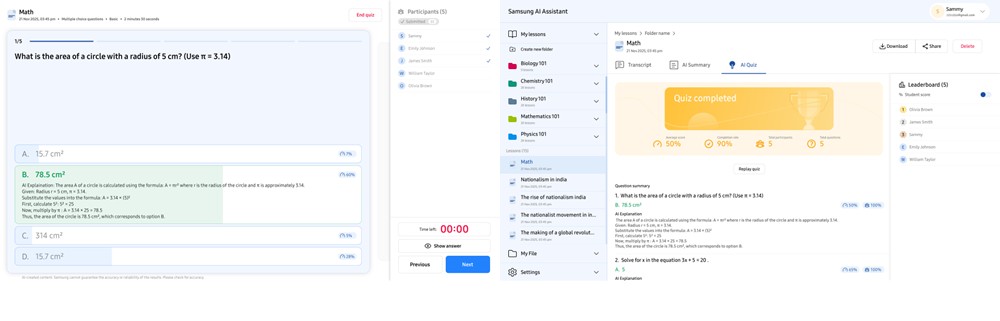
Samsung AI Assistant is a built-in app for compatible Android-based Samsung Interactive Displays1 that helps teachers support every stage of a lesson with AI-powered features.2 With features including Live Transcript, Circle to Search, AI Quiz and My Lessons, teachers can support more accessible instructions, quickly bring additional learning resources into class and review student understanding.
Watch the video below to see how Samsung AI Assistant helps teachers enhance classroom engagement across every stage of a lesson.
Live Transcript: Begin Class with More Accessible Instruction
In classrooms, it is important that every student can understand and follow classroom instruction. In larger lecture rooms, the teacher’s voice can be harder to hear, and for some students, spoken instruction alone may not always be enough.
 ▲ After turning on Live Transcript and starting Voice Recording, teachers’ spoken instructions are converted into real-time text and displayed on the Samsung Interactive Display.
Samsung AI Assistant’s Live Transcript3 feature converts teachers’ spoken instructions into real-time text displayed on the screen, helping students follow along with the lesson. Teachers can adjust the transcript’s language, font size and screen position to accommodate different classroom needs.
When paired with Samsung’s screen sharing app4, students can also view the Live Transcript on their own devices5, helping them stay connected to the lesson even if they are seated farther from the display or have difficulty hearing.
 ▲ Students can view the Live Transcript on their personal devices using Samsung’s screen sharing app.
Grant Wilson, Solution Architect AV/IFP at STS Education, highlighted how Live Transcript can help students stay connected and better follow classroom instruction.
“Kids these days are turning on transcripts, even as they’re watching movies at home, and it’s helping with their understanding,” said Wilson. “What I really like is that you can pair it with the Samsung screen sharing app, so every student in the classroom has a front-row seat to the screen from their own device.”
Circle to Search: Expand Context in Every Lesson
During the lesson, teachers may need to introduce additional examples and resources to help students connect classroom concepts to real-world context. Finding relevant materials during a lesson, however, can take time.
Circle to Search lets teachers circle any image or object displayed on the screen to quickly find related images, videos and relevant web resources.6 Teachers can add search results directly to the whiteboard by pressing and holding the selected results, making it easier to introduce diverse examples and expand on a topic while keeping students focused.




![Image for [Video] Samsung AMS Transforms Shared Classroom Displays into Personalized Workspaces for Teachers](https://img.us.news.samsung.com/us/wp-content/uploads/2026/08/12082249/Samsung-AMS-1-424x283.jpg)

