Galaxy Book5 Pro: A Laptop That Helps You Game Your College Experience


Between assignments, lectures and keeping up with a busy social calendar both online and offline, college demands serious multitasking. Your smartphone and apps help, but the laptop you use can unlock an AI-powered upgrade to campus life.
What does the right laptop for college look like? Samsung Newsroom explores the features and capabilities college students should consider when choosing a new computer.
Q: As a college student, what are the top three features to look for when buying a new laptop?
The first and most important factor is to consider how well the laptop can work with all the other devices you already have. Another key consideration is how a touchscreen could increase your productivity. Finally, battery life — how long the battery lasts during a busy day — is also crucial.
Q: What kind of laptop integrates best with your Android phone?
A college laptop should integrate seamlessly with your smartphone and your tablet, serving as the hub of your digital life. It should let you access all your notifications, send and receive text messages, and even run your favorite mobile apps right from your PC. No matter where that photo you need is stored, a well-integrated laptop will be able to find it for you. You should be able to connect to all your mobile devices to help you keep track of your digital materials. With a laptop that is connected to your entire device ecosystem, you’ll finish your thesis in no time.
Q: Do college students really need a touchscreen on their laptop?
Touchscreens are a popular option for some of the latest models, and having one on your laptop can streamline your process when working on your assignments. Using touchscreens feels more natural, since we now interact with them almost every single day, from our smartphones to the self-ordering kiosks at cafés. A touchscreen can save you time when you need to multitask intuitively with what is on your screen — without having to open another window or switch between tools. You can easily highlight the important parts of documents and jot down handwritten notes directly onto PDFs. Additionally, the latest AI tools work efficiently with touchscreen-based interactions, like circling items on the screen to instantly search for information about them.
Q: Can you get a laptop with a battery that lasts all day?
A good laptop battery should last the entire day1 even without charging. With that capability, when it’s time to hit the library, you shouldn’t have to worry about sitting next to the outlet because your laptop has more energy than you do. And when you end up at a friend’s house for a study session later in the day, your laptop will still be going strong. Even if you reach the point where the battery is almost dead, a simple 30-minute charging session will get it back up to 35%2.
Q: Bottom line, what’s one of the best laptops for college students?
The Galaxy Book5 Pro 16” is a great choice for college students. It seamlessly integrates with your other Galaxy devices to help you keep track of all your data and stay organized; the laptop’s expansive touchscreen display helps you multitask faster and work with all your assignments; and the powerful performance of its battery helps it stay active with you from morning until night.

Galaxy Book5 Pro Key Feature – AI Select
Under the laptop’s hood are powerful AI capabilities, based on its own AI Boost neural processing unit
(NPU). This is a new type of processor, different from a CPU or GPU, that is specifically for AI computing. With the power of this NPU, your laptop can understand you on a deeper level, almost like your own personal assistant.
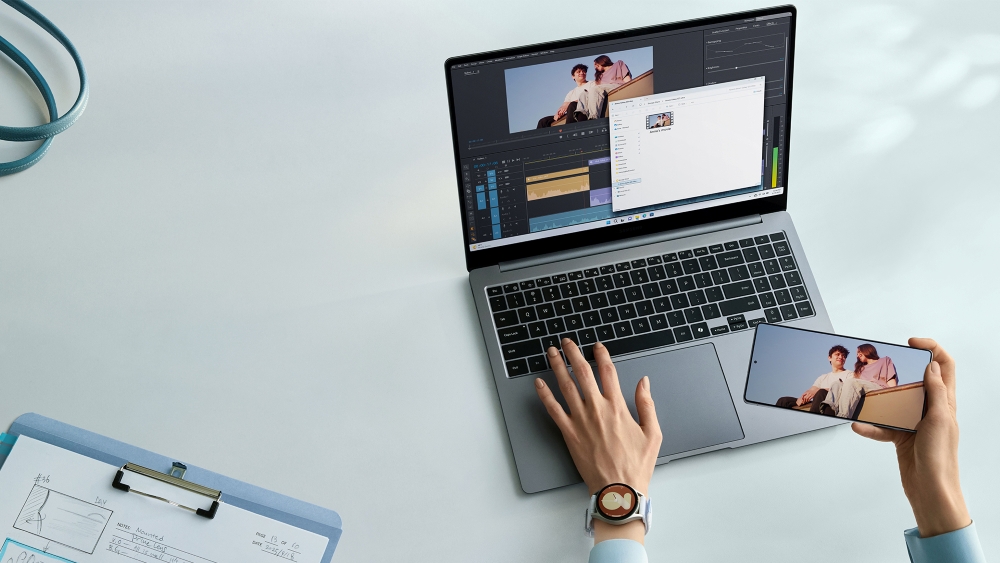
In addition, Storage Share3 connects your laptop to your Galaxy smartphone and tablet. Introduced with One UI 7, this feature lets your Galaxy smartphone and tablet operate as a wireless USB drive or storage space for your Galaxy Book5 Pro. After authorization, you can effortlessly access files on any of your devices, so you always have your data available to you on your hub — your laptop. Thanks to this, when you record lectures or meetings on your phone, your laptop can transcribe or summarize them.
Galaxy Book5 Pro Key Feature – Storage Share
This all happens on an anti-reflective screen, a crystal-clear AMOLED display featuring Samsung’s
Dynamic AMOLED 2x technology that offers 3K resolution and a 120Hz adaptive refresh rate. It gives you ultra-smooth scrolling and responsiveness, so the only possible thing you might have to wait on is your own thoughts. It also automatically adjusts its brightness and enhances its visibility with tone mapping in a bright environment, so it is clearly visible even if you are studying outside on a sunny day. And since it’s a touchscreen, you can use AI Select4 to circle what you want to search for right on the screen.
And all of this is built on the dependable foundation of the Galaxy Book5 Pro’s high-capacity battery, which can last up to 25 hours1,2. But despite all that battery power, the laptop itself is still thin and light. Thanks to that slim and lightweight design, carrying it around with you to the library, a coffee shop, your friend’s house and then back home is never a burden.
To learn more about Galaxy Book5 Pro, visit Samsung.com.
1 Typical value of battery capacity tested under third-party laboratory condition. Typical value is the estimated average value considering the deviation in battery capacity among the battery samples tested under IEC 61960 standard. Rated (minimum) capacity is 74.0Wh (Galaxy Book5 Pro 16″) and 62.2Wh (Galaxy Book5 Pro 14″). Based on results from internal lab tests for local video playback time conducted by Samsung. Tested with results from a pre-release version of the device using inbox 65W charger under settings (1080p video playback from video files stored on the device’s local storage, player-Windows video players (Media Player, Movies & TV, Films & TV) with full screen, brightness-150nits, wired earphone with default volume, airplane mode on, keyboard backlight off) without connection to Wi-Fi or mobile network, measuring the time until the device is discharged to 2%. Battery life varies significantly depending on settings, network environment, usage patterns and other factors.
2 Actual charging speed may also vary depending on the actual usage, charging conditions and other factors. Battery capacity, video runtime on a full charge and amount of charge that can be charged in 30 minutes vary by model and configuration. Galaxy Book5 Pro 16″ model features a 76.1Wh (typical) battery, supports up to 25 hours of video runtime on a full charge and can be charged with up to 35% charge in 30 minutes. Galaxy Book5 Pro 14″ model features a 63.1Wh (typical) battery, supports up to 21 hours of video runtime on a full charge and can be charged with up to 41% charge in 30 minutes. The inbox charger and data cable are USB Type-C. Using the original Samsung data cable and charger is
recommended.
3 Availability may vary. Usage requires all devices to be on the same Samsung account, connected via Wi-Fi and Bluetooth, running One UI 7 or later, and have Storage Share enabled.
4 Requires internet connection and Samsung Account login. Results may vary by uniqueness, clarity and framing of circled image and related factors.
Products > Mobile
Press Resources > Press Releases
For any issues related to customer service, please go to samsung.com/ca/support for assistance.
For media inquiries, please contact canadanewsroom@samsung.com.


