Samsung Releases New Refrigerator Software Update To Improve User Convenience


including personalized settings through Voice ID feature
Samsung Electronics Co., Ltd. announced today that it has started rolling out a software update to introduce new features for its Bespoke AI Refrigerator with screen[1]. Designed to enhance the user experience, the update includes the Voice ID feature provided by Bixby, which was unveiled at Welcome to Bespoke AI global launch event in March.
“Our primary goal for this year is to realize an AI Home that adapts intuitively to the user,” said Jeong Seung Moon, EVP and Head of the R&D Team for Digital Appliances Business at Samsung Electronics. “We aim to enhance the user experience through continuous software upgrades for existing products, taking us one step closer to a true AI Home experience.”
New Update: Bixby and Samsung TV Plus
The Voice ID feature[2] is a new multi-voice recognition function provided by Bixby.[3] It identifies users’ voices registered either on the refrigerator or a Galaxy mobile device, enabling personalized features based on the recognized user. This allows consumers to personalize shared home appliances for individual use, offering greater convenience and functionality.
For example, Bixby intelligently switches to each user’s Samsung account based on the recognized user. Users can check their registered schedules on the calendar,[4] or their photos[5] using simple voice commands. Also, they can trigger an alarm on their phone to emit a sound revealing its location, even when the device is set to silent mode.[6]
The Voice ID feature also enables seamless interactions with the refrigerator screen for users who utilize vision enhancements on their Galaxy mobile phones. Even without a request to switch accounts, Bixby automatically switches accounts with general conversations for these users. It then synchronizes the appliance’s display modes with the settings on the user’s mobile phone, such as colour inversion or grayscale.[7]
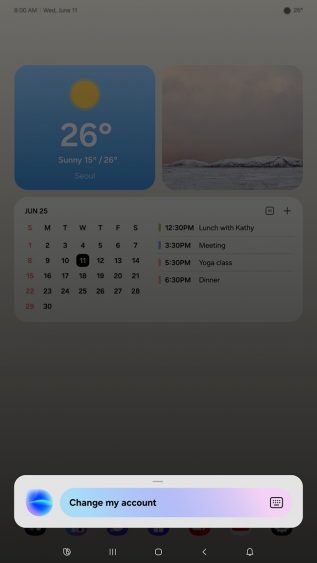
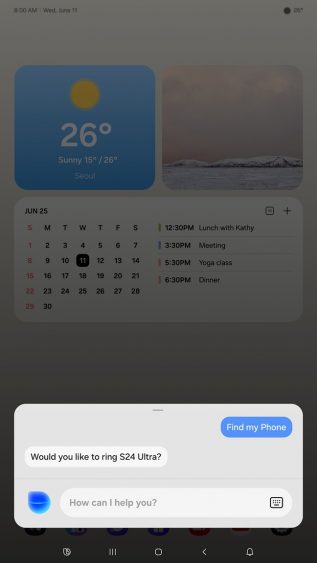
Additionally, Samsung has introduced a new way to activate Bixby on the screen. Previously, users could activate Bixby by clicking the Bixby icon on the screen or through voice commands. When the screen is off, an additional option has been added to activate Bixby by double-tapping the display. Users can make the most of this feature by selecting their preferred method in the settings.
The update is being applied to Bespoke AI Refrigerators with AI Family Hub launching in 2025 first,[8] with availability coming after the completion of the latest software update on AI Family Hub screens or SmartThings.
Additionally, Samsung plans to gradually apply this update to the Bespoke AI refrigerators with AI Home[9] in the second quarter of 2025. For refrigerators with AI Home, the update expands the service area for Samsung TV Plus, as well. Previously available in only South Korea and the United States, the service will extend to Canada in the future. Thanks to the update, it is expected that consumers will be able to easily enjoy entertainment features right from their kitchen with Samsung TV Plus.
[1] Refers to the refrigerators with AI Family Hub, and 9-inch AI Home screens
[2] Each user must register and log into their Samsung Account on the applicable refrigerator appliance in advance. Voice ID should be registered either on the refrigerator directly, or on a Galaxy mobile device that will require transferring the Voice ID registration to the refrigerator. (Limited to Galaxy S24 and subsequent models where Voice ID can be registered.)
[3] Bixby is Samsung’s brand of Internet of Things (IoT) voice assistant. Bixby service availability may vary depending on the country. Bixby recognizes certain accents/dialects of English only. User interface may change and differ by device. Availability of Bixby features and content providers may vary depending on the country/carrier/language/device model/OS version. A Samsung account log-in and network connection (Wi-Fi or data network) are required.
[4] To use calendar feature, users need to either register their schedule directly on the refrigerator or link their mobile phone calendar in advance. Only Google or Microsoft calendars saved under a Google or Microsoft account can be synced with the Bespoke AI Refrigerator with AI Family Hub. (Refrigerators with AI Home support Google Calendar only.)
[5] Gallery feature is supported only for users who have saved photos to OneDrive cloud storage via the Samsung Gallery app on a Samsung mobile phone.
[6] To enable the service, a preset is required in the SmartThings Find. Samsung Account is required.
[7] When a user registers a device through the SmartThings app, a one-time sync notification may appear via a plug-in. If the user signs into their Samsung account on a refrigerator and related settings are stored in the cloud, this data may be transmitted once to the device. Screen settings can be modified at any time, and any changes will be saved and remain in effect unless manually updated.
[8] Timeline may vary depending on the service region or model.
[9] AI Home refers to the 7’’ or 9’’ LCD screen on the product. Does not mean all services available on the AI Home are AI or generate information or outcome using AI. Certain functions accessible through the AI Home utilize AI-based algorithms, which can be updated periodically to improve accuracy. Accuracy of results not guaranteed.
Products > Home Appliances
Press Resources > Press Releases
For any issues related to customer service, please go to samsung.com/ca/support for assistance.
For media inquiries, please contact canadanewsroom@samsung.com.


