Why Students Should Buy the Galaxy Tab S12 Series
28-10-2026
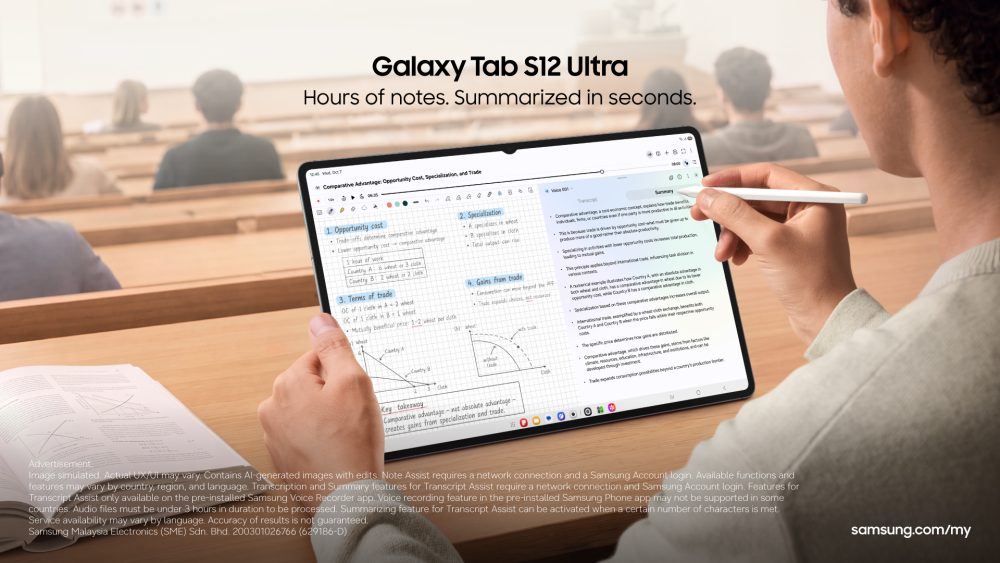
University life is a constant juggling act. Between lectures, assignments, research papers, group projects and extracurricular activities, students need more than just a device to take notes. Enter the Samsung Galaxy Tab S12 Series combining an expansive display, powerful performance, AI-powered assistance and a connected digital experience, the latest tablet series is designed to help students rethink how they learn, work and create. Whether it’s for drafting the outline of their next assignment, preparing for an important presentation or bringing a creative project to life, the possibilities are endless for students with the Galaxy Tab S12 Series.
Here are five reasons why the Galaxy Tab S12 Series deserves a place in every university student’s backpack.
1. Because you can get more done on one big screen
It’s tiring to bring around a bag full of laptop, textbooks and notebooks around campus so you would love the portability of a tablet! From juggling lecture slides and research papers to annotating PDFs before a deadline, the Galaxy Tab S12 Series helps make studying less of a scramble. The Galaxy Tab S12 Series caters to students’ needs with two display options: choose the 14.6-inch display for more room to work across materials, or the 12.6-inch option for a more portable setup between lectures and study sessions.
What’s more, the Galaxy Tab S12 Series can be turned into a portable screen as an extension to compatible Windows laptops – Second Screen allows you to mirror or extend your laptop screen onto the tablet, instantly making group study at a café or library more productive.
Both are powered by the MediaTek Dimensity 9500 processor, delivering the performance to keep up with demanding academic workloads. Whether you’re preparing an assignment or revising for exams, the Galaxy Tab S12 Series gives you the screen space and power to stay organised and focused.
2. Because AI help you work through tough topics and get ideas flowing
Stuck on a tricky topic or unsure where to start with an assignment? The Galaxy Tab S12 Series gives students access to AI assistants including Google Gemini and Perplexity to help simplify complex concepts, explore research topics and organise ideas for presentations. Getting help is easy, too: just activate the AI assistants by tapping the AI Key on the FREE Book Cover Keyboard. It’s a convenient way to iron out learning workflows, move quickly from questions to ideas and make study sessions more productive, while still checking AI-generated information against reliable sources. You can also perform seamless actions across apps and add your research to your Samsung Notes with a single command without leaving your current app. The best part is the Galaxy Tab S12 Series also comes with six months of Google AI Pro with higher access to Gemini and 5TB of storage so you can take your research to the next level.
3. Because it’s more than a tablet. It’s a creative toolkit for every student
Whether you’re preparing a presentation, editing videos for an assignment or exploring a creative hobby, the Galaxy Tab S12 Series comes with tools to do more. A wide range of essential apps is preloaded to help students explore their individual interests inside and outside the classroom. They include:
- Adobe Photoshop1: First Android tablet with multi-layer editing, suitable for those looking to pick up a new skill and how to edit pictures on the go
- Notability2 and Goodnotes3: Organise lecture notes, annotate documents and keep study materials in one place.
- Notion4: Organise tasks, manage deadlines and keep track of projects and study plans.
- LumaFusion5: Edit videos for assignments, presentations and personal creative projects.
- Clip Studio Paint6: Explore digital illustration, drawing and visual storytelling.
4. Because organizing your notes and files is just that much easier
Switching between devices to find lecture notes, assignment files or group project materials can be a hassle. The Galaxy Tab S12 Series makes it easier to access and share files across compatible Galaxy devices with Storage Share, while Quick Share support for sharing across other compatible operating systems helps students move materials between devices and collaborate seamlessly with classmates. The result is greater flexibility to work with the tools you already own, rather than having to rebuild your entire digital setup around a new tablet.
5. Because it’s a smart investment, with exclusive student offers
Students are always looking to make the most of their ringgit. Samsung is offering big deals to eligible students on the Galaxy Tab S12 Series, which can support up to seven times of OS upgrades and security updates7, to make the most out of their devices.
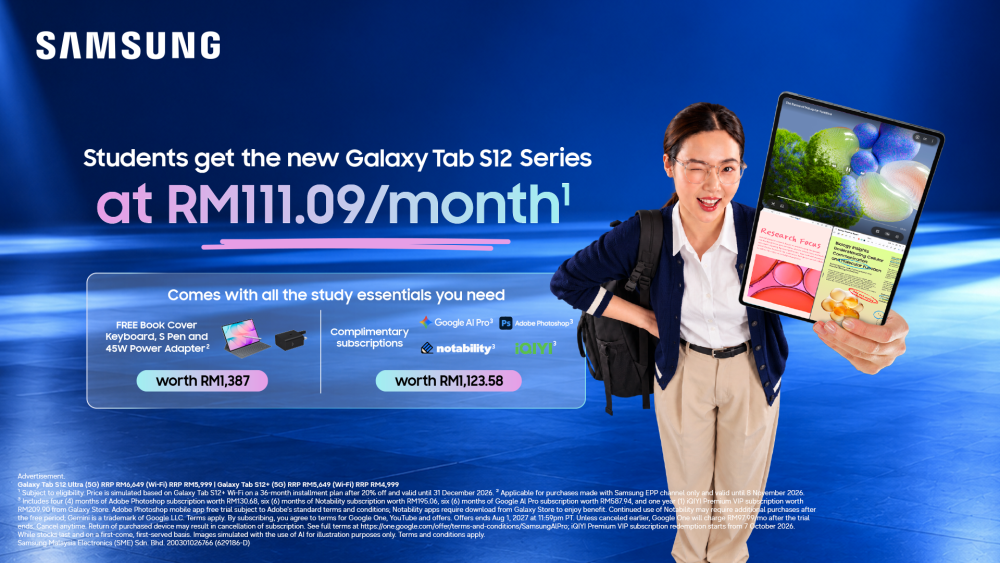
From now until 31 December 2026, eligible students can purchase the Galaxy Tab S12 Series which comes with FREE Book Cover Keyboard, and S Pen for as low as RM111.09 per month under the Samsung Student & Teacher Program. It also comes with preloaded essential apps, like Adobe Photoshop and Google AI Pro, so that students can get started without a hitch.
| Participating models | Variant | Colour availability | RRP before and after Samsung Student & Teacher Program | Samsung Student & Teacher Program price (36-month instalment) | Promotion |
| Galaxy Tab S12 Ultra | 256GB (WiFi) | Silver Grey | Before: RM5,999 After: 4799.20 | RM133.31/month | Pre-loaded applications like Gemini, Adobe Photoshop, Notability and iQIYI worth RM1,123.58 FREE accessories worth up to RM1,387: Book Cover Keyboard S Pen Until 8 Nov 2026 only: 45W Power Adapter8 |
| Galaxy Tab S12+ | Before: RM4,999 After: RM3999.20 | RM111.09/month | |||
| Galaxy Tab S12 Ultra | 256GB (5G) | Before: RM6,649 After: RM5319.2 | RM147.76/month | ||
| Galaxy Tab S12+ | Before: RM5,649 After: RM4519.20 | RM125.53/month |
Getting the student offer is simple:
- Register for a Samsung Account here.
- Verify your education email address. Users with a valid “edu.my” education email address are able to enjoy these deals.
- Shop and save on selected Samsung Experience Stores nationwide, Samsung.com and Samsung Shop app.
But that’s not all, newly registered students can also enjoy an additional 5% off their first purchase, subject to the applicable promotion terms and eligibility requirements.
Whether you are preparing for your first semester, looking to replace an ageing laptop or ready to upgrade the way you manage your academic workload, these offers make it easier to explore what the Galaxy Tab S12 Series can bring to your student life.
- Adobe Photoshop comes preloaded on Galaxy Tab S12 Series in the Galaxy Picks folder. Adobe Photoshop for Tablet will be launched exclusively in the Galaxy Store for a period of at least six months starting Oct 7, 2026, after which Adobe may launch the app in other app stores. Galaxy Tab S12 Series users are eligible to receive a 4-month free Adobe Photoshop premium mobile subscription, including 100 monthly generative credits. ↩︎
- Notability comes preloaded on Galaxy Tab S12 Series in the Galaxy Picks folder. Galaxy Tab S12 Series users are eligible to receive a 6-month free Notability subscription. Once the free full version period ends, an additional purchase is required for continuous use. App availability and the terms of service may vary by country and region. ↩︎
- Goodnotes app comes with a 1-year free full version. Once the free full version period ends, an additional purchase is required for continuous use. App availability and the terms of service may vary by country and region. ↩︎
- Notion app requires a separate download from Galaxy Store and comes with a 1-month free trial of the Plus&Notion AI for one newly created Notion workspace. App availability and the terms of service may vary by country and region. ↩︎
- LumaFusion app is preloaded as stub, requiring users to click the icon and complete the purchase from Galaxy Store. All Galaxy device users can get a 66% discount when purchasing from Galaxy Store and receive a 1-month free Creator Pass subscription. 66% discount promotion limited until Nov 30, 2026. ↩︎
- Clip Studio Paint membership required. Clip Studio Paint app comes pre-installed in select markets. The app can be downloaded from Galaxy Store and comes with a 6-month free trial for first-time users. Once the free trial period ends, paid subscription to a monthly or annual usage plan is required for continuous use. A 20% discount is available on the first subscription. ↩︎
- Availability and timing of OS upgrades and security updates may vary by device model and market. ↩︎
- Free 45W power adapter promotion valid until 8 November 2026. ↩︎


