Galaxy Tab S10 Lite: A Value-Packed Tablet for Everyday Needs


| [Galaxy AI Tools] The Galaxy Tab S10 Lite has AI features such as Solve Math and Handwriting Help on Samsung Notes help to structure everyday work and creation
[Large Screen Readability] The Galaxy Tab S10 Lite features a 10.9‑inch screen, supporting up to 600 nits peak brightness that delivers vibrant, comfortable viewing experience for both indoors and outdoors |
- Immersive display: A 10.9-inch screen with Vision Booster and up to 600 nits peak brightness delivers vibrant viewing indoors and out
- Dependable performance that lasts: With an upgraded processor and an 8000mAh battery with Super-Fast Charging, Galaxy Tab S10 Lite is built to handle long sessions of entertainment, studying and more
- S Pen and creative tools: The in-box S Pen, Intelligent Features, and wide third-party app support, help users to sketch, write and create with ease
Samsung Electronics Co., Ltd. unveiled the Galaxy Tab S10 Lite, an affordable tablet designed to elevate how users watch, create and stay productive wherever they go. With a large display for immersive viewing and a bundled S Pen for effortless creative expression, Galaxy Tab S10 Lite offers everyday versatility and great value in one streamlined device. In addition, Samsung Intelligent Features make it easy to reach new levels of creativity and productivity, while the seamless connected experiences keep ideas, content and tasks flowing across the Galaxy ecosystem.
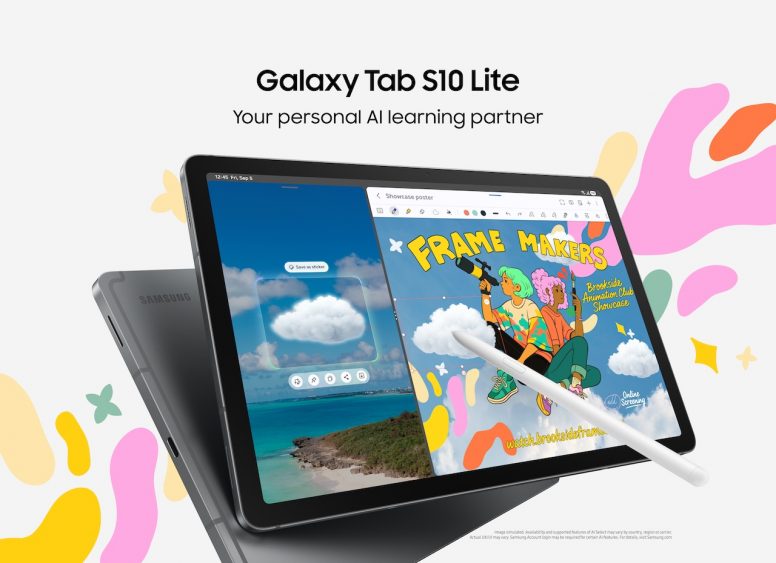
“With the new Galaxy Tab S10 Lite, we are adding a tablet that is perfect for the practical, value-conscious Singaporean consumer. With a larger screen and battery capacity, it empowers consumers to get more out of every moment, whether it is staying productive at work, managing daily tasks, or enjoying downtime for creativity and entertainment,” said Ronnie Ng, Head of Mobile eXperience, Samsung Electronics Singapore. “By making advanced AI tools and thoughtful design more accessible, we aim to give consumers a seamless experience that truly fits into their everyday lives.”
Watch and Play on Brighter, Smoother Displays
With an expansive 10.9-inch screen[1], Galaxy Tab S10 Lite offers a fun entertainment experience that is perfect for streaming, browsing and more. Users can now enjoy their favourite content on a vibrant, smooth display that adapts comfortably from indoor to outdoor use, thanks to Vision Booster and a peak brightness of up to 600 nits. Meanwhile, lower blue-light emission[2] supports extended viewing comfort when catching up on the latest shows.
Equipped with an upgraded processor and increased memory capacity, the Galaxy Tab S10 Lite responds smoothly to everyday demands like jumping between open tabs during research or brainstorming across apps. An 8000 mAh battery capacity[3] and Super-Fast Charging[4] ensure that the Galaxy Tab S10 Lite can keep up with uninterrupted entertainment or late-night study sessions at the library without having to worry about frequent recharging.
Intelligent Features for Creating and Getting More Done
From studying to capturing creative ideas, Galaxy Tab S10 Lite includes Intelligent Features that support focus and inspiration anytime, anywhere. With intuitive tools that keep up with everyday demands on the move, users can think clearly and create freely, no matter what the task.
- The in-box S Pen keeps pace with creativity in real time, offering instant responsiveness and fluid precision. From jotting down ideas during a call to sketching out a quick layout while commuting to campus, users have the flexibility to work through their thoughts whenever and wherever they come.
- Intelligent Features on Samsung Notes help bring structure to everyday thinking, whether it’s organising handwritten notes with Handwriting Help[5] or solving equations instantly with Solve Math[6]. From quick annotations to full markups, users can work directly on imported PDFs and export polished files without switching apps. And when following lecture slides while taking notes or illustrating with reference images open side by side, Split View supports more efficient multitasking and organisation.
- The Galaxy Tab S10 Lite also serves as a capable AI companion, with Circle to Search[7] with Google[8] enabling intuitive discovery and translation from anywhere on screen. This allows users to seamlessly access information in the moment they need it, without breaking focus from what they’re watching, reading or working on. The Galaxy AI Key on the Book Cover Keyboard[9] provides quick access to AI assistance to brainstorm ideas or get help mid-task, offering a smart and creative partner.
- Galaxy Tab S10 Lite offers access to a wide selection of third-party apps[10], helping users explore different tools to suit unique ways of working. From a curated suite of preloaded favourites like Goodnotes[11], Clip Studio Paint[12], LumaFusion[13] and Notion[14] to other popular tools such as Noteshelf 3[15], ArcSite[16], Sketchbook and Picsart[17], the tablet enables ideas to flow freely from concept to execution.
Users can try out many of these apps as exclusive benefits, making it easier to experiment, stay productive and bring ideas to life. Offers include a 1-year free full version of Goodnotes, a 6-month free trial of Clip Studio Paint with 20% off the first subscription and a 66% discount on LumaFusion plus a 1-month free Creator Pass subscription. Notion includes a 1-month free trial of its Plus plan with Notion AI.
Availability
The Galaxy Tab S10 Lite will be available starting 19 September 2025 in Singapore and will be offered in three colours: Grey, Silver and Coralred[18].
For more information about the Galaxy Tab S10 Lite, please visit: Samsung Newsroom or Samsung.com.
[1] Measured diagonally.
[2] The display used in Galaxy Tab S10 Lite has received the “Low Blue Light” certification from SGS based on its ability to reduce some of the blue light emission from the screen. More information of this certification can be found on www.sgs.com/performance.
[3] Typical value tested under third-party laboratory conditions. Typical value is the estimated average value considering the deviation in battery capacity among the battery samples tested under IEC 62133 standard. Typical capacity is 8,000 mAh for Galaxy Tab S10 Lite. Actual battery life may vary depending on network environment, usage patterns and other factors.
[4] Super-Fast Charging speed depends on battery level and other factors. Using the original Samsung data cable is recommended.
[5] Handwriting Help feature runs on-device and does not require an internet connection, but requires Samsung Account login. Accuracy of results is not guaranteed. Handwriting Help feature currently supports Arabic, Chinese (Chinese mainland), Chinese (Hong Kong), Chinese (Taiwan), English (Australia), English (India), English (United Kingdom), English (United States), Dutch, French (Canada), French (France), German, Hindi, Indonesian, Italian, Japanese, Korean, Polish, Portuguese (BraFil), Portuguese (Portugal), Romanian, Russian, Spanish (Mexico), Spanish (Spain), Spanish (United States), Swedish, Thai, Turkish and Vietnamese.
[6] Solve Math feature runs on-device and does not require an internet connection, but requires Samsung Account login. Incorrect handwriting recognition may lead to inaccurate calculations. Available only on S Pen-supported devices.
[7] Service availability may vary by country, language, device model. Requires internet connection. Users may need to update Android and Google app to the latest version. Works on compatible apps and surfaces. Results may vary depending on visual matches. Accuracy of results is not guaranteed.
[8] Circle to Search is a trademark of Google LLC. Sequences shortened and simulated. Results for illustrative purposes only. Service availability may vary by country, language and device model. Requires internet connection. Users may need to update Android and Google app to the latest version. Works on compatible apps and surfaces. Results may vary depending on visual matches. Accuracy of results is not guaranteed.
[9] Book Cover Keyboard sold separately. Features and keyboard layout may vary by country, language and device model. App shortcuts can be assigned for select apps only. A network connection is required to use Bixby or Google Gemini. Compatibility and availability may vary.
[10] App availability and terms of service may vary by country and region.
[11] Goodnotes app requires a separate download from Galaxy Store and comes with a 1-year free full version. Once the free full version period ends, an additional purchase is required for continuous use. App availability and the terms of service may vary by country and region.
[12] Clip Studio Paint membership required. Clip Studio Paint app comes pre-installed in select markets. The app can be downloaded from Galaxy Store and comes with a 6-month free trial for first-time users. Once the free trial period ends, paid subscription to a monthly or annual usage plan is required for continuous use. A 20% discount is available on the first subscription.
[13] LumaFusion app is preloaded as stub, requiring users to click the icon and complete the purchase from Galaxy Store. All Galaxy device users can get a 66% discount when purchasing from Galaxy Store and receive a 1-month free Creator Pass subscription. 66% discount promotion limited until 30 Nov 2026.
[14] Notion app requires a separate download from Galaxy Store and comes with a 1-month free trial of the Notion Plus with AI for one newly created Notion workspace. App availability and the terms of service may vary by country and region.
[15] Noteshelf 3 app requires a separate purchase for a Premium plan upgrade. A 30% discount on the upgrade is available only via Galaxy Store.
[16] ArcSite app requires a separate download from Galaxy Store and comes with a 1-month free trial for first-time users. Once the free trial period ends, paid subscription to a monthly or annual usage plan is required for continuous use. A 30% discount is available on the first monthly subscription. App availability and the terms of service may vary by country and region.
[17] Sketchbook and Picsart apps require a separate download from Google Play Store. Additional features may require a separate purchase.
[18] Colour and model availability may vary depending on country, region or carrier.
Products > Mobile
Press Resources > Press Releases
For any issues related to customer service, please go to samsung.com/support for assistance.
For media inquiries, please contact samsungsg@infom.asia.


