Samsung Launches The Movingstyle portable touchscreen display in Singapore


Pre-order begins 15 February 2026 via Samsung Online Store, Samsung Shop App and Samsung Official Stores on Lazada, Shopee and TikTok
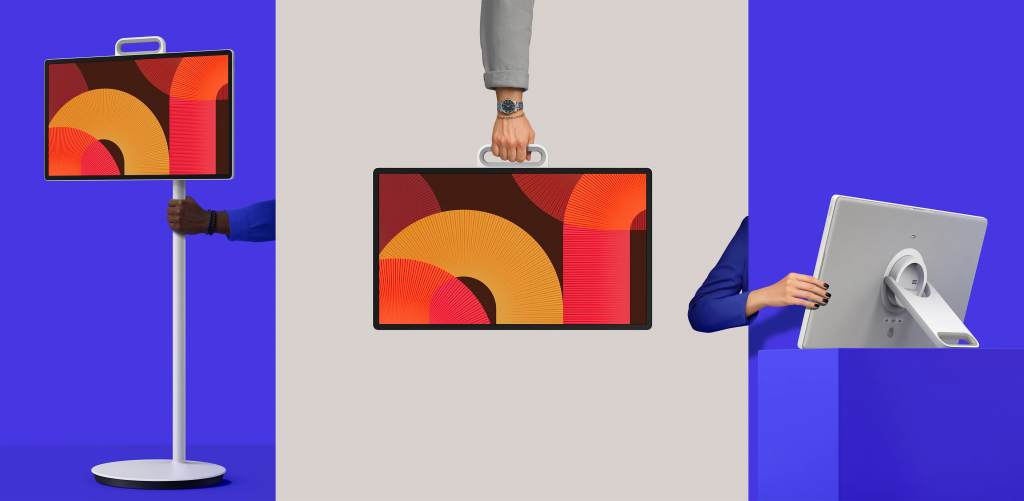
Multiple ways to use The Movingstyle
Samsung Electronics Singapore today announced that The Movingstyle will be launched in Singapore.
“A screen in every room becomes an integral part of modern life, as Singaporeans are increasingly looking for flexibility in how and where they view their content,” said Patrick Khor, Head of TV, AV and Monitor at Samsung Electronics Singapore. “The Movingstyle is a game-changer, bringing cinematic visuals and adaptability to places traditional screens can’t reach. It combines the mobility of a tablet, the precision of a monitor and the immersive quality of a TV. And with its intuitive touch interface, The Movingstyle sets a new standard for portable displays in Singapore.”
Made to Move Anywhere
Designed to transform any space into an entertainment or work setup, The Movingstyle is a fully portable, 27-inch touchscreen that allows users the ability to watch and interact with content however they like.
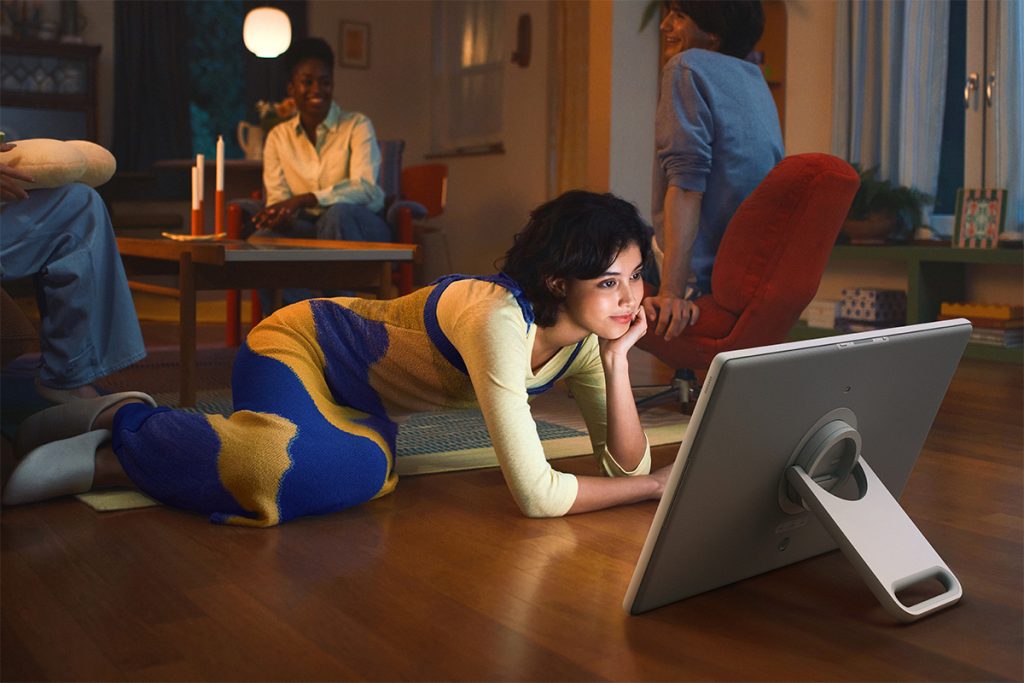
Users can use The Movingstyle like a tablet
The portable screen can be used in two ways. Users can remove the monitor from its stand and convert it to a tablet[1], thanks to the integrated kickstand that allows it to rest on surfaces like a conventional TV or tablet. Plus, the kickstand doubles as a handle for users to carry The Movingstyle when on the go. Alternatively, they can use it with the rollable floor stand[2] with hidden wheels to move it from room to room, to enjoy content in both portrait and landscape orientations.
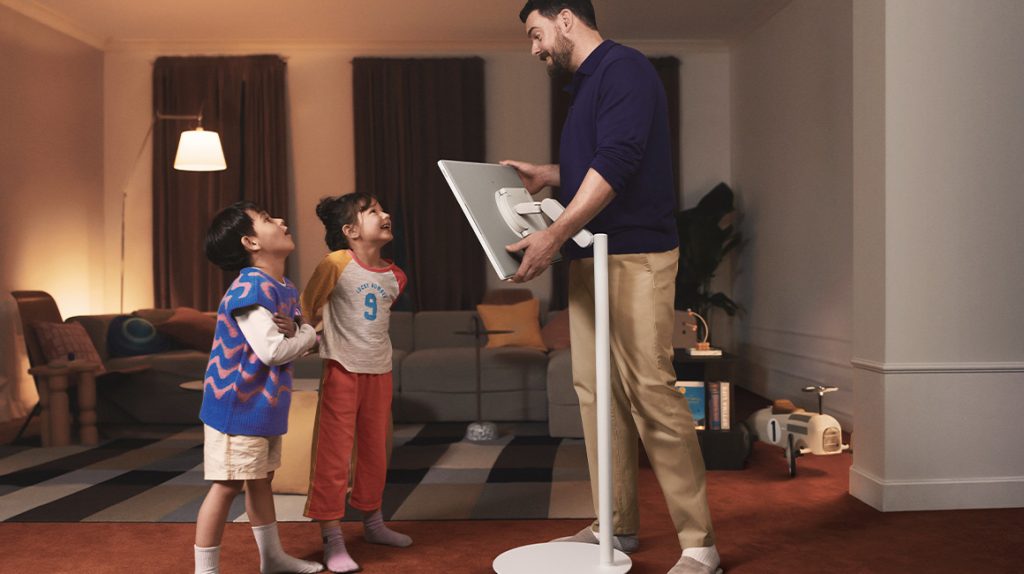
The Movingstyle can also be moved around with the rollable floor stand
The Movingstyle features a built-in battery with up to 3 hours of rechargeable power[3] for users to watch content or complete work without worrying about a power connection. In addition to using The Movingstyle’s provided remote control, users can also activate voice control with Bixby[4], or use gesture commands with a Galaxy Watch[5].
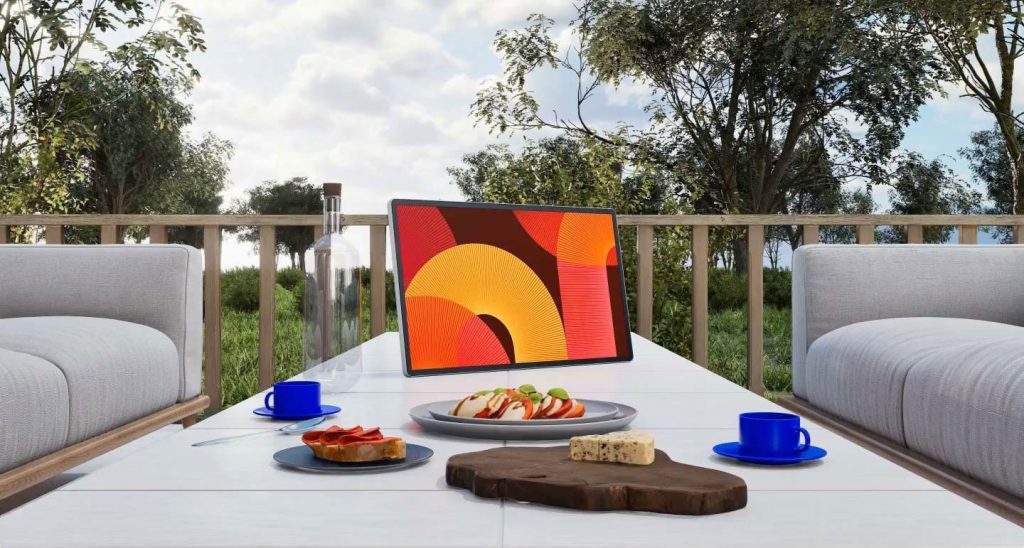
Users can use The Movingstyle like a tablet
Experience Content You Want Seamlessly
With vibrant, lifelike HDR10+ picture and Dolby Atmos support, The Movingstyle delivers crisp visuals and immersive audio quality for users who want a screen that enhances their home entertainment experience. For gamers, Motion Xcelerator 120Hz enables ultra-smooth performance for fast-paced games. And with Samsung Vision AI[6], The Movingstyle pairs AI-enhanced picture and sound with personalised experiences that bring users closer to their content.
The in-built touchscreen also provides new ways to create. With Sketch Now[7] on The Movingstyle, users can draw or write when brainstorming and take ideation from room to room, and even collaborate across different devices.
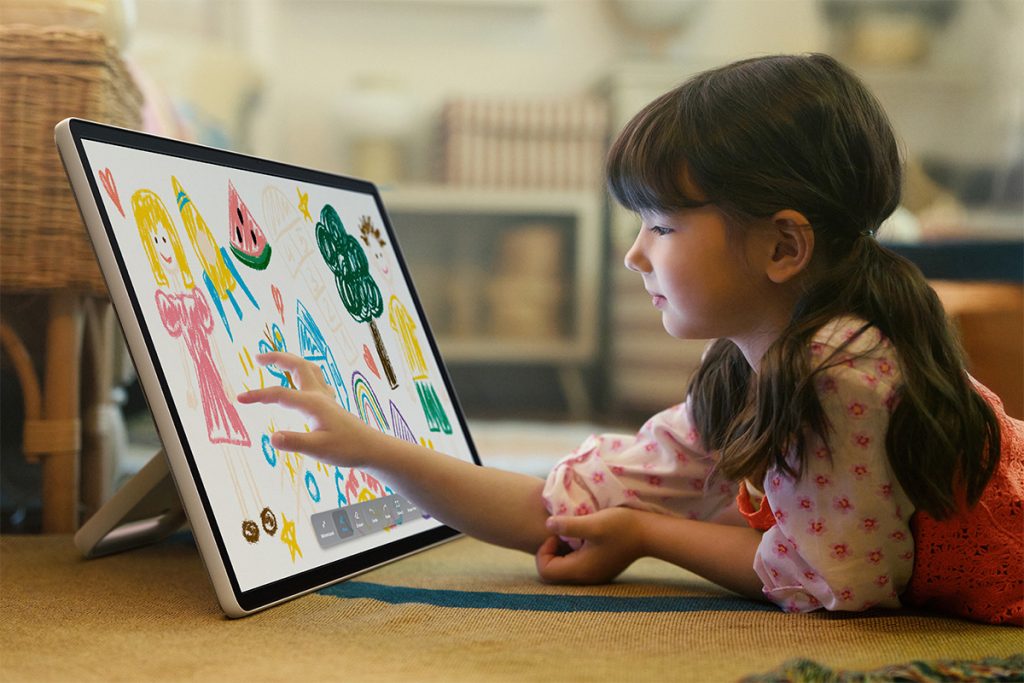
The Movingstyle supports Sketch Now, which allows users to draw or write on the screen directly
The Movingstyle offers Wi-Fi support for seamless and convenient connectivity. External connections are also made simple through phone mirroring, USB-C and HDMI. Galaxy mobile users can also stream content to the larger screen with Storage Share[8].
Endless Entertainment Made Effortless for Every User
Powered by One UI Tizen, The Movingstyle allows households to create separate profiles and receive curated recommendations, so everyone can access content catered to what they love. This includes Samsung TV Plus[9] for free live TV and on-demand entertainment with no extra subscription needed.
Stay on top of tasks and optimise daily routine with Now Brief[10], an AI-powered feature that provides personalised briefing of selected content throughout the day. Users can customise what they see with custom widgets for Weather, Memo, Music, Tips and more. Add custom touches with AI-powered Generative Wallpaper[11] and Click to Search[12] provides instant answers and recommendations about what’s onscreen.
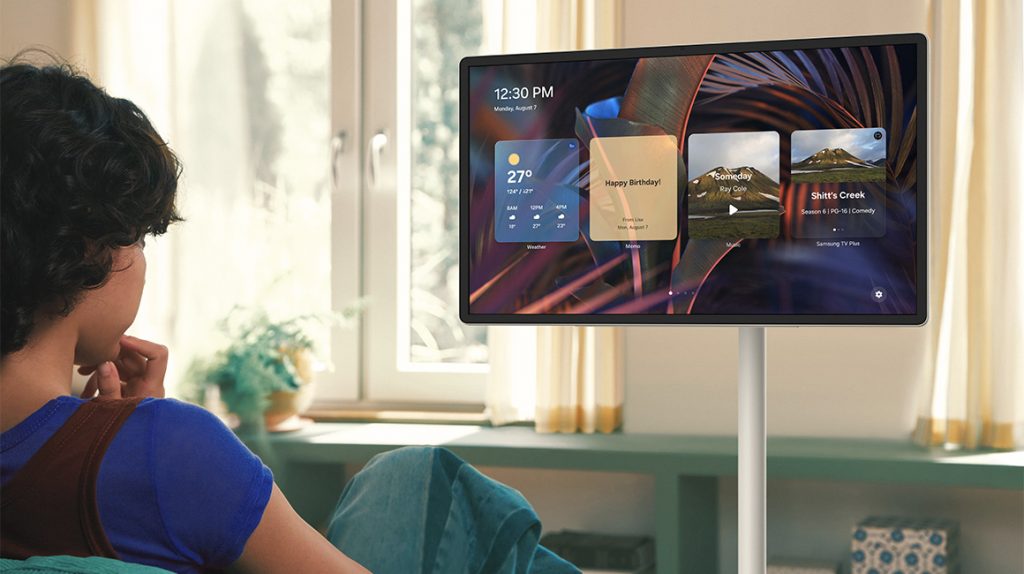
Stay on top of schedules and latest news with Now Brief on The Movingstyle
The Movingstyle can also liven up homes by turning into an on-the-go art gallery with world-renowned art pieces. The subscription-based Samsung Art Store[13] offers access to over 4,000 works of art from leading museums and artists such as The Met, MoMA, Keith Haring, and more.
Plus, user privacy on The Movingstyle is secured by Samsung Knox[14]. Sensitive data like passwords are protected, connected IoT devices are monitored and malicious apps and sites are automatically blocked. The Movingstyle also supports up to seven years of OS updates[15] to get the latest monitor experience.
Local Availability
The Movingstyle will be available for pre-order in Singapore from 15 February 2026 online via the Samsung Online Store and Samsung Shop App, as well as Samsung Official Stores on Lazada, Shopee and TikTok, with general availability from late March 2026. From 15 February 2026 to 10 March 2026, consumers who pre-order The Movingstyle will enjoy $200 off.[16]
The Movingstyle will be available at a recommended retail price of $1,699. More information on The Movingstyle is available here.
The Movingstyle is the latest addition to Samsung’s portable screens line-up, which includes Movingstyle M7 Smart Monitor.
Specification Sheet
| Display | Screen Size | 27″ |
| Resolution | QHD (2,560 x 1,440) | |
| Refresh Rate | 100Hz | |
| Touch Interaction | Yes | |
| Video | Picture Engine | NQ4 AI Gen2 Processor |
| HDR (High Dynamic Range) | HDR | |
| HDR 10+ | Yes (ADAPTIVE) | |
| Auto HDR Remastering | Auto HDR Remastering | |
| HLG (Hybrid Log Gamma) | Yes | |
| AI Picture | AI Optimised/AI Customisation | |
| HDR Brightness Optimiser | Yes | |
| Colour Booster | Colour Booster Pro | |
| EyeComfort Mode | Yes | |
| Audio | Dolby Atmos | Yes |
| Object Tracking Sound | OTS Lite | |
| Q-Symphony | Yes | |
| Sound Output (RMS) | 10W W | |
| Speaker Type | 2CH | |
| Active Voice Amplifier | Yes (Active Voice Amplifier Pro) | |
| Bluetooth Audio | Yes | |
| Adaptive Sound | Yes (Adaptive Sound Pro) | |
| 360 Audio | Yes | |
| Smart Service | Operating System | Tizen™ Smart TV |
| Bixby | Yes | |
| Far-Field Voice Interaction | Yes | |
| Works with AI Speaker | Google Assistant (SG only) | |
| Samsung TV Plus | Yes (SG Only) | |
| Web Browser | Yes | |
| SmartThings Hub / Matter Hub / IoT-Sensor Functionality / Quick Remote | IoT-Sensor / Quick Remote only | |
| Smart Feature | Multi Device Experience | Mobile to TV, TV initiate mirroring, Sound Mirroring, Wireless TV On |
| Multi-View | Up to 2 videos | |
| Apple AirPlay | Yes | |
| Daily+ | Yes | |
| Daily Board | Touch/Remote/Voice/User Detection | |
| AI Explore | Yes | |
| Google Cast | Yes | |
| Game Feature | Game Motion Plus | Yes |
| Dynamic Black EQ | Yes | |
| Game Bar | Yes | |
| Connectivity | Wi-Fi | Yes (Wi-Fi 5) |
| Bluetooth | Yes (5.3) | |
| HDMI | 1 | |
| HDMI Audio Return Channel | eARC | |
| Anynet+ (HDMI-CEC) | Yes | |
| USB | 2 x USB-C | |
| POGO (SlimFit Cam Only) | 1 | |
| Design | Front Colour | Black |
| Rear Colour | Light Gray | |
| Stand Colour | Stone White | |
| Additional Feature | Art Store | Yes |
| Motion Detection | Yes | |
| OSD Language | Local Languages | |
| MBR Support | Yes | |
| Accessibility | Low Vision Support | Audio Subtitles, Magnification, Audio Description, Zoom Menu and Text, High Contrast, SeeColors, Color Inversion, Grayscale, Auto Picture Off |
| Hearing Impaired Support | Closed Caption (Subtitle), Multi-output Audio, Sign Language Zoom | |
| Motor Impaired Support | Slow Button Repeat, Remote Control App. for All | |
| Power & Eco Solution | Power Supply | AC220-240V~ 50/60Hz |
| Power Consumption (Max) | 100 W | |
| Rated Capacity (Wh) | 69.3 Wh | |
| Eco Sensor | Yes | |
| Auto Power Saving | Yes | |
| Type (Internal/External) | Internal Power | |
| Dimension | Package Size (WxHxD) | 1234 x 174 x 525 mm |
| Set Size with Stand (WxHxD) | 628.3 x 1272.3 x 409.0 mm | |
| Set Size without Stand (WxHxD) | 628.3 x 368.2 x 47.4 mm | |
| Height Adjustable Range | 230mm (±10mm) mm | |
| Tilt Range | -35.0 (±3.0) ~ 35.0˚ (±3.0˚)° | |
| Swivel Range | -30.0 (±3.0) ~ 30.0˚ (±3.0˚)° | |
| Pivot | -93.0 (±3.0) ~ 93.0˚ (±3.0˚)° | |
| Weight | Package Weight | 30.3 kg |
| Set Weight with Stand | 25.7 kg | |
| Set Weight without Stand | 5.2 kg | |
| Accessory | Remote Controller Model | TM2361E |
| SlimFit Cam Support | Yes | |
| User Manual | Yes | |
| USB-C Cable | Yes |
[1] This product does not support a stylus.
[2] Keep out of reach of children.
[3] Up to 3 hours based on Eco Screen Mode, volume 20, HDMI input, power saving mode on, standard video play. Results vary with settings, usage, temperature, depth of discharge and battery age. Can be charged using the included 65W power adaptor.
[4] Works on select controls. Samsung Account required for network based smart services, including streaming apps and other smart features. Separate computer, mobile or other device may be necessary to create/log in to Samsung Account (free to download and create). Without Account log in, only external device connections (e.g., via HDMI) available. Bixby voice commands recognise English (US/UK), French, Spanish, German, Italian, Chinese, and Korean. Not all accents, dialects and expressions are recognised.
[5] Available apps and services may vary and are subject to change without notice. Only supported on Galaxy Watch4 and later models, and Wear OS 5 and higher versions. Galaxy Watch sold separately.
[6] Samsung Vision AI and associated features vary by model. See individual TV model specifications for details.
[7] Supports only single finger drawing; stylus not supported.
[8] Each device must be signed in to same Samsung account and must have both Wi Fi and Bluetooth turned on. Service availability may vary by device model.
[9] Samsung Account required. Computer, mobile or other device may be necessary to create/log in to Samsung Account (free to download and create). Without Account log in, only external device connections available. Channels may vary by location and are subject to change.
[10] Samsung Account required. Computer, mobile or other device may be necessary to create/log in to Samsung Account (free to download and create). Without Account log in, only external device available. Channels may vary by location and are subject to change.
[11] The number of generation attempts is limited by user per day.
[12] Click to Search feature only works with Samsung TV Plus; Click to Search Watch Next feature utilises AI based algorithms.
[13] Samsung Account log in and Wi Fi connection are required. Includes free 30 refreshed artworks monthly through Art Store Streams and over 70 ambient content supported complimentary throughout the year. Paid subscription required to enjoy all the art from the Art Store.
[14] Personal data includes directly input PIN-codes and passwords, and IoT device information shared through the SmartThings app. The latest software version is required.
[15] Based on model year; requires internet connection and does not cover hardware-related performance, features, or durability. Samsung Account required for network-based smart services, including streaming apps and other smart features. Computer, mobile or other device may be necessary to create/log in to Samsung Account (free to download and create). Without Account log in, only external device connections (e.g., via HDMI) available.
[16] Promotion is valid for The Movingstyle from 15 February 2026, 12:00AM SGT to 10 March 2026, 11:59PM SGT. Discount will be applied automatically at checkout. T&Cs apply.
TAGSThe Movingstyle
Press Resources > Press Releases
Products > TVs & Displays
For any issues related to customer service, please go to samsung.com/support for assistance.
For media inquiries, please contact samsungsg@infom.asia.


