Samsung Partners With Jamie Oliver To Create New Recipe Range On Bespoke AI Appliances
June 9, 2025
Jamie Oliver has crafted a range of unique recipes that make cooking nutritious and tasty meals easy with Samsung’s AI-powered smart ovens and refrigerators
Samsung Electronics Co., Ltd. today announced a partnership with chef, restaurateur and cookbook author Jamie Oliver, which will bring an exclusive new range of simple, easy-to-make, family-friendly recipes to Samsung’s Bespoke AI appliances and smart devices.
Jamie’s life-long mission to get more people cooking, and his passions for making home life simpler with new technologies have inspired the new recipes. With many people lacking time, confidence and knowledge in the kitchen, mealtimes can sometimes feel like a chore. Samsung has partnered with Jamie to create a range of recipes that make cooking joyful.
Jamie designed the new recipes with Samsung’s AI technology in mind, and how it can help us live smarter; from ovens that cook two dishes at two different temperatures at once, to refrigerators that suggest recipes based on the ingredients you already have at home.
New exclusive recipes from Jamie Oliver x Samsung
The new recipes include classic favourites, such as a Whole Roast Chicken Tray Bake and Salmon Gravadlax, as well as an Irresistible Focaccia bread, and sweet Fruit Tarte Tatin. Each recipe has been designed to make cooking quality dishes easy for busy people who don’t have time to meal plan but want to home cook nutritious meals for family and friends.
“As a chef, I’ve always had the luxury of time to cook, and I love it. But we’re cooking less and less and I’m always looking for ways to help people fall in love with their kitchens” comments Jamie Oliver.
“If there’s something that’s going to make your home life simpler, I want to know about it. Whether that’s letting you know what ingredients you already have when you’re out shopping and giving you recipes to use them up, or an oven with AI that can sense the food you’re cooking and let you know if it’s burning. It’s exciting to think people can fall in love with their kitchen again, and cook quality meals while also getting more time with the family.”
Simple cooking with Bespoke AI
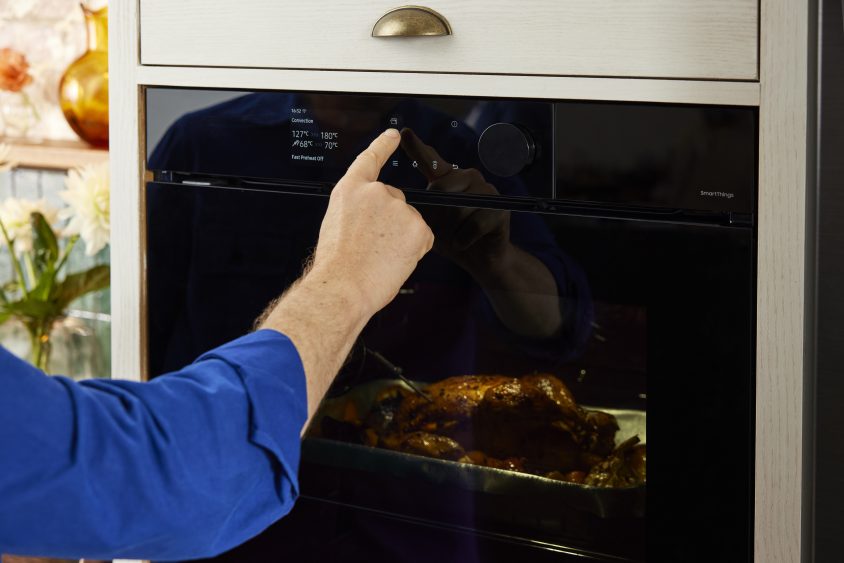
“Cooking can be one of the most fun experiences in the home, but often it’s done in a rush to get a meal on the family table” comments Benjamin Braun, Chief Marketing Officer, Samsung Europe. “The AI in our smart appliances brings the fun back to cooking, and makes it less time consuming so you can spend more time with the family. Everything, from watching your dish cook on SmartThings from the comfort of your sofa, to sending a recipe direct from the fridge to the oven and set the temperature automatically, is possible with Bespoke AI.”
Organising and cooking multiple dishes at the same time, at different temperatures, and making sure they don’t burn, are challenges when preparing meals for the family.
When you’re ready to cook Jamie’s dishes, Samsung’s Bespoke AI ovens and SmartThings Cooking[1] make the kitchen experience more joyful. The SmartThings app pre-heats ovens to the perfect temperature according to Jamie’s recipe details, as the AI-powered oven knows the right temperature to set.
Once you’re cooking, you can remotely view the dish as it cooks on the AI Pro Cooking[2] View Inside internal cameras, and adjust the oven on your smartphone as needed with SmartThings Cooking. AI Pro Cooking also monitors the food to stop it being overcooked, all in line with Jamie’s recipes.
Samsung’s Dual Cook ovens[3] make whipping up two dishes at the same time simple – for instance Jamie’s Salmon Gravadlax and Fruit Tarte Tatin, with upper and lower cooking zones that work separately, at the same time, at different temperatures and settings. So you can cook both dishes in one oven together, and not end up with a suspiciously fishy smelling dessert.
Making the most of your ingredients with Bespoke AI
Jamie’s new recipes, combined with Samsung’s Bespoke AI refrigerators, can help with common challenges like meal planning, shopping for ingredients, and keeping track of food freshness.
AI Vision Inside technology uses a camera[4] to identify up to 37 different fresh food items[5], such as tomatoes, onions, peppers, lettuce, eggs, and more, when they are put in the fridge. It then creates a food list of items, which you can see at any time on the SmartThings app[6] or the refrigerator’s built-in screen. So during the weekly food shop, you can see both the ingredients you have, and what you need.
The SmartThings Food app can also suggest the best recipes, including the new Jamie-created recipe range, based on the ingredients already in the refrigerator – making it easy to plan meals and make use of the food items you have to hand.
Reducing food waste
Food waste is a significant issue across Europe, and keeping track fresh expiration dates isn’t easy. Each person in the European Union generates an average of 129 kilograms of food waste according to estimates from Eurostat[7]. People are also keen to reduce food waste, with almost most two-thirds (64%)[8] of consumers from across Europe agreeing they’d like to take measures to “reduce food waste” when asked.
The SmartThings Food[9] app tracks use by dates and helps reduce food waste by suggesting recipes that use ingredients close to expiring, such as using leftover vegetables for extra taste and a pop of colour in Jamie’s Whole Chicken Tray Bake and Irresistible Focaccia bread.
Recipes available on the SmartThings Food app

The first three of the exclusive new recipes from Jamie Oliver are available now on SmartThings app, in the Food section, with three more to follow later this year. The SmartThings app can be downloaded for Play Store or App Store for free. For more information on the SmartThings app visit Samsung.com/SmartThings.
The recipes can also be viewed directly on Samsung’s Bespoke AI refrigerator models that feature a 9 inch AI Home display or Family Hub display, and on JamieOliver.com.
For more information on the Samsung Bespoke range please visit here.
[1]Requires a wireless network, a Samsung account and the Samsung SmartThings App. The Samsung SmartThings App supports Android OS 8.0 (Oreo) or later, which is optimised for Samsung smartphones. This App also supports iOS 13 or later for iPhone models. The SmartThings App is available in the App Store and Play Store.
[2]Available on certain models where model code begins NV7B79*9***; NV7B79*7***; NV7B6**9*** or NV7B6**7***. Requires SmartThings. A dish should be placed in the center of the oven to achieve the best recognition. The accuracy of the recognition may vary depending on the actual usage conditions, such as the type of ingredients, cleanliness of the cavity and the brightness of the room light. For more detailed information, please refer to the user guide enclosed with the package.
[3]Requires the Dual Cook Divider tray to be inserted. Insert the divider in level 3 to separate the cooking chamber in two zones. The oven senses the divider to initialise Dual Cooking. Some cooking functions where the whole cavity is required are not available with Dual Cooking. Maximum temperature difference is 80℃
[4]A red light will turn on when camera is working. The user’s appearance can be captured, but surroundings other than the food item will be automatically blurred.
[5]As of March 2025, AI Vision Inside can recognize 37 food items like fresh fruits and veggies. If the food is not recognizable, it may be listed as an unknown item. AI Vision Inside cannot identify or list any food items in the fridge door bins or freezer. It recognizes food items based on deep learning models, which may be updated periodically to improve accuracy.
[6]The user may need to manually check and adjust the list to ensure its accuracy.
[7]Source: Eurostat, Food waste in kg per capita, EU27, 2021 https://ec.europa.eu/eurostat/databrowser/view/env_wasfw/default/table?lang=en
[8]Source: Global Web Index data, percentage of people in 22 European countries who agree when asked “Which of the following do you think are the most effective measure(s) people can take to reduce their impact on the environment?”
[9]Available on Android and iOS devices. A Wi-Fi connection and a Samsung account are required.


