Galaxy S26 and Galaxy S26+: The Compact Flagships That Do It All


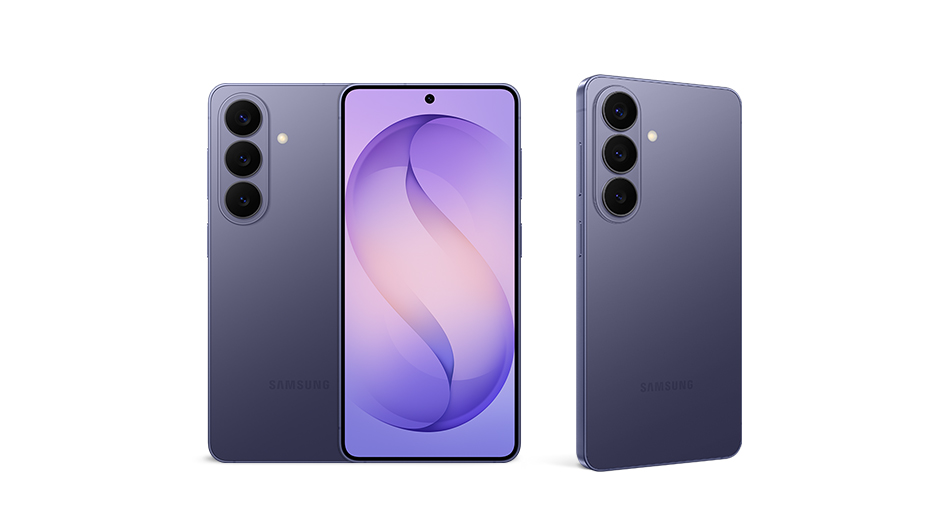
Samsung recently unveiled its latest Galaxy S series lineup: Galaxy S26 Ultra, Galaxy S26+ and Galaxy S26 — delivering the ultimate flagship experience for every kind of user.
But mobile devices are not one-size-fits-all. That’s why each device in the lineup is thoughtfully engineered to suit different preferences and lifestyles. Beyond the powerhouse Galaxy S26 Ultra, Galaxy S26+ and Galaxy S26 deliver premium Galaxy experiences in a more compact form factor, featuring reliable battery life, advanced camera capabilities and the same sleek colour options as Galaxy S26 Ultra.
Portability Without Compromise
Galaxy S26 delivers the most compact experience of the lineup, bringing flagship performance into a form that feels seamless and light. Galaxy S26+ builds on that experience with a slightly larger display and Fast Wired Charging[1]. Whether streaming, scrolling or creating, both devices are built to keep pace with everyday life. With sleek designs, strong battery life, and comfortable one-handed use, Galaxy S26 and Galaxy S26+ help users stay focused on the moments around them — not the device in their hand.
Effortlessly Turn Moments Into Memories
Even with their slim designs, Galaxy S26 and Galaxy S26+ deliver advanced, AI-powered experiences to help users capture everyday moments more confidently and creatively. Across the lineup, the upgraded Photo Assist[2] makes editing more intuitive by allowing users to simply describe edits in their own words — from transforming a daytime scene into nighttime to restoring missing parts of an object. Audio Eraser[3] helps reduce distracting background noise and enhance speech for clearer playback, while Auto Framing automatically keeps subjects centred and in focus during video recording. Document Scan further streamlines everyday productivity, helping users stay focused on what matters instead of the scanning process itself.[4] And in Gallery, Galaxy AI[5] automatically organises screenshots into different categories — such as coupons, chats, boarding passes, QR codes and more — making it easy for users to instantly find what they need.
When it comes to capturing the moment, enhanced Nightography Video[6] helps users preserve nighttime memories with accuracy. Upgraded Super Steady[7] capabilities make it easier to record clearer, more stable content, whether filming a view out of a car window on a road trip or capturing a sunrise on a morning jog. The Galaxy S26 lineup delivers Samsung’s best end-to-end camera experience, making it more seamless than ever to capture, edit and share the memories that matter most.
A Unified Flagship Design
Beyond performance and portability, the Galaxy S26 lineup brings a more unified flagship experience to life. With a consistent form factor and shared colour palette across the family, each model feels truly connected while giving users the flexibility to choose the device that best fits their lifestyle.
Galaxy S26 and Galaxy S26+ are made for users who want the full Galaxy S26 series experience in a slimmer form factor. With intelligent features, reliable performance and sleek design, they offer a more approachable way to experience flagship innovation, thoughtfully built around users’ personal needs.
“Galaxy S26 and Galaxy S26+ were designed for users who want a premium flagship experience in a form that better fits their everyday needs,” said Jiyoung Lee, Corporate VP and Head of Group, MX Design at Samsung Electronics. “With a slimmer, lighter design and the same look and feel as Galaxy S26 Ultra, these devices offer users a more compact way to experience flagship innovation every day.”
[1] Wired charging compatible with QC2.0 and AFCPD.
[2] Samsung Account may be required to use certain AI Photo Assist features. Edit Suggestion is compatible with JPG, PNG. GIF and MP4 formats. Edit results may vary depending on the photography or filming condition. Images generated by the Live Effect feature will be saved in MP4 format. Editing with Generative Edit results in a resized photo up to 12MP. Editing with Portrait Studio results in a resized photo up to 9MP. A visible watermark is overlaid on the image output upon saving in order to indicate that the image is generated by AI. Accuracy of results is not guaranteed.
[3] Results may vary per video depending on how sounds present in the video. Samsung Account login required. Six types of sound can be detected; voices, music, wind, nature, crowd and noise. The actual sound detection may vary depending on audio source, and the condition of the video. Accuracy of results is not guaranteed.
[4] Document area within the camera screen must be greater than 20%. Results may vary depending on image subject, shape, camera angle, and clarity of document. Available Saved File format is JPEG or PDF. Available Multi-Scan Image Import Input File Format is JPEG, HEIC, PNG, BMP, WebP or GIF. Available Gallery Scan Input File Format is JPEG or HEIF (JPG, HEIC). Usage may be limited in certain temperatures.
[5] Basic Samsung Galaxy AI features are free. Future releases may be offered on a paid basis. Different terms may apply for third party AI features.
[6] Results may vary depending on light condition and/or shooting conditions including multiple subjects, being out of focus or moving subjects.
[7] Super Steady results may vary depending on editing method and/or shooting conditions.
Products > Mobile & wearables
For any issues related to customer service, please go to Samsung.com/au/support for assistance.
For media inquiries, please contact mediateam@samsung.com.


