Samsung Begins Official Rollout of One UI 9, Bringing the Latest Galaxy Experiences to More Devices


Rollout starts from the end of September, starting with the Galaxy S26, S26+, and S26 Ultra.
Samsung Electronics Co., Ltd. today announced the expansion of One UI 9 to more Galaxy devices, with the rollout beginning from the end of September starting with the Galaxy S26, S26+, and S26 Ultra.[1] Following its debut on Galaxy Z Fold8 Ultra, Z Fold8, and Z Flip8, One UI 9 brings an easier, more seamless mobile experience across form factors, as well as enhanced Galaxy AI[2] that is richer, more personal, and more helpful.
New Features Help Users Capture, Personalise, and Manage
One UI 9 introduces new ways to keep people in focus, tailor the information users see each day, and manage device care more easily.
- My FanCam[3] automatically tracks a selected person in a recorded video and keeps them centered, intelligently reframing the footage as the scene moves. This allows users to turn dynamic moments into social-ready content with less manual editing. Whether it’s a child’s performance, a friend on the dance floor, or an exciting moment during a sporting event, users can instantly put the focus on the person they want to see.
- The new Generative and Editable Cards on Now Brief[4] help users choose what appears in their daily summaries. Users can create cards across health, weather, and video so their daily brief reflects the information most relevant to them.
- Warranty and Care[5] Users can now check warranty coverage across connected mobile devices, run self-diagnostics, view repair estimates, and manage Samsung Care+[6] or book a service appointment with just a few taps.
Enhanced Capabilities Help Users Do More With Less Effort
One UI 9 builds on familiar Galaxy experiences to help users complete everyday tasks in fewer steps, with context-aware suggestions, timely creative prompts, and improvements to translation, scanning, and recording.
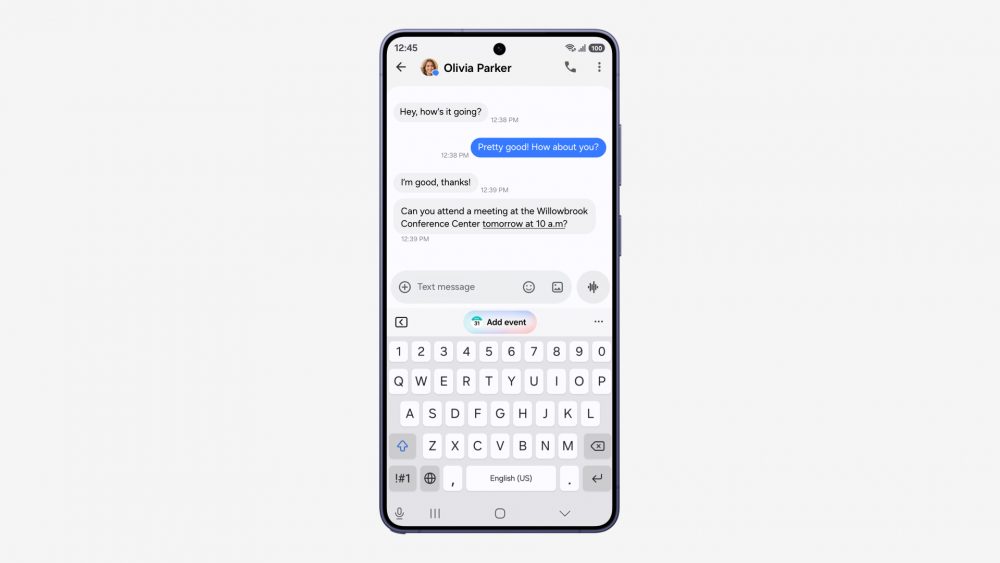
Now Nudge uses real-time context to help give suggestions to users. Image simulated for illustrative purposes.
- Now Nudge[7] can surface timely, context-aware suggestions across more moments in the Galaxy experience, helping users take the next step without breaking their flow. For example, when making plans over text, users can pull up reservation details or save a shared location without leaving the conversation.
- Creative Studio[8] now suggests image-generation ideas based on relevant upcoming events. For example, when a friend’s birthday is approaching, users may see a prompt to create a themed image or greeting, allowing them to quickly create something meaningful for the occasion.
- Interpreter[9] introduces a new Thread View that enables users to better follow translated conversations by quickly referencing earlier exchanges. In addition, faster translation in Conversation Mode and quicker playback with compatible Galaxy Buds help reduce delays, making conversations feel more natural and continuous.
- Document Scan[10] now allows users to digitise challenging materials such as curved book pages and corner-folded papers with less manual adjustment. The large-screen-optimised views on compatible Galaxy devices, along with an improved Finger Eraser, help create cleaner and more usable scans.
- Voice Recorder [11]presents summaries in a clearer, more structured format, using elements such as headings and tables to make key information easier to scan at a glance.
Enhanced Security and Privacy Help Users Stay Informed and in Control
One UI 9 continues Samsung’s approach to security and privacy with transparency, choice, and control built into the experience. The latest updates help users better understand when something may need their attention and make it easier to take action.
- Security Brief[12] brings key security and privacy updates like alerts for malware, apps from unknown sources, and unnecessary permissions to Now Brief4, helping users identify potential issues earlier and determine when action is necessary.
- Privacy Alerts[13] use on-device AI to identify potential privacy risks, including unnecessary attempts to access permissions in the background, giving users greater awareness of how their information is being accessed.
- Scam Detection[14] expands to additional countries[15] and languages, bringing protection against potential scam calls to more Galaxy users across supported markets.
[1] As of the publication of this press release, the official One UI 9 has been rolled out to Galaxy Z Fold8 Ultra, Galaxy Z Fold8, and Galaxy Z Flip8. The update is expected to gradually roll out to other Galaxy devices.
[2] Galaxy AI basic features provided by Samsung are free. Future releases may include enhanced features or new services that are offered on a paid basis. Different terms may apply for AI features provided by third parties. Galaxy AI basic features are those listed under “Advanced Intelligence” in the current Samsung T&C’s. For details visit www.samsung.com/au/galaxy-ai
[3] My FanCam feature requires a Samsung Account login. Availability may vary by video. Not supported if there is no subject to track. Results may vary depending on shooting conditions and environment. Accuracy of results is not guaranteed.
[4] Now Brief feature requires Samsung Account login. Available functions and features may vary by country, region, language, device model, and app. Some features may require a network connection. Customised briefing content provided is based only on the personal information to which the user has consented. Accuracy of generated results is not guaranteed.
[5] Available features in Warranty and care menu may differ by country/region. Warranty information is available for devices linked to the user’s Samsung Account. Ask Bixby features and supported content may vary by country or language. Estimated repair cost availability may vary by device model/region. Samsung Care+ availability, coverage, pricing, and eligibility requirements may vary by country/region and a deductible (service fee) may apply.
[6] Terms and conditions apply. Samsung Care+ coverage, service type and promotion details may vary by country/region and a deductible (service fee) may apply. To be eligible for Samsung Care+ promotion benefits, registration may be required. For detailed Samsung Care+ information, please visit https://www.samsung.com/au/samsung-care-plus/. Care at home: When in need of Samsung Care+ services contact a local customer services center in advance for Samsung Care+ availability.
[7] Now Nudge feature requires a Samsung Account login. Available functions and features may vary by country, region, and language. Text message prompts are available with Samsung Messages and certain third-party messaging apps including Samsung Messages, Google Messages, and Google Chat. Split view supported apps may vary. Photo sharing in Now Nudge works by analysing available image content. Accuracy of results is not guaranteed.
[8] Creative Studio feature requires a network connection and Samsung Account login. Service availability may vary by country, language or device model. The accuracy and reliability of the generated output is not guaranteed. Sticker sets only compatible with Samsung keyboard and can only be shared via Quick Share feature with other Galaxy devices that have One UI 5.0 or later installed and Quick Share app version 13.8.50.x or later.
[9] Interpreter requires Samsung Account login. Certain languages may require language pack download. Service availability may vary by language. Accuracy of results is not guaranteed. Availability and supported features may vary by country, region or carrier. Availability of supported languages may vary.
[10] Document area within the camera screen must be greater than 20%. If the document contains only images without text, it may not be recognised as a document in Photo Mode. Original document must be rectangular. All four corners of the document must be visible within the camera screen without any obstructions. Capture angle must be within 20 degrees after setting to 0 degrees when the document surface and the camera are level. Correction for folding is possible within two turns and between 130 and 180 degrees. For warped documents, the document must be placed on the floor with a uniformly short-axis angle of A4 size, with a distance of less than 4 cm between the floor and the document. Traces may remain after shadow removal for documents with strong shadows or colours. A gap greater than 0.8 cm between objects (text, tables, images, etc.) and obstructions (fingers, folded edges) must be present. Not supported if the object and obstacle are not separated or overlap. Moiré removal restrictions may result in residual moiré in cases of very strong moiré. Document-specific filters may produce unintended results when applied to scenes where the document is not visible. Available Saved File format is JPEG or PDF. Available Multi-Scan Image Import Input File Format is JPEG, HEIC, PNG, BMP, WebP or GIF. Available Gallery Scan Input File Format is JPEG or HEIF (JPG, HEIC). Usage may be limited in certain temperatures.
[11] Transcription and Summary features for Transcript Assist require a network connection and Samsung Account login. Features for Transcript Assist only available on the pre-installed Samsung Voice Recorder app or files recorded using the pre-installed Samsung Phone app, Samsung Notes app or Samsung Interpreter app. Voice recording feature in the pre-installed Samsung Phone app may not be supported in some countries. Audio files must be under 3 hours in duration to be processed. Summarizing feature for Transcript Assist can be activated when a certain number of characters is met. Service availability may vary by language. Accuracy of results is not guaranteed.
[12] Security Brief feature requires Samsung Account login. Service availability may vary by country, language, device model and apps.
[13] Privacy alerts is supported on Galaxy S26, S26 Ultra, S25, S25 FE, S24, S24 FE, S23, S23 FE, Galaxy Z Fold8 Ultra, Z Fold8, Z Flip8, Z Fold7, Z Flip7, Z Fold6, Z Flip6, Z Fold5, Z Flip5, Galaxy Tab S12 Ultra, Tab S12 Plus, Tab S11 Ultra, Tab S11, Tab S10 Ultra, Tab S10 Plus, Tab S9 Ultra, Tab S9 Plus, and Tab S9. Privacy alerts, may not account for all relevant factors.
[14] Availability may vary by country, region, language, device model, or OS/One UI version.
[15] Scam Detection will be available in Japan, Canada, and India.
Products > Mobile & wearables
For any issues related to customer service, please go to Samsung.com/au/support for assistance.
For media inquiries, please contact mediateam@samsung.com.


