Samsung Expands Language Support Across AI Experiences on Galaxy


Samsung is expanding language support for Galaxy AI[1] and Bixby[2], bringing these experiences to more users in their own language.
Galaxy AI[1] is expanding language support across more of its features, starting with those that translate, transcribe and summarise. Call Assist, Note Assist, Interpreter and Transcript Assist will include Hungarian and Malay, bringing Live Translate to 24 languages.[3]
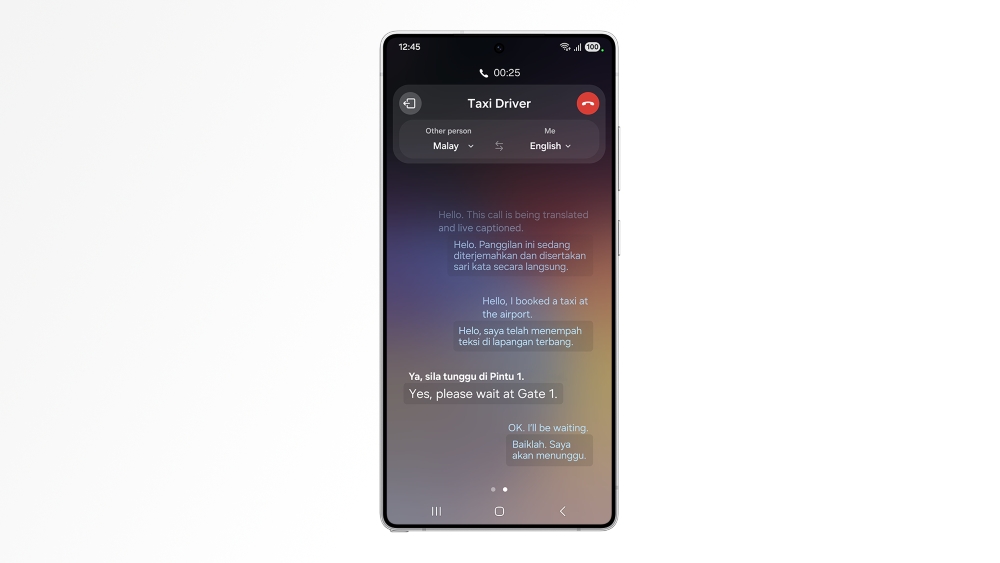
Live Translate of a phone call in Malay-English. Image simulated for illustrative purposes. Actual UX/UI may differ.
Elsewhere in Galaxy AI[1], Now Nudge, which suggests a relevant next step based on what is on screen, adds eight languages[4] to reach 24 as well.
Bixby[2] is a device agent that offers intuitive device control through natural conversation. Users can ask for what they need in their own words, which may reduce the need to know the exact name of a setting or where to find it in a menu. With the addition of Polish, Thai and Vietnamese, Bixby now supports 12 languages,[5] allowing more Galaxy users to control their devices more effortlessly.
Bixby’s[2] new languages will begin rolling out in Australia on October 14,[6] with the new Galaxy AI[1] languages to follow in the coming weeks.[7]
[1] Galaxy AI basic features provided by Samsung are free. Future releases may include enhanced features or new services that are offered on a paid basis. Different terms may apply for AI features provided by third parties. Galaxy AI basic features are those listed under “Advanced Intelligence” in the current Samsung T&C’s. For details visit www.samsung.com/au/galaxy-ai
[2] Ask Bixby features and supported content may vary by country or language. Bixby is provided for general guidance only and may not always be able to identify, diagnose or resolve issues. Outcomes can vary depending on the information provided, and Bixby’s responses should not be relied on as a complete or definitive solution. For complex, urgent or unresolved matters, please contact Samsung customer service.
[3] Galaxy AI supports 24 languages: Arabic, Chinese (China mainland, Hong Kong, Taiwan), Dutch, English (Australia, India, UK, U.S.), Filipino, French (Canada, France), German, Gujarati, Hindi, Hungarian, Indonesian, Italian, Japanese, Korean, Malay, Polish, Portuguese (Brazil, Europe), Romanian, Russian, Spanish (Mexico, Spain, U.S.), Swedish, Thai, Turkish and Vietnamese. Regions in parentheses do not represent separate languages.
[4] Now Nudge adds Dutch, Filipino, Gujarati, Hungarian, Malay, Romanian, Swedish and Turkish. Now Nudge feature requires a Samsung Account login. Available functions and features may vary by country, region, or language. On-screen nudge currently available with Samsung Messages and certain third-party messaging apps including Google Messages, Google Chat, KakaoTalk, LINE, Signal, Tango, NTT Docomo Message, and KDDI Message. Based on availability at the time of product launch. May change without notice. Share photos in Now Nudge works by analysing available image content. Accuracy of results is not guaranteed.
[5] Bixby service availability requires Samsung Account login and a data connection. Available functions and features may vary by country, region and language. Bixby supports 12 languages: Chinese (China mainland), English (India, UK, U.S.), French, German, Italian, Japanese, Korean, Polish, Portuguese (Brazil), Spanish (Latin America, Spain), Thai and Vietnamese. Regions in parentheses do not represent separate languages. Other supported languages may be added in the future. Not all accents, dialects and expressions are recognised, and actual performance may vary depending on pronunciation, voice level and the surrounding environment. Use of Bixby may be limited in certain situations such as when recording media (Video/Game/Voice), during calls, and when using Maximum Power Saving mode, Emergency mode, and Samsung Kids.
[6] Detailed schedules and features may vary depending on the device or country.
[7] Some of the new Galaxy AI languages can be downloaded as language packs from the Settings app
Products > Mobile & wearables
For any issues related to customer service, please go to Samsung.com/au/support for assistance.
For media inquiries, please contact mediateam@samsung.com.


