Samsung Introduces Next-Gen Galaxy Watch Features for AI-Powered Everyday Health Companion


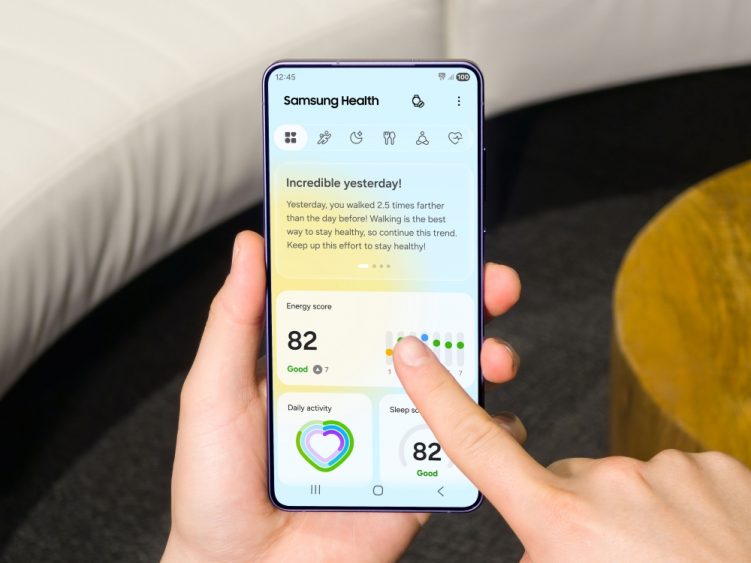
Samsung Electronics today announced a major update to the Samsung Health app[1], transforming the upcoming Galaxy Watch into an intelligent health partner. Starting 8 June, Samsung will begin rolling out the app update to showcase the key health features included in the upcoming Galaxy Watch. The update[2] makes daily health management effortless by translating complex biometric data — from overnight sleep to daily activity — into simple, actionable guidance.
“Samsung Health is evolving to connect health data measured by Galaxy Watch with AI-based insights, enabling users to understand their physical and mental condition more easily and intuitively,” said Hon Pak, Senior Vice President and Head of the Digital Health Team for the Mobile eXperience (MX) Business at Samsung Electronics. “Samsung Electronics will continue to expand personalised health management experiences based on the connected Galaxy ecosystem and digital health innovations.”
This advancement is a key milestone in Samsung’s overarching vision for a truly AI-powered health platform designed to help users stay ahead of their health. The newly announced health features will first be available on the upcoming Galaxy Watch.
Features Transforming Galaxy Watch into an Intelligent Health Partner
The Samsung Health update comes with the following features:
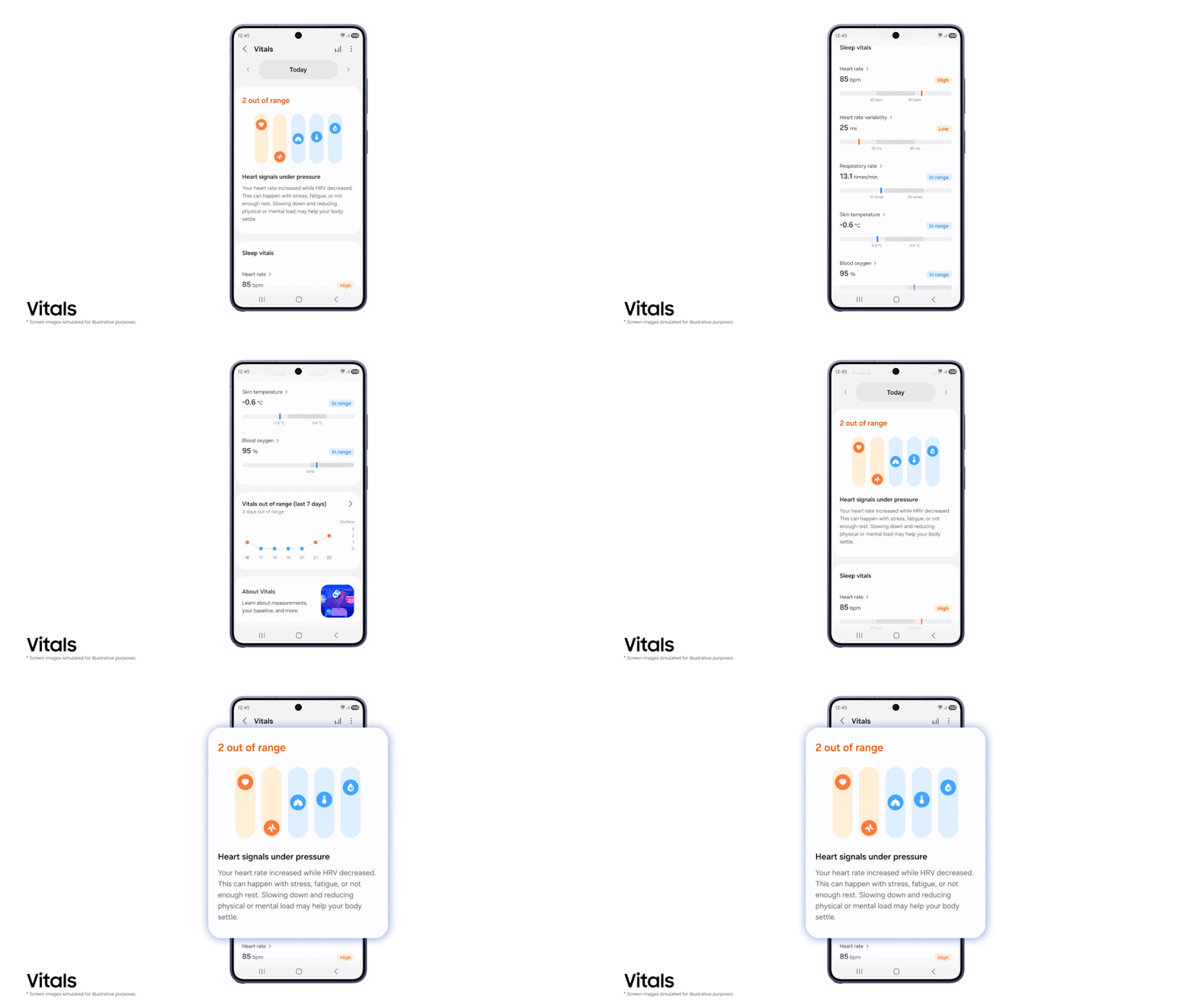
- Vitals[3]: A Better Understanding of the Body’s Signals — Previously, Samsung Health monitored specific health metrics to help measure users’ daily Energy Score. Now, Samsung Health is taking this a step further. When users wake up, the new Vitals feature analyses five key overnight bio-signals — heart rate, heart rate variability, respiratory rate, skin temperature and blood oxygen — against their true resting baseline. It sends notifications only when it detects meaningful deviations, helping users determine if they need more rest or are fighting an illness, without causing alert fatigue.
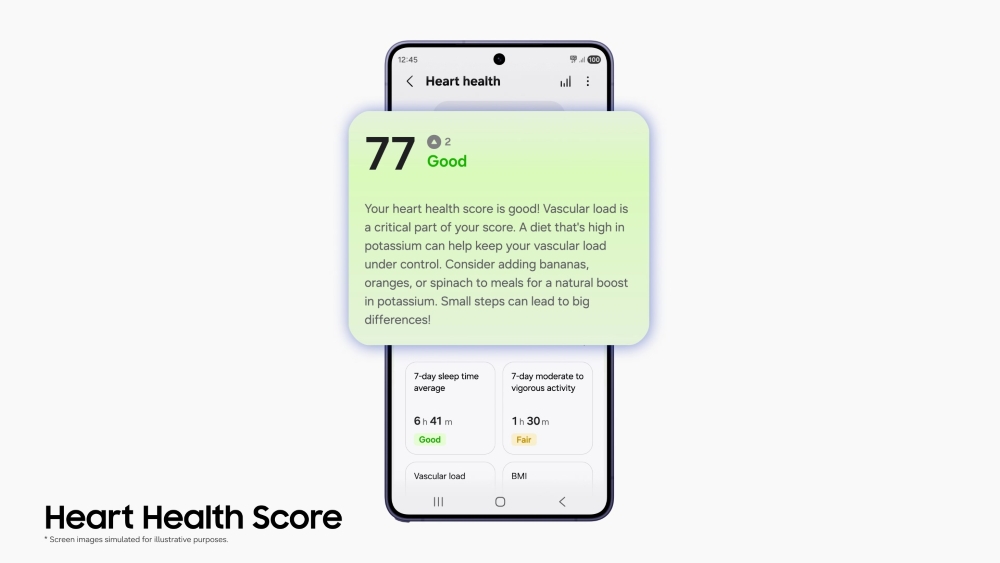
- Heart Health Score[4]: Last year, Samsung introduced Vascular Load to help users monitor vascular stress and adopt a more holistic approach to health.[5] Today, that vision evolves into the Heart Health Score. This single daily metric takes the insights previously found in Vascular Load — such as sleep, stress and activity — and combines them with body composition data. The result is a unified score that clearly identifies the habits impacting users’ long-term well-being, giving them clarity on key metrics related to their heart health.
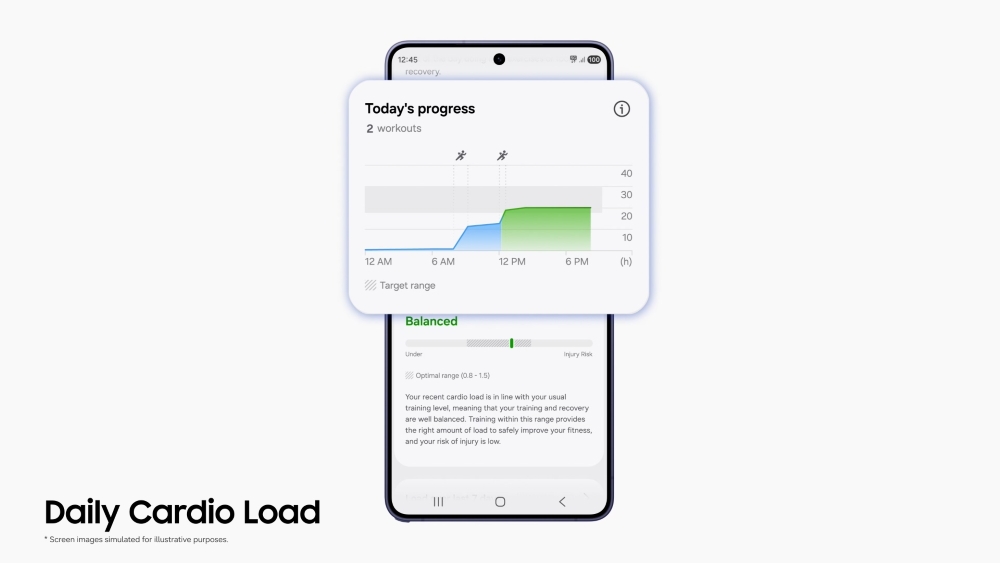
- Daily Cardio Load[6]: Smarter Cardiovascular Training — When users are deciding how hard to push during aerobic exercise, Daily Cardio Load measures accumulated cardiovascular strain. By calculating daily load and maximum training capacity, it recommends optimal training targets and rest times to help users reach their goals without risking burnout or injury.
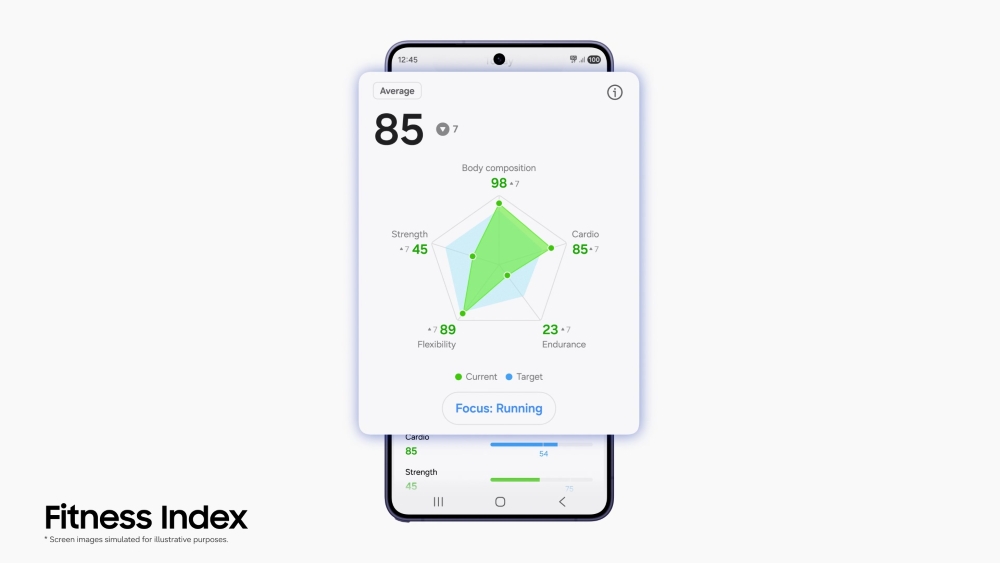
- Fitness Index[7]: Seamless Progress Tracking — The Fitness Index ensures exercise routines are working by analysing metrics like heart rate, VO2 max (a key measure of aerobic fitness) and daily steps against users’ peers. By clearly identifying individual physical strengths and weaknesses, it delivers tailored content and personalised goals so users can make continuous, targeted improvements
New Samsung Health Design for a Simplified, Personal Experience
To make these insights easy to find, Samsung Health introduces a streamlined layout organised into five core pillars: Sleep, Activity, Nutrition, Mindfulness and Vitals. Within the Home screen, users can now easily access their daily wellness tips alongside their AI-powered Energy Score. This centralised view removes guesswork from health management, allowing users to quickly understand how different aspects of their routine interconnect at a single glance.
Upgraded Capabilities for Proactive Wellness
Samsung Health is also significantly advancing the core features users already rely on, delivering deeper personalisation with greater precision. As users navigate their day, Antioxidant Index now provides new trend charts and daily history logs.[8] Behind the scenes, the AGEs index has been enhanced to quietly work in the background, capturing automatic overnight measurements to help build a long-term picture of how lifestyle choices accumulate in users’ bodies.[9] This helps users uncover health insights that truly matter for their well-being.
Comprehensive wellness extends to external environments, as well, with Samsung offering a brand-new Hearing Health feature that integrates seamlessly across the Galaxy ecosystem.[10] By monitoring surrounding ambient noise through Galaxy Watch, it delivers personalised analytics to help protect the user’s ears — whether they are on a loud commute or dialing up the music during a workout.
Together, these advanced refinements and new ecosystem-connected features turn everyday data into simple, practical guidance, setting the perfect stage for the future of Samsung Health.
A Seamlessly Connected Health Ecosystem
Samsung’s expansive ecosystem unlocks the true power of these new features, seamlessly managing health across users’ Galaxy mobile phones and connected devices. This frictionless integration ensures that personalised insights are always accessible, providing a unified view of user well-being. These advancements offer a glimpse into the future of Samsung Health — a future that will be fully realised with the launch of Samsung’s next generation of Galaxy Watches, engineered to bring this intelligence to life like never before.
[1] Samsung Health is not a medical/therapeutic device. It is solely intended for fitness and wellness purposes only and is not intended for use in the diagnosis of disease or other conditions; or in the cure, mitigation, treatment or prevention of disease; or for the prevention or control of conception or pregnancy. Samsung recommends that you consult with your doctor or physician before participating in any exercise program.
[2] New health features are for wellness only, not for the diagnosis or treatment of any medical condition. If concerned about health, be sure to see a medical professional. Available on Android phones (Android 10 or above) and requires the Samsung Health app (v7.0 or above). Samsung account login required. Certain features may require user activity and data accumulation over time to enable personalised results. Feature availability, supported devices and rollout timing may vary by market, model and other factors and are subject to change.
[3] Vitals is available on Samsung Galaxy phones and requires Samsung Health app. Samsung Account login required. Requires initial setup wearing the Galaxy Watch for 7 out of 28 nights. Vitals is not a medical/therapeutic feature. It is solely intended for fitness and wellness purposes only and is not intended for use in the diagnosis of disease or other conditions; or in the cure, mitigation, treatment or prevention of disease; or for the prevention or control of conception or pregnancy. Samsung recommends that you consult with your doctor or physician before participating in any exercise program
[4] Heart health is available on Android phones (Android 13 or above) and requires Samsung Health app (v7.0 or above). Samsung Account login required. Requires initial setup wearing watch for 24 hours (including awake and asleep). To calculate Heart health score, data on related lifestyle factors – including sleep duration, BMI, vascular trends and stress, and moderate to vigorous activity time – must be collected. To use this feature, you need a Galaxy Watch7 or above with One UI 9 or above. Heart health score is not a medical/therapeutic feature. It is solely intended for fitness and wellness purposes only and is not intended for use in the diagnosis of disease or other conditions; or in the cure, mitigation, treatment or prevention of disease; or for the prevention or control of conception or pregnancy. Samsung recommends that you consult with your doctor or physician before participating in any exercise program.
[5] Vascular Load feature assesses certain bio-signals overnight against your baseline, and tracks your heart rate measurements over time. Galaxy Watch must be worn when sleeping for at least 3 days out of recent 14 days. Vascular load feature does not act as a medical/therapeutic device. It is solely intended for fitness and wellness purposes only and is not intended for use in the diagnosis of disease or other conditions; or in the cure, mitigation, treatment or prevention of disease; or for the prevention or control of conception or pregnancy. Samsung recommends that you consult with your doctor or physician before participating in any exercise program.
[6] Daily Cardio Load is available on Samsung Galaxy phones and requires Samsung Health app. Samsung Account login is required. To use the Daily Cardio Load features, at least 7 days of activity records are required, while 28 days of continuous wear is recommended for optimal accuracy. Please note that values may increase in daily situations where heart rate rises, such as during tension, anxiety, or stress. Daily Cardio Load is not a medical/therapeutic feature. It is solely intended for fitness and wellness purposes only and is not intended for use in the diagnosis of disease or other conditions; or in the cure, mitigation, treatment or prevention of disease; or for the prevention or control of conception or pregnancy. Samsung recommends that you consult with your doctor or physician before participating in any exercise program.
[7] Fitness Index on Galaxy Watch9 is available on Android phones (Android 13 or above) and requires the Samsung Health app v7.0 or above. Samsung account login required. To use the feature, BIA and VO2Max each need to be measured at least once, along with 2 days of activity records and step count data. It is solely intended for fitness and wellness purposes only and is not intended for use in the diagnosis of disease or other conditions; or in the cure, mitigation, treatment or prevention of disease; or for the prevention or control of conception or pregnancy. Samsung recommends that you consult with your doctor or physician before participating in any exercise program.
[8] Antioxidant Index available on Android phones (Android 10 or above) and requires the Samsung Health app (v6.30.2 or above). Samsung account login required. Antioxidant Index measures carotenoid levels. To measure, place the center of your finger on the sensor at the back of the Watch and hold it for 5 seconds. While antioxidant index can be measured using any finger, the thumb is recommended for the most accurate result. Repeated measurement due to uneven skin texture may lead to inaccurate results. Antioxidant Index is for fitness and wellness only. Not intended for use in detection, diagnosis or treatment of any medical condition. Please consult a medical professional for advice if you’re concerned about your antioxidant level.
[9] Advanced Glycation End-products (AGEs) index requires Samsung Account login and Samsung Health app 6.27 or later. Available on devices with Android OS 10 (Q OS) or later. Requires wearing Galaxy Watch to sleep. Not intended for use in detection, diagnosis, treatment of any medical condition. AGEs index is for your personal reference only. Please consult a medical professional for advice.
[10] To use the features, activation from the Watch is needed (Samsung Health > Hearing > Settings > Sound Monitoring “On”).
Products > Mobile & wearables
Download
-
Samsung-Mobile-Next-Gen-Galaxy-Watch-AI-Powered-Health-Companion-Main1.jpg
-
Samsung-Mobile-Next-Gen-Galaxy-Watch-AI-Powered-Health-Companion-Main2.gif
-
Samsung-Mobile-Next-Gen-Galaxy-Watch-AI-Powered-Health-Companion-Main3.jpg
-
Samsung-Mobile-Next-Gen-Galaxy-Watch-AI-Powered-Health-Companion-Main4.jpg
-
Samsung-Mobile-Next-Gen-Galaxy-Watch-AI-Powered-Health-Companion-Main5.jpg
For any issues related to customer service, please go to Samsung.com/au/support for assistance.
For media inquiries, please contact mediateam@samsung.com.


