Samsung Launches One UI 8 Beta Program: The First Generation Upgrade Starting with the New Galaxy Foldables


One UI 8 is now available through its beta program[1], kicking off a new era of software intelligence that brings a true multimodal AI agent designed for various Samsung Galaxy form factors.
One UI is Samsung’s integrated software platform, designed to help Galaxy devices simplify everyday routines and enhance productivity and convenience. Thanks to the mutual partnership between Samsung and Google, One UI 8 will debut on Samsung’s newest foldables and will gradually expand to more Galaxy devices[2] so users can now enjoy an enriched, more personalised mobile experience with the latest Android.
Through open communication, Samsung and Google actively shared their respective design systems and real-time feedback with one another, accelerating software development that made One UI 8 one of the first UI platforms to adopt Android 16.
In addition to being the first generation of upgrades to launch alongside new foldable devices, the launch of One UI 8 also initiates a new rhythm for Samsung’s software evolution with major UX and AI updates.
Personalised AI for Seamless, Natural Interactions
The official rollout of One UI 8 will introduce AI[3] experiences that will help make your everyday smarter and more convenient by enhancing AI features first introduced in Galaxy S25 series. There are three-main factors that realise this: multimodal capabilities, UX tailored to different device form factors, and personalised, proactive suggestions. Intelligent multimodality enables you to have natural, seamless communication with AI that understands what you’re looking at or watching in the moment. The updated UX is optimised to unique form factors across the Galaxy product portfolio, boosting your everyday productivity and efficiency. One UI 8 will also recognise your context, offering personalised, proactive suggestions that support your unique daily routine. Features like Now bar[4] and Now brief[5] will deliver even more customised insights and suggestions that help you stay on top of tasks and support your daily routine, through curated AI information.
This intelligent, personalised AI experience did not just come out of nowhere. It is made possible by robust security that helps safeguard your data. Samsung Knox Vault[6] combines a dedicated secure processor with secure memory to isolate sensitive data from the rest of your user data and helps ensure that no one else can physically or remotely reach your personal information. One UI 8 also provides settings where you can choose to process data only on the device[7], as many of our Galaxy AI experiences use both on-device and cloud-based AI processing. With transparency and user choice at its core, One UI 8 will deliver a personalised AI experience without compromising privacy.
Enhanced Everyday Convenience
One UI 8 is not only about providing the AI experience, but also includes convenient, intuitive tools designed to make your day-to-day experiences with your mobile devices even more seamless. Auracast[8], a broadcast audio technology based on Bluetooth LE Audio[9], will support effortless audio connection via QR code scanning and sharing, allowing multiple Auracast devices[10] – like Galaxy Buds3 and hearing aids – to join a shared audio stream without the hassle of a complex manual setup. Additionally, customer support at repair centers will be faster and more convenient, thanks to QR and NFC-enabled support[11] accessible right in Samsung Account. You can now register with QR and NFC without having to write any registration form, reducing wait times and simplifying service requests.
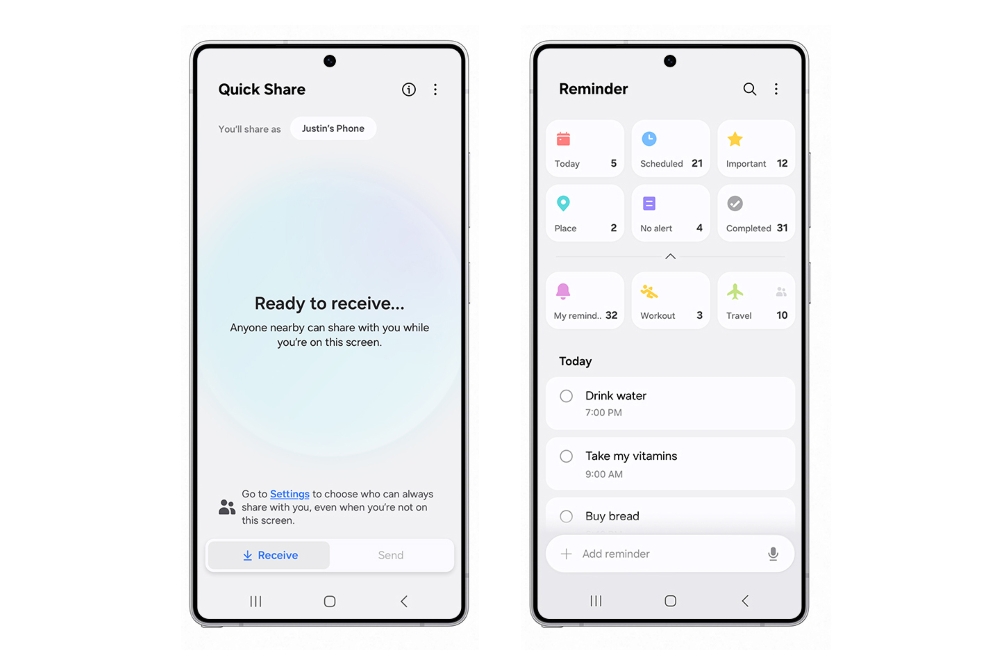
Reminder app will be your travel supporter with more convenient and intuitive features. If you are planning a travel to New York with your family, you can manage all your reminders in one place as soon as you open the app with UX that is easy-looking even for first-time users. You can also share the reminder list filled with to-dos during your trip with your family and friends just by pressing a button. When your hands are full of shopping bags, you can use your voice to add reminders on the go as it is voice enabled.
Sharing memories with family and friends will also be easier than ever with enhanced Quick Share[12]. A single tap of the Quick Share button on the Quick Settings panel will let you instantly send and receive files
The future of Galaxy AI starts now.
[1] One UI 8 beta program will be available on Galaxy S24 series, Galaxy Z Fold6 and Galaxy Z Flip6 in August, in the following countries: Korea, the U.S., the U.K. and India. One UI 8 will be rolled out in Australia by end of 2025 on eligible models.
[2] Official rollout of One UI 8 will apply to the following Galaxy devices this year: Galaxy S25 series, Galaxy S24 series, Galaxy Z Fold6, Galaxy Z Flip6, Galaxy S24 FE, Galaxy S23 series, Galaxy Z Fold5, Galaxy Z Flip5, Galaxy S23 FE, Galaxy S22 series, Galaxy Z Fold4, Galaxy Z Flip4, Galaxy S21 FE, Galaxy Tab S10 series, Galaxy Tab S10 FE, Galaxy Tab S10 Lite, Galaxy Tab S9 series, Galaxy Tab S9 FE, Galaxy Tab S8 series, Galaxy A56 5G, Galaxy A36 5G, Galaxy A26 5G, Galaxy A17 5G, Galaxy A17, Galaxy A07, Galaxy A06 5G, Galaxy A55 5G, Galaxy A35 5G, Galaxy A25 5G, Galaxy A16 5G, Galaxy A16, Galaxy A15 5G, Galaxy A06, Galaxy A54 5G, Galaxy A34 5G, Galaxy A73 5G, Galaxy A53 5G and Galaxy A33 5G.
[3] Galaxy AI features are currently free of charge, with any specific plans for premium AI services to be decided in close coordination with our partners. There are currently no plans to charge for Galaxy AI features, however different terms may apply to other AI features provided by third parties, at the end of 2025.
[4] Availability of functions supported within the apps may vary by country. Some functional widgets may require a network connection and/or Samsung Account login.
[5] Now Brief feature requires Samsung Account login. Service availability may vary by country, language, device model and apps. Some features may require a network connection. Modes and Routines need to be enabled to use Personal Data Engine for context-based Routines suggestions. User needs to consent to access permissions such as photos, videos, audio files, and calendar events. May not display moments depending upon exposure policy. The description of photos provided by moments may not align with the user’s intent. Events schedule notification is supported with calendar apps that utilize Android calendar database and available if Samsung Calendar is installed. Notifications for coupons only available for coupons added to Samsung Wallet with expiration date.
[6] The Personal Data Engine functions under the condition that the Personal Data Intelligence menu is on. Analysed data will be deleted once the Personal Data Intelligence menu is turned off. Personal Data Engine recognises select languages and certain accents/dialects, including but not limited to Arabic, (Simplified) Chinese, Dutch, English, French, German, Hindi, Indonesian, Italian, Japanese, Korean, Polish, Portuguese, Romanian, Russian, Spanish, Swedish, Thai, Turkish, and Vietnamese. Personal Data Engine currently analyses Samsung native applications.
[7] Samsung Account login required. Processing data only on your device allows advanced intelligence features to operate locally, rather than online. Enabling this option may limit the functionality of certain AI features that rely on online data processing for advanced capabilities.
[8] The quality of the Auracast audio stream may vary depending on the application, network connection and other factors.
[9] Available on devices with Bluetooth 5.2 and above that support Auracast.
[10] Auracast Transmitter/Assistant supported devices: Samsung Galaxy flagship smartphones, tablets released in 2023 or later with Samsung One UI version 6.1 or above. Auracast Receiver supported devices: Galaxy Buds3, Buds3 Pro, Buds2 Pro. May require software update. Availability may vary by market and model.
[11] Available on 36 countries: U.S, Argentina, Austria, Brazil, Chile, Colombia, Czech Republic, Ecuador, France, Greece, Guatemala, Hungary, India, Indonesia, Kenya, Korea, Malaysia, Mexico, Netherlands, New Zealand, Nigeria, Pakistan, Panama, Peru, Philippines, Poland, Portugal, Singapore, South Africa, Spain, Taiwan, Thailand, Türkiye, Ukraine, Uzbekistan, Vietnam. Availability may vary by country. The feature availability will expand to more countries via further updates. The feature is available in limited number of repair shops, and will be expanded further afterwards. Available on with Android 10 or above, NFC availability may vary by device, Samsung Account app is available on devices with Android 10 or above. Availability may vary by NFC Memory support availability.
[12] Bluetooth Low Energy and Wi-Fi connection are both required for Quick Share. Number of devices Quick Share can share to at the same time may vary depending on the Wi-Fi chip hardware of the sharing device. Actual speed may vary depending on device, network condition and user environment.
Products > Mobile & wearables
Press Resources > Press Releases
For any issues related to customer service, please go to Samsung.com/au/support for assistance.
For media inquiries, please contact mediateam@samsung.com.


