Samsung Vision AI Companion: Bringing Conversational AI to Households Worldwide


The television has long been the heart of the home, bringing entertainment, news, and shared experiences to families around the world. With Samsung Vision AI Companion (VAC), that familiar screen now becomes a connected hub for the household. Samsung’s latest AI technology transforms everyday viewing into an interactive experience, enabling users to ask questions, receive customised recommendations, and manage tasks with simple voice commands and natural two-way dialogue[1].
Conversations That Connect the Whole Household
Unlike AI designed for individual devices, Samsung Vision AI Companion is purpose-built for the communal screen. It’s designed to bring everyone closer together, turning everyday moments into shared experiences.
the core of Samsung Vision AI Companion is an upgraded version of Bixby that enables more natural dialogue, deeper contextual understanding, and personalised responses. Samsung Vision AI Companion, delivers answers, accompanied by helpful visuals and related content[2]. There’s no need to navigate complicated menus or use additional devices. Everything happens right on the screen.
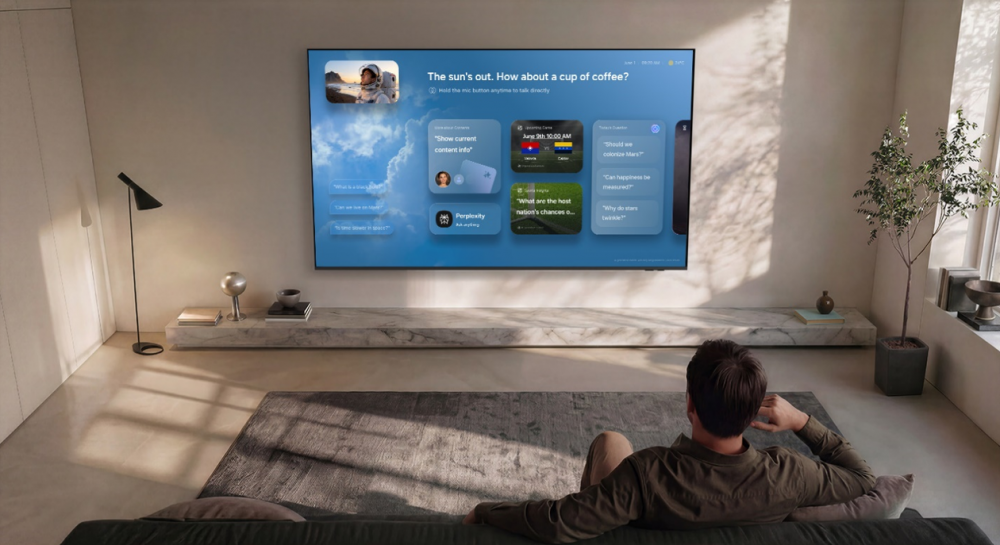
How to access and use Visions AI Companion
To launch[3] Vision AI Companion, press the AI button on your 2026 TV Samsung smart remote or long-press the Home button if your compatible 2025 TV smart remote doesn’t have an AI button.
Once you have opened Vision AI Companion, press and hold the microphone button to talk to Bixby and interact with the companion.
You can also select and navigate to related queries and AI-generated answers.
You can launch the AI Companion when you’re watching content on select sources including live TV and Samsung TV Plus.
Conversational and Visual Intelligence
What sets Vision AI Companion apart is its ability to answer questions and requests with visualised, intelligent responses through multiple AI agents by simply pressing the AI button on your remote control.
Powered by Generative AI, Vision AI Companion delivers a more natural and conversational experience. That understands context and follow-up questions, enabling more fluid interactions that feel like a real conversation – no commands, no menus, no typing.
Samsung’s First Multi-AI Agent TV Platform Supported in 10 Languages
As an open, multi-AI agent platform, Vision AI Companion combines various LLMs (large language models), including Perplexity, Gemini and Samsung’s Bixby voice assistant to share visualised, intelligent responses adapted to user questions and requests[4].
Other features include:
- AI Gaming Mode: Enhances gameplay with responsive, AI-powered optimisation for picture and sound[5].
- Generative Wallpaper: Creates dynamic, personalised visuals for the TV, adapting to user preferences and moods[6].
- AI Picture, AVA (Active Voice Amplifier) Pro, and AI Upscaling Pro: Automatically optimise picture and audio quality, ensuring every scene looks and sounds its best[7].
With one of the broadest language offerings for conversational AI on a TV or monitor, Samsung Vision AI Companion supports 10 languages, including Korean, English, Spanish, French, German, Italian, and Portuguese bringing advanced AI capabilities to more people in more places.
Samsung Vision AI Companion[8] is integrated across nearly Samsung’s entire current 2026 , including Micro RGB, OLED, Neo QLED, Mini LED TVs and The MovingStyle[9], and Smart Monitors lineup[10]. The platform is built on One UI Tizen, with up to seven years of OS software upgrades to maintain security and deliver new features over time.
Driven by Samsung’s commitment to making advanced technology part of daily life for more households, Vision AI Companion puts the TV at the center of a connected home—ready to help, inform, and adapt as your needs evolve.
To learn more, visit www.samsung.com/au/tv
[1] Provides AI created content, with accuracy not guaranteed. Not all accents, dialects, and expressions are recognised. Availability of the AI features may vary, depending on the nature of the content. Available on 2025 Q7F and above, and 2026 TVs.
[2] Information based on current viewing available and Samsung TV Plus channels. Provides AI created content, with accuracy not guaranteed. Not all accents, dialects, and expressions are recognised. Availability of the AI features may vary, depending on the nature of the content. Available on 2025 Q7F and above, and 2026 TVs.
[3] Users will need to review and accept the Privacy Notice the first time they use the service.
[4] Services are subject to change and may be suspended or ceased without notice. Not all languages, accents, dialects and expressions are recognised. Internet connection and Samsung account required. Data usage and subscription fees may apply.
[5] Picture quality of upscaled content will vary depending on the quality and resolution of source content and may not apply to PC connection and Game Mode.
[6] Generative Wallpaper: Requires internet connection and Samsung Account. Number of daily attempts may be limited. This feature is not supported on OLED models.
[7] Viewing experience may vary according to types of content and format. Upscaling may not apply to PC connection and Game Mode.
[8] Availability of Vision AI Companion may vary depending on market and model. For Smart Monitors, Vision AI Companion is only available on M70 and above.
[9] Available on features on 2025 Q7F and above TVs. Feature accessible by the AI button 2026 TVs, or by the Home button (long press) on the remote control without an AI button for remote controls on 2025 TVs (Q7F and above) and 2026 Crystal UHD TVs.
Products > TV & Audio
For any issues related to customer service, please go to Samsung.com/au/support for assistance.
For media inquiries, please contact mediateam@samsung.com.


