The Art of Effortless Exploration: How Galaxy AI Unlocks Seamless Travel



When it comes to travel, discovering hidden local attractions and engaging meaningfully with people and places can transform experiences into core memories. In this final edition of a three-part series on how Galaxy AI[1], together with Google AI’s capabilities, transforms everyday life, learn the best ways to travel smart and smoothly, with the right AI tools on hand.
From planning your itinerary to chatting with locals and uncovering the history behind iconic landmarks, here’s how you can unlock better travels with Galaxy AI.
Seamless communication for every moment
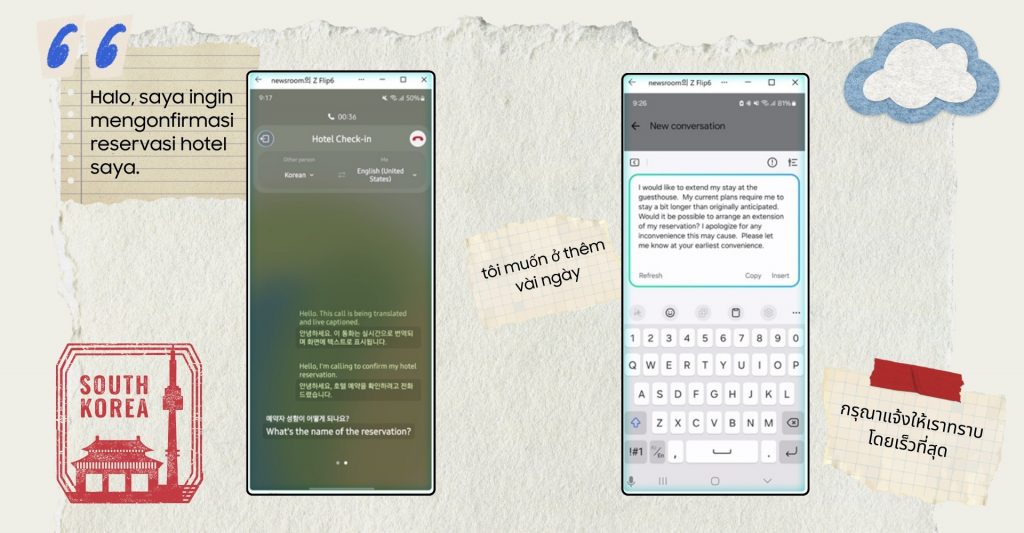
Handle calls and messages with ease using Live Translate (left) and Chat Assist (right) to communicate clearly across languages.
Now imagine you’ve just landed in Korea and need to confirm your hotel stay. You’re about to make a phone call, but the language barrier makes this simple question feel daunting. Live Translate[2] is your secret weapon. Built into your Galaxy device[3], it allows real-time audio translation with the person you’re speaking to, accompanied by a transcript on-screen, for stress-free communication. Offering support for a total of 30 languages and dialects, Live Translate enables you to enjoy nothing but smooth conversations when you’re out exploring.
If you’re texting instead, Chat Assist[4] can help enhance sentence structure, refines expressions, corrects grammatical errors and even generates complete sentences to save time while adjusting the tone to match your personal style. This makes sure you can communicate effortlessly with someone in multiple languages, with your message coming across as polite.
Find the Best Itinerary for You
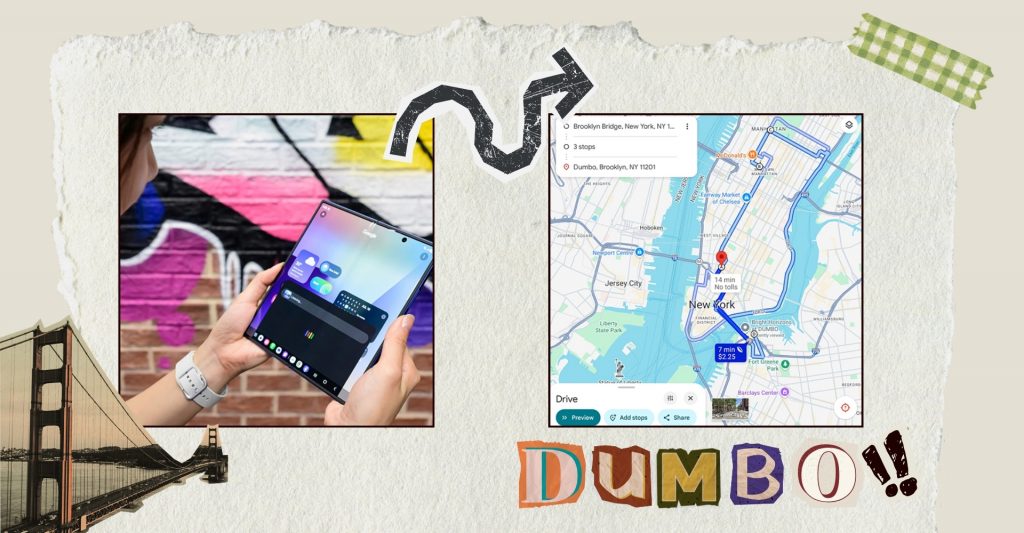
Curate your personalised photo itinerary of New York City with Gemini Live
Let’s say you are planning a trip to New York City with your friend, and the both of you have a different list of photo spots you’d like to visit. With only a few days to explore, make the most out of your time and simply tell Google Gemini Live[5] what each of you want, and it will create a seamless itinerary that fits in the places on both your lists. Gemini also enables seamless interactions combining voice, touch and visual input, to offer intelligent, conversational guidance that supports your journey of exploration.
Here Gemini pulls together a visual itinerary of New York’s most iconic photo spots, including the scenic views from DUMBO, the cobblestone charm of SoHo, and the architectural wonder of the Jenga Building in Tribeca. No toggling between apps, no search fatigue, just instant, intelligent planning. And whether you’re using the new Galaxy Z Fold7 or the Galaxy S25 series, AI-powered camera software like the optimised ProVisual Engine enables sharper outputs,[6] making sure you and your friend are all set to capture some amazing shots for the memories.
Dive Deep into Local Essences

With Circle to Search, discover the story behind any image instantly.
After you get back to the hotel from your day of exploring Tribeca, you wonder what building is actually in that photo you snapped.
With Circle to Search with Google[7], all you need is to press your home button and circle the item on screen. Instantly, Circle to Search identifies it as the Jenga Tower, giving you all the details without needing to type a single word. Whether it’s a piece of street art in Melbourne or a historic temple in Bangkok, Circle to Search on your Galaxy device is your in-pocket local guide that reveals the story behind every landmark, mural and more – adding meaning to every experience.
Ready to take off and explore the world your way? Take the lightweight Galaxy Z Fold7 along and make use of its wider screen with a new 21:9 aspect ratio perfect for multi-tasking as you plan, translate, and discover all at once. Or keep things compact with the Galaxy Z Flip7 – your pocket-sized travel companion ready to support with quick translations and capturing moments, all conveniently from the FlexWindow.[8]
With Galaxy AI and the latest Foldables by your side, make each step of your journey smarter, smoother and more connected than ever.
[1] Galaxy AI features are currently free of charge, with any specific plans for premium AI services to be decided in close coordination with our partners. There are currently no plans to charge for Galaxy AI features, however different terms may apply to other AI features provided by third parties.
[2] Network connection and Samsung Account required. Currently limited to select languages only. See website for full list of available languages. Live Translate feature must be enabled and language package must be downloaded prior to use. Only available on the pre-installed Samsung Phone app and certain supported apps. Supported apps include Whatsapp, Google Meet, Facebook Messenger, Instagram and Signal. List of supported apps may vary from country. Translation might not be accurate.
[3] Live translation during calls is available on the Galaxy S25 Ultra, S25 Edge, S25+, S25, S25 FE, S24 Ultra, S24+, S24, S23 Ultra, S23+, S23, S22 Ultra, S22+, S22, Z Fold7, Z Fold6, Z Fold5, Z Fold4, Z Flip7, Z Flip7 FE, Z Flip6, Z Flip5, Z Flip4, Tab S11 Ultra, Tab S11, Tab S10+ 5G, Tab S9+ 5G, and Tab S8+ 5G. The feature is not supported on the Galaxy Tab S10 Lite, Galaxy Tab S10 series (Wi-Fi), Galaxy Tab S9 series (Wi-Fi), Galaxy Tab S10 FE series, Galaxy Tab S9 FE series, Galaxy Tab S8 series (Wi-Fi), A series phones or tablets, or on other models.
[4] Requires Wi-Fi connection or mobile data. Some features of Chat Assist may require a Samsung Account. Translation might not be accurate. The availability of translation service may vary by country, region, or language. Accuracy of results is not guaranteed. Supported apps include Samsung Messages, Android Messages, KakaoTalk, Whatsapp, Instagram, Google Chat, Signal, Line Messenger and Tango. List of supported apps may vary from country.
[5] Google Gemini requires a network connection and is provided by Google. Gemini is a trademark of Google LLC. Gemini Live feature requires internet connection and Google Account login. Compatible with certain features and certain accounts. Available on select devices and select countries, languages, and to users 18+.
[6] Results may vary depending on shooting conditions including multiple subjects, being out of focus or moving subjects.
[7] Circle to Search is a trademark of Google LLC. Requires internet connection. Mobile data fees may apply. Circle to Search feature must be enabled. May not work on all visual elements. Results may vary depending on visual matches. Accuracy of results is not guaranteed. Google SafeSearch filter applies.
[8] Photo Ambient Wallpaper must be enabled for FlexWindow customisation. Certain applications may not support FlexWindow widgets.
TAGSCircle to SearchGalaxy AIGalaxy S25 SeriesGalaxy Z Fold7Google GeminiLive TranslateProVisual Engine
Products > Mobile & wearables
Press Resources > Press Releases
For any issues related to customer service, please go to Samsung.com/au/support for assistance.
For media inquiries, please contact mediateam@samsung.com.


