Samsung Introduces Galaxy Tab S12 Series: The Ultimate Productivity Powerhouse Built for Growth


Samsung Electronics Co., Ltd. today unveiled the Galaxy Tab S12 series — Galaxy Tab S12 Ultra and Tab S12+ — delivering Samsung’s most capable and versatile tablet experience yet. Packing breakthrough performance, long-lasting battery life, and the latest Galaxy AI1 into Galaxy Tab’s signature ultra-thin design, the new lineup turns complex workflows into effortless, everyday achievements whether it’s mastering skills, pursuing career goals or exploring creative passions.
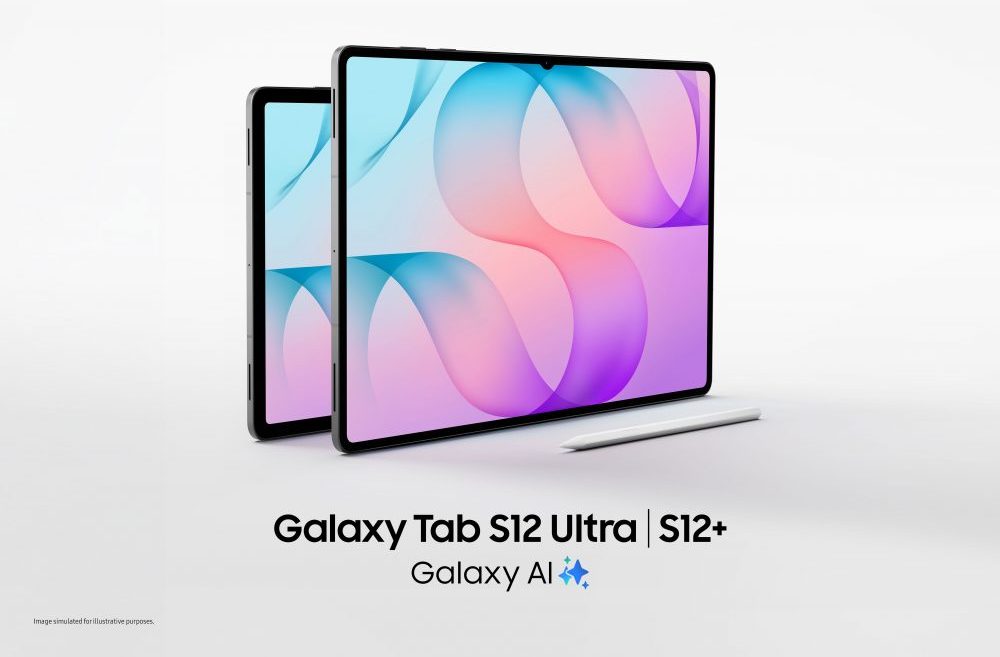
Galaxy Tab S12 Ultra and Tab S12+ both feature immersive displays and come bundled with the ergonomically designed S Pen for effortless note-taking and precise editing. With easy access to professional-grade apps and versatile accessories, users can pursue their passions and progress toward their goals with ease. Combining portability with professional-grade power, the Galaxy Tab S12 series gives users instant access to powerful capabilities whenever inspiration strikes.
“The Galaxy Tab S12 series is designed for people who are constantly exploring new ideas, developing new skills and bringing their ambitions to life,” said Jay Kim, Executive Vice President and Head of Customer Experience Office, Mobile eXperience (MX) Business at Samsung Electronics. “Built with industry-leading hardware, the Galaxy Tab S12 series pairs an expansive screen with the power of Galaxy AI — helping remove friction from complex tasks so users can stay focused on achieving impactful results.”
Peak Performance in an Ultra-Thin Design
The Galaxy Tab S12 series combines powerful performance and long-lasting battery life into a thin and light design, making it easy for users to achieve more, wherever ambition takes them. At a remarkably slim 5.1mm[1], Galaxy Tab S12 Ultra delivers the most powerful performance of any Galaxy Tab to date, supporting productive use throughout the day. For example, users taking an online course alongside a full-time job can catch up on a lesson during the commute, then work through course exercises on the large screen at a café or library later in the day.
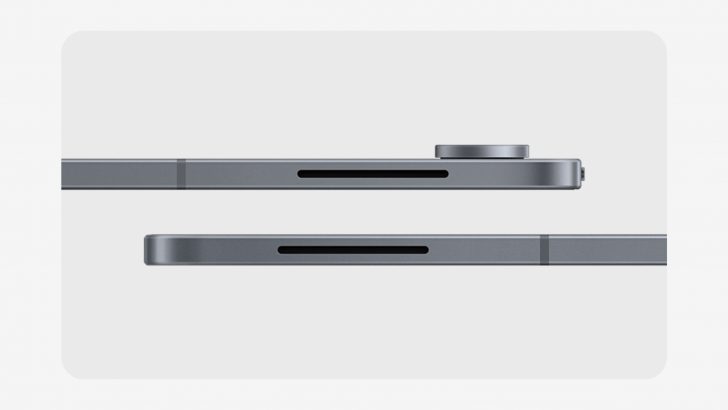
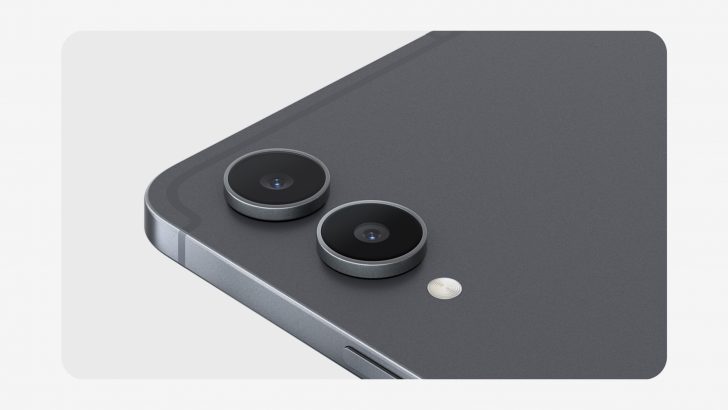
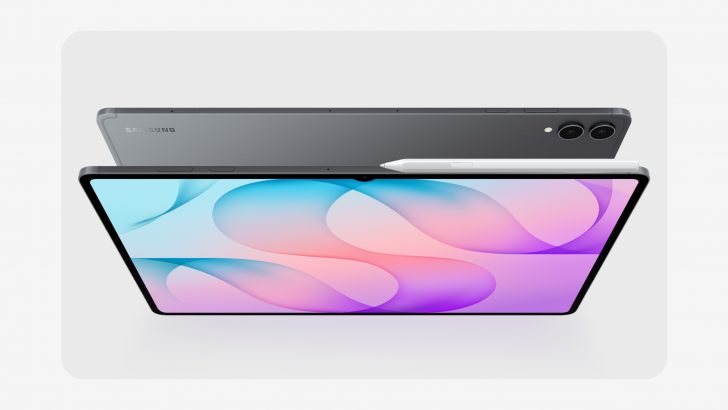
Both models are built to go the distance, allowing users to keep going without losing momentum. On a single charge, the all-day battery lasts up to 23 hours on Galaxy Tab S12 Ultra[2] and up to 21 hours on Galaxy Tab S12+[3], supporting long stretches of productivity anywhere. When it is time to recharge, users can quickly get their tablet to 100% with the 45W adapter[4] — minimising downtime so users can get back to what they were doing.[5]
Beyond long-lasting battery life, the Galaxy Tab S12 series delivers the most powerful performance of any Galaxy Tab to date, keeping pace with even intensive tasks. In everyday use, that means users can take on more demanding tasks with increased speed and responsiveness. Whether rendering complex creative projects or watching a lecture while taking notes and asking AI for clarification — the experience stays responsive and fast with fewer interruptions to break their focus.
A newly designed 3D Vapour Chamber efficiently dissipates heat to support more reliable performance during demanding tasks, whether users are editing video or designing graphics for hours.[6] Engineered for resilience and durability to withstand the elements and give users peace of mind, the Galaxy Tab S12 series also comes with IP68-rated water and dust resistance.[7]
The Galaxy Tab S12 series comes with an expansive screen designed to help users think bigger and give ideas more room to unfold. Galaxy Tab S12 Ultra features a large 14.6-inch display[8], making it easy to explore complex topics and keep multiple perspectives in view. The Galaxy Tab S12+ features a 12.6-inch display[9] and slimmer bezels than its predecessor, offering more screen space without sacrificing portability. Both models feature Dynamic AMOLED 2X displays reaching up to 1,600 nits of peak brightness[10] — delivering clear, vivid visuals indoors or out, The upgraded seamless Vision Booster now adjusts brightness in real time based on lighting conditions for comfortable viewing.
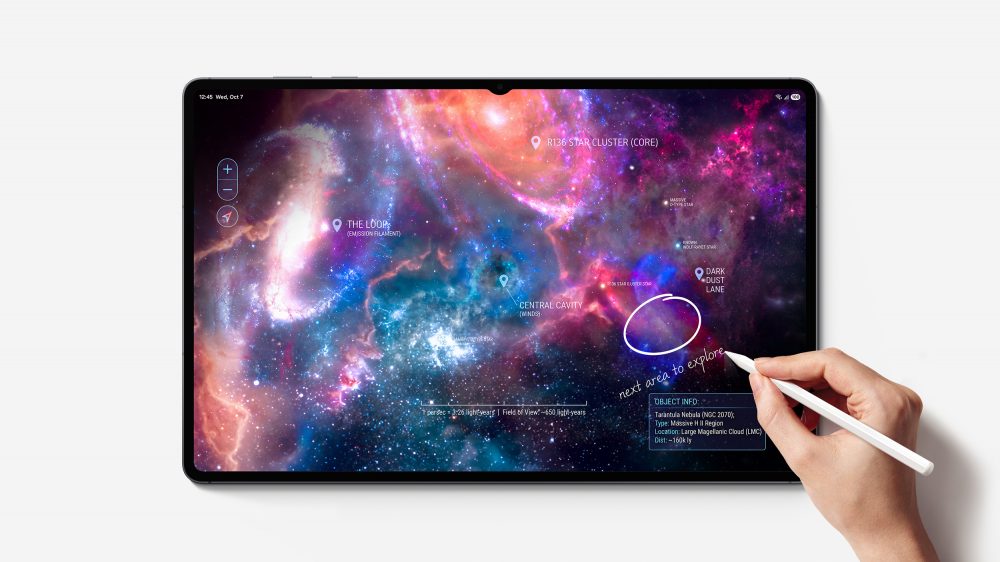
Sound gets a major upgrade as well, with 4-channel spatial audio — twice as many channels as the previous generation — delivering a richer, more immersive experience whether users are streaming content, following a tutorial or editing.
Making Everyday Tasks More Intuitive and Effortless
Building on an industry-leading hardware foundation, the Galaxy Tab S12 series turns its large screen into a flexible workspace that makes it easy to keep up with different tasks without missing a beat. Running Android 17 with One UI 9 and the latest Galaxy AI, it brings research, note-taking, creation and AI assistance into one place, giving users more freedom to explore new ideas, capture what matters and put what they learn into practice.
Thanks to the Galaxy Tab S12 series’ immersive screen, users can split the screen into up to three sections in Multi Window layout. For example, users can take notes in Samsung Notes on one side while playing a lecture and opening an AI assistant on the other. As key takeaways or questions come up, users can capture them with the S Pen directly in Samsung Notes, while Note Assist[11] summarises their notes – all without pausing the lecture.
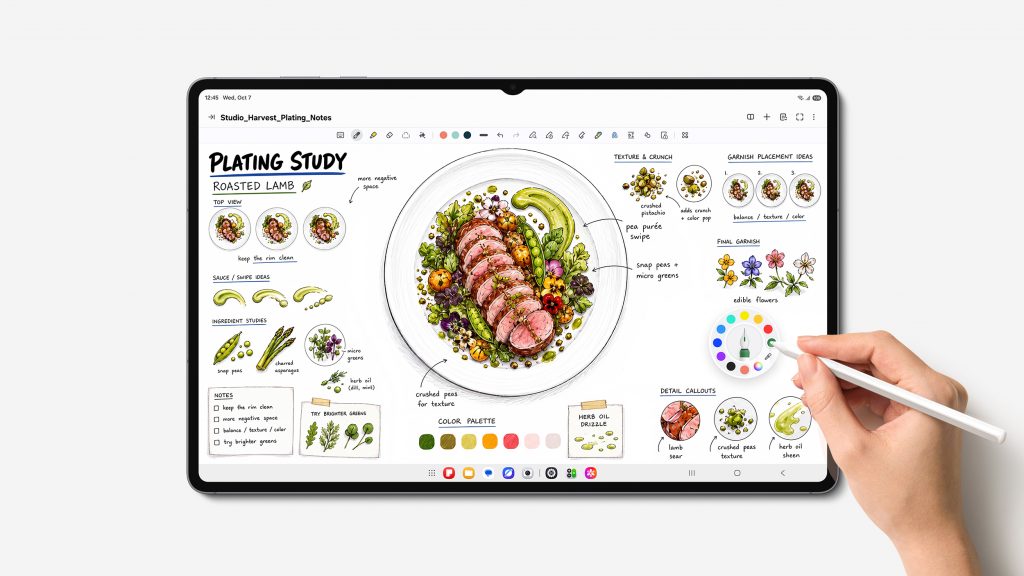
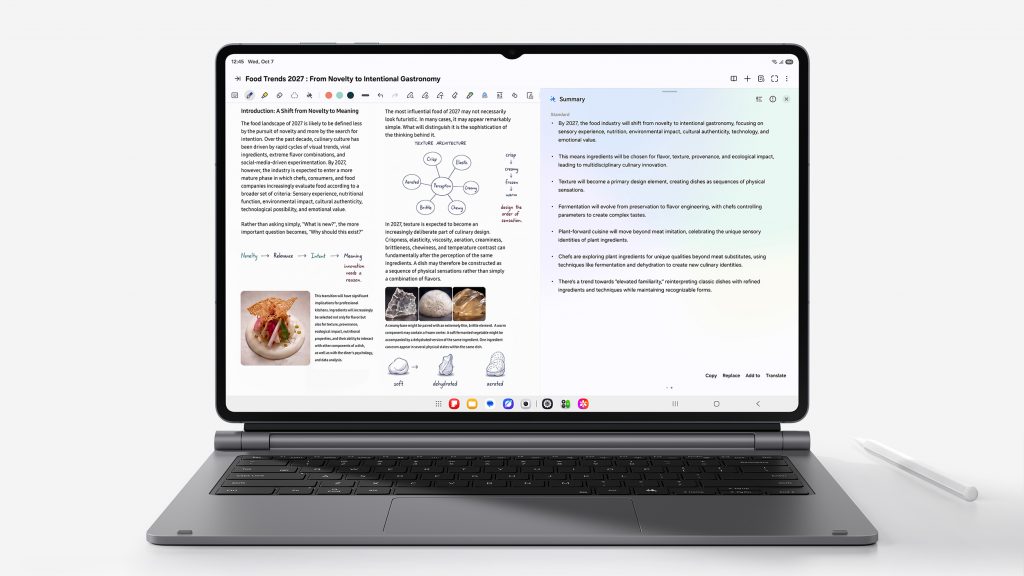
Both models come bundled with an ergonomic S Pen, offering precise, intuitive input for note-taking, annotating materials, and sketching concepts. For a more structured, professional workstation, the Pro Keyboard[12] elevates productivity with a premium aluminum finish and a Galaxy AI Key[13] that enables instant access to AI assistants, while the Book Cover Keyboard Slim[14] delivers flexibility with comfortable viewing angles and an effortless typing experience.[15]
-
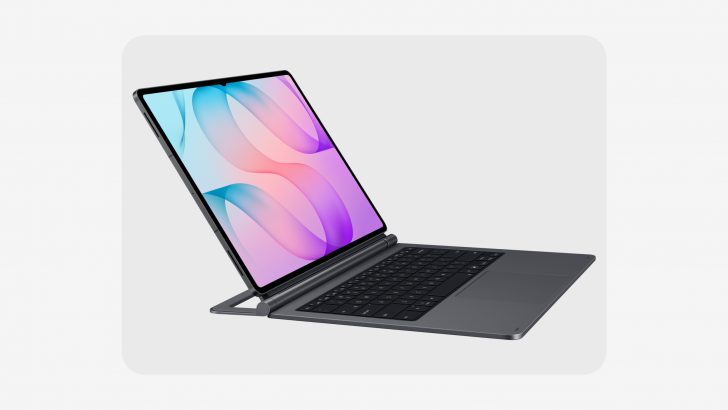
- Pro Keyboard
-
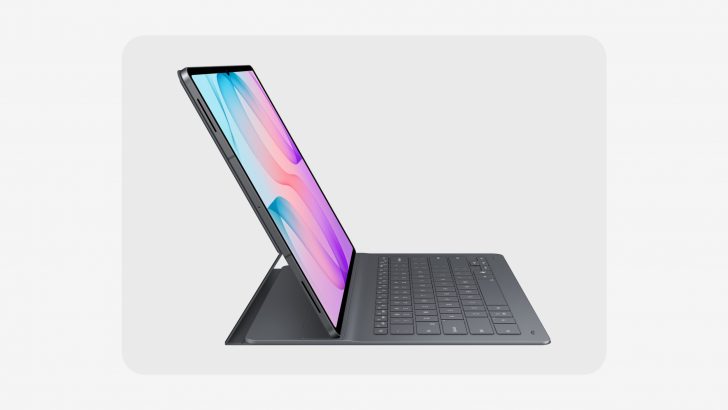
- Book Cover Keyboard Slim
The Galaxy Tab S12 series helps users bring information together and get real-time support the moment curiosity strikes. The Galaxy Tab S12 series comes equipped with a six-month trial of Google AI Pro[16], providing expanded access to Google’s most capable AI models from day one. Users can ask Gemini[17] about anything unclear or dive deeper into subjects they want to explore the moment a question comes up. With Gemini Notebook, users can bring together notes, images, recordings, and files in one workspace and create summaries, podcasts, and even quizzes to make key information easier to understand.
As exploration expands into deeper research, Samsung Browser helps users stay focused without losing track of what they have already discovered. By understanding webpage content, context across multiple tabs, and browsing history, it can summarise information across open pages or surface a relevant source viewed days earlier – helping users spend less time searching through past tabs and more time capturing the key insights that matter most.[18]
A Complete Ecosystem Designed to Take Skills and Creativity Further
The Galaxy Tab S12 series gives users the ideal place to put knowledge into practice, bringing together professional-grade apps[19] alongside various app benefits [20] to help them take their skills further.
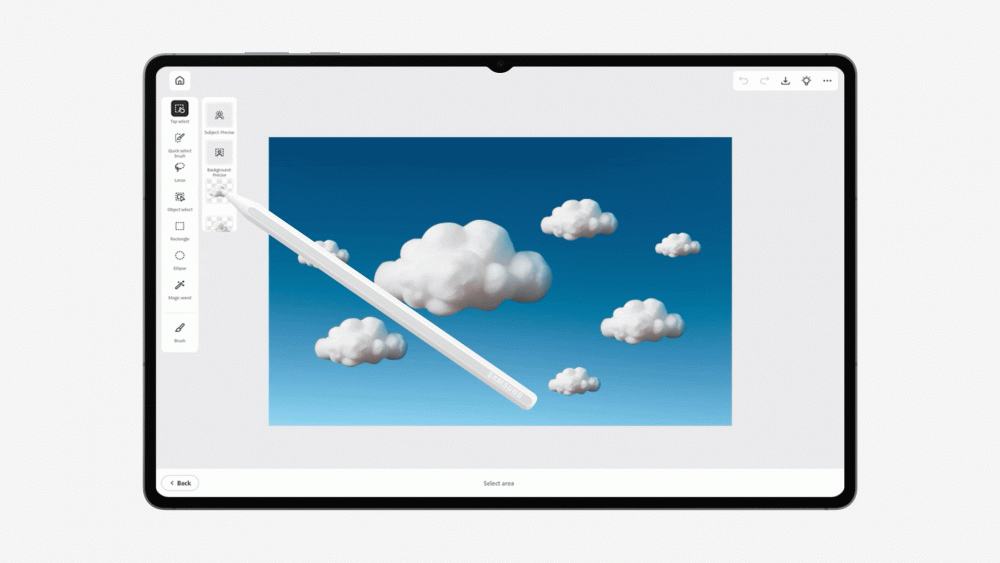
Adobe Photoshop[21] comes pre-loaded on the Galaxy Tab S12 series — a first for Android tablets — bringing pro-grade image editing and design to the tablet. The interface is optimised for tablets, and S Pen support makes it more intuitive to move ideas from hand to screen. Photoshop includes AI-powered features including AI Assistant[22] and generative AI features powered by Adobe Firefly, like Generative Fill and Image to Video, helping creatives edit faster and effortlessly. Exclusively for the Galaxy Tab S12 series, users receive four months of free access to the Photoshop mobile plan[23].
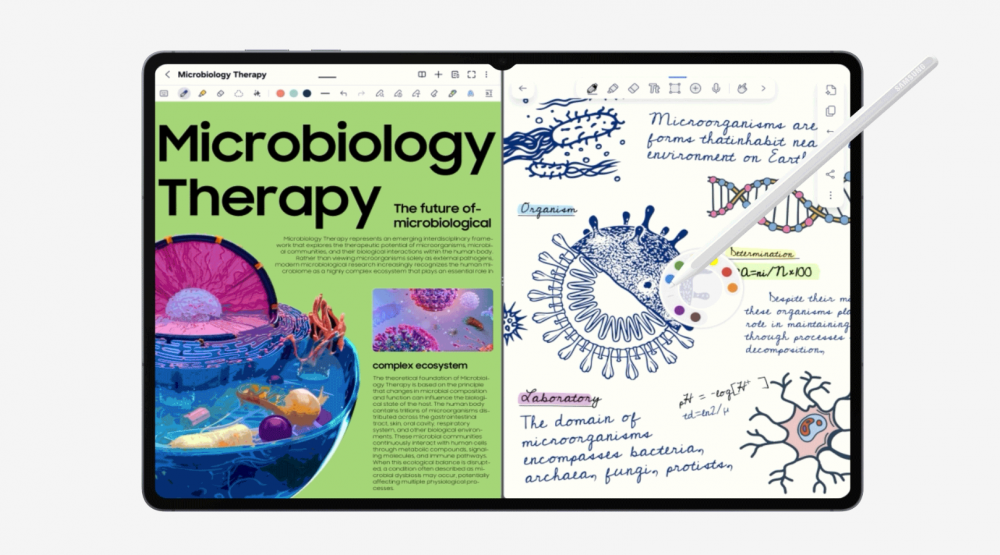
Notability[24], newly pre-loaded on Galaxy Tab, helps users capture their ideas, organise notes and build knowledge more efficiently with S Pen optimisation and AI-driven study tools with a six-month free trial, plus 20% off the first subscription[25].
Goodnotes[26] delivers clean note-taking and organisation with one year of free access and LumaFusion[27] enables professional-grade video editing, offered at a 66% discount. And Notion[28] supports flexible writing, planning and organisation with one month of its Plus plan free. Clip Studio Paint[29] brings precision drawing and painting tools for digital art with a six-month trial and 20% off the first subscription.
In addition to these apps, users can explore a broader range of options that support different needs. MyScript Math app solves handwritten equations and shows the steps behind each one, while MyScript Notes app summarises handwritten notes into study materials with built-in AI tools to explain concepts or generate quizzes.[30] Noteshelf 3[31] offers customisable layouts for capturing and organising ideas, while ArcSite[32] converts rough field sketches into precise CAD drawings.
Availability
The Galaxy Tab S12 series will be available in Australia from the 22nd of October and will be offered in Grey.[33] Galaxy Tab S12 Ultra will be available from $2,299 and Galaxy Tab S12+ from $1,999.
Built for lasting and confident use, Galaxy Tab S12 Ultra and Galaxy Tab S12+ support up to seven times of OS upgrades and security updates.[34]
To give users added peace of mind, Samsung Care+[35] offers comprehensive coverage tailored to users’ device needs, including Device Swaps and certified expert support available both at home. Additionally, Galaxy mobile phone users running One UI 9 can easily check the Samsung Care+ status of their Galaxy Tab and enroll through the Warranty and care menu in the Settings. It provides quick access to warranty information, self-diagnostics, repair requests, and remote support for connected devices—all directly from the tablet.
For additional information, visit Samsung Australia Newsroom, news.samsung.com/au/ or Samsung.com/au.
Specifications
| Galaxy Tab S12 Ultra
(14.6-inch) |
Galaxy Tab S12+
(12.6-inch) |
|
| Dimensions | 208.5 x 326.3 x 5.1 mm | 187.8 x 289.5 x 5.3 mm |
| Weight | 692 g (Wi-Fi), 695 g (5G) | 553 g (Wi-Fi), 555 g (5G) |
| OS | Android 17, One UI 9 | Android 17, One UI 9 |
| Display | 14.6-inch[36], 2960 x 1848, 120Hz, Dynamic AMOLED 2X | 12.6-inch[37], 2800 x 1752, 120Hz, Dynamic AMOLED 2X |
| Brightness | Peak 1,600 nits / HBM 1,000 nits | Peak 1,600 nits / HBM 1,000 nits |
| AP | MediaTek Dimensity 9500 | MediaTek Dimensity 9500 |
| Memory & Storage | 16GB + 1TB, 12GB + 512GB, 12GB + 256GB, microSD up to 2TB | 12GB + 512GB, 12GB + 256GB,
microSD up to 2TB |
| Battery / Charging | 11,600 mAh / 45W | 10,600 mAh / 45W |
| Network & Connectivity | 5G, Wi-Fi 7, Bluetooth v6.0 | 5G, Wi-Fi 6E, Bluetooth v6.0 |
| Camera | Rear: 13 MP + 8 MP ultra-wide
Front: 12 MP ultra-wide |
Rear: 13 MP
Front: 12 MP ultra-wide |
| Sound | Quad Speaker (4-channel Spatial Audio) | Quad Speaker (4-channel Spatial Audio) |
| S Pen | S Pen (BLE not supported) In-box | S Pen (BLE not supported) In-box |
| Durability | IP68[38] | |
| SIM | Dual SIM (pSIM + eSIM) | |
| Security | Fingerprint on Display | |
| Color | Grey | |
| Accessories[39] | Pro Keyboard
Book Cover Keyboard Slim Book Cover Frame Cover (Ultra only) Anti-Reflecting Screen Protector |
|
*Specifications may vary by market.
*All specifications and descriptions provided herein may be different from the actual specifications and descriptions for the product. Samsung reserves the right to make changes to this document and the product described herein, at any time, without obligation on Samsung to provide notification of such change. All functionality, features, specifications, GUI and other product information provided in this document including, but not limited to, the benefits, design, pricing, components, performance, availability and capabilities of the product are subject to change without notice or obligation. The contents within the screen are simulated images and are for demonstration purposes only.
[1] Thickness measured from top to bottom of the glass at the thinnest point.
[2] Typical value tested under third-party lab conditions. Typical value is the estimated average value considering the deviation in battery capacity among the battery samples tested under IEC61960 standard. Rated (minimum) capacity is 11374 mAh. Based on Samsung internal lab test conditions with pre-release version of given model connected to earphone via Bluetooth under default settings over LTE. Estimated against battery capacity and measured current over battery power consumption during video playback (video file resolution 720 p, saved on device), respectively. Actual video playback times vary by network connection, settings, file format, screen brightness, battery condition and other factors.
[3] Typical value tested under third-party lab conditions. Typical value is the estimated average value considering the deviation in battery capacity among the battery samples tested under IEC61960 standard. Rated (minimum) capacity is 10392 mAh. Based on Samsung internal lab test conditions with pre-release version of given model connected to earphone via Bluetooth under default settings over LTE. Estimated against battery capacity and measured current over battery power consumption during video playback (video file resolution 720 p, saved on device), respectively. Actual video playback times vary by network connection, settings, file format, screen brightness, battery condition and other factors.
[4] Adapter sold separately.
[5] Super Fast Charging speed may vary depending on charging conditions and other factors. Galaxy Tab S12 series supports up to 45W wired charging. 45W power adapter sold separately. Use only Samsung approved chargers and cables. Fast charger sold separately.
[6] The 3D vapor chamber on both Galaxy Tab S12 Ultra and Galaxy Tab S12+ helps heat dissipate faster and more efficiently than the flat vapor chamber on their respective predecessors, the Galaxy Tab S11 Ultra and Galaxy Tab S10+.
[7] Galaxy Tab S12 series and the included S Pen have an IP68 rating based on lab test conditions and are dust resistant and water resistant for submersion in up to 1.5 meters of fresh water for up to 30 minutes. Third party testing was conducted in fresh water. Not suitable for diving or high pressure water activities. Refer to user manual for further care and instructions.
[8] Measured diagonally, Galaxy Tab S12 Ultra’s screen size is 14.6″ in the full rectangle and 14.5″ accounting for the rounded corners. Actual viewable area is less due to the rounded corners and the camera hole.
[9] Measured diagonally, Galaxy Tab S12+’s screen size is 12.6″ in the full rectangle and 12.5″ accounting for the rounded corners. Actual viewable area is less due to the rounded corners and the camera hole.
[10] Galaxy Tab S12 series has maximum brightness of 1,600 nits and outdoor brightness of 1,000 nits in High Brightness Mode.
[11] *Samsung Account and Wi-Fi or mobile data required. Feature must be enabled with latest version of Samsung Notes. May not work on all content pasted or written content. The Auto format function has a limit on the number of characters. Summary feature for Note Assist is activated when a certain number of characters is met and is under the character limit. Accuracy of results is not guaranteed.
[12] The Pro Keyboard is sold separately.
[13] Galaxy AI Key available on Book Cover Keyboard and Book Cover Keyboard Slim only. Book Cover Keyboard sold separately. Features and keyboard layout may vary by country, language and device model. App shortcuts can be assigned for select apps only. A network connection is required to use Bixby or Google Gemini. Gemini is a trademark of Google LLC. Compatibility and availability may vary.
[14] The Book Cover Keyboard is sold separately.
[15] Pro Keyboard and Book Cover Keyboard Slim sold separately. The products are available for Galaxy Tab S12 Series. Features and keyboard layout may vary by country, language and device model. Galaxy AI Key can be assigned for select apps only. Pressing Alt + Galaxy AI Key provides the option to switch the AI assistant to Bixby, Gemini or Perplexity. A network connection is required to use Bixby, Gemini or Perplexity. To launch Gemini using the Galaxy AI Key, Google Assistant needs to be updated to Gemini.
[16] Purchasers of eligible new Galaxy Tab S12 Series devices can receive 6 months of Google AI Pro at no extra cost, valued at AUD $197.94, based on an Australian subscription price of AUD $32.99 per month. Google Account sign-in and Google Payments registration are required. Additional eligibility requirements and exclusions apply. Google AI Pro offer must be redeemed by 1 August 2027. All other benefits, including YouTube Premium Lite, AI Top Up Credit or other Google AI Pro benefits not mentioned are excluded during the promotional period. At the end of the 6-month promotional period, the subscription will renew automatically at the applicable Australian subscription price unless cancelled. Gemini is a trademark of Google LLC. Offer is subject to Google’s eligibility, redemption, account, subscription and service terms. Availability of individual services, features and content may vary.
[17] Gemini is a trademark of Google LLC. Gemini Live feature requires internet connection and Google Account login. Compatible with certain features and certain accounts. Available on select devices and select countries, languages, and to users 18+.
[18] Available functions and features may vary by country, region, language, and Samsung Browser version. The number of search queries may be subject to limitations. Accuracy of results is not guaranteed. Some features of Samsung Browser for Android requires a network connection and Samsung Account login.
[19] App availability and the terms of service may vary by country and region.
[20] Includes free trial periods and first-subscription discounts for Adobe Photoshop, Notability, Goodnotes, LumaFusion, Notion, Clip Studio Paint, MyScript Notes, MyScript Math, Noteshelf 3, and ArcSite, plus a 6-month Google AI Pro trial. Actual value and availability may vary by country, region, market, and currency.
[21] Adobe Photoshop comes preloaded on Galaxy Tab S12 series in the Galaxy Picks folder. Adobe Photoshop for Tablet will be launched exclusively in the Galaxy Store for a period of at least six months starting 7 Oct , 2026, after which Adobe may launch the app in other app stores. Galaxy Tab S12 series users are eligible to receive a 4-month free Adobe Photoshop premium mobile subscription, including 100 monthly generative credits.
[22] AI Assistant on Adobe Photoshop is beta version.
[23] Purchasers of eligible new Galaxy Tab S12 Series devices can receive 4 months of premium access to Adobe Photoshop: Photo Editor at no extra cost, valued at AUD $143.96, based on an Australian subscription price of AUD $35.99 per month. Adobe Photoshop: Photo Editor is preloaded as a stub application on eligible devices. Offer is available to users who have not previously subscribed to the Adobe Photoshop Android app. The promotional offer is currently indicated as available until 19 May 2028. At the end of the 4-month promotional period, the subscription will renew automatically at the applicable Australian subscription price unless cancelled. Adobe Photoshop’s offer is subject to Adobe’s eligibility, redemption, account, subscription and service terms. Availability of individual services, features and content may vary.
[24] Notability comes preloaded on Galaxy Tab S12 series in the Galaxy Picks folder. Galaxy Tab S12 series users are eligible to receive a 6-month free Notability subscription. App availability and the terms of service may vary by country and region.
[25] Purchasers of eligible new Galaxy Tab S12 Series devices can receive a 6-month free trial of Notability Plus, valued at AUD $69, based on an Australian subscription price of AUD $11.50 per month. Notability is preloaded as a stub application on eligible devices. Eligible customers may also receive a 20% discount on their first Notability subscription following the promotional trial period. Eligibility requirements apply, offer limited to new Notability subscribers who have not previously redeemed a Notability free trial. At the end of the 6-month promotional trial, the subscription will renew automatically at 20% discount for the first subscription period after the promotional trial. The subscription fee will automatically renew at the Australian subscription price unless cancelled after this. Notability’s offer is subject to Notability’s eligibility, redemption, account, subscription and service terms. Availability of individual services, features and content may vary.
[26] Goodnotes app comes with a 1-year free full version. Once the free full version period ends, an additional purchase is required for continuous use. Eligibility requirements apply, offer available to new and existing users provided no paid premium applies at time of redemption. App availability and the terms of service may vary by country and region.
[27] LumaFusion app is preloaded as stub, requiring users to click the icon and complete the purchase from Galaxy Store. All Galaxy device users can get a 66% discount when purchasing from Galaxy Store and receive a 1-month free Creator Pass subscription. 66% discount promotion limited until Nov 30, 2026.
[28] Notion app requires a separate download from Galaxy Store and comes with a 1-month free trial of the Plus & Notion AI for one newly created Notion workspace. App availability and the terms of service may vary by country and region.
[29] Clip Studio Paint membership required. Clip Studio Paint app comes pre-installed in select markets. The app can be downloaded from Galaxy Store and comes with a 6-month free trial for first-time users. Once the free trial period ends, paid subscription to a monthly or annual usage plan is required for continuous use. A 20% discount is available on the first subscription.
[30] MyScript Math and MyScript Notes apps require a separate download from Galaxy Store and comes with a 30 day free trial. App availability and the terms of service may vary by country and region.
[31] Noteshelf 3 app requires a separate purchase for a Premium plan upgrade. A 30% discount on the upgrade is available only via Galaxy Store.
[32] ArcSite app requires a separate download from Galaxy Store and comes with a 1-month free trial for first-time users. Once the free trial period ends, paid subscription to a monthly or annual usage plan is required for continuous use. A 30% discount is available on the first monthly subscription. App availability and the terms of service may vary by country and region.
[33] Availability and timing may vary by market, carrier or model. Color and model availability may vary depending on country, region or carrier.
[34] Availability and timing of OS upgrades and security updates may vary by device model and market.
[35] Terms and conditions apply. Samsung Care+ coverage, service type and promotion details may vary by country/region and a deductible (service fee) may apply. To be eligible for Samsung Care+ promotion benefits, registration may be required. For detailed Samsung Care+ information, please visit https://www.samsung.com/au/samsung-care-plus/. Care at home: When in need of Samsung Care+ services, contact the local customer services center in advance for Samsung Care+ availability.
[36] Measured diagonally, Galaxy Tab S12 Ultra’s screen size is 14.6″ in the full rectangle and 14.5″ accounting for the rounded corners. Actual viewable area is less due to the rounded corners and the camera hole.
[37] Measured diagonally, Galaxy Tab S12+’s screen size is 12.6″ in the full rectangle and 12.5″ accounting for the rounded corners. Actual viewable area is less due to the rounded corners and the camera hole.
[38] Galaxy Tab S12 series and the included S Pen have an IP68 rating based on lab test conditions and are dust resistant and water resistant for submersion in up to 1.5 meters of fresh water for up to 30 minutes. Third party testing was conducted in fresh water. Not suitable for diving or high pressure water activities. Refer to user manual for further care and instructions.
[39] Accessories sold separately
Products > Mobile & wearables
For any issues related to customer service, please go to Samsung.com/au/support for assistance.
For media inquiries, please contact mediateam@samsung.com.


